

Is Flashcloud Any Good? Our Opinion
Flashcloud delivers a polished, managed-lite hosting experience with strong bundled value, reliable uptime, and a well-integrated caching stack. Its shared hosting performance (based on our first-hand experience) is solid for everyday workloads, while heavier applications may require more resources than the shared tier provides.
Who’s it best for? Flashcloud is an excellent choice for beginners, creators, freelancers, small businesses, and users who value managed-lite convenience at an affordable price.
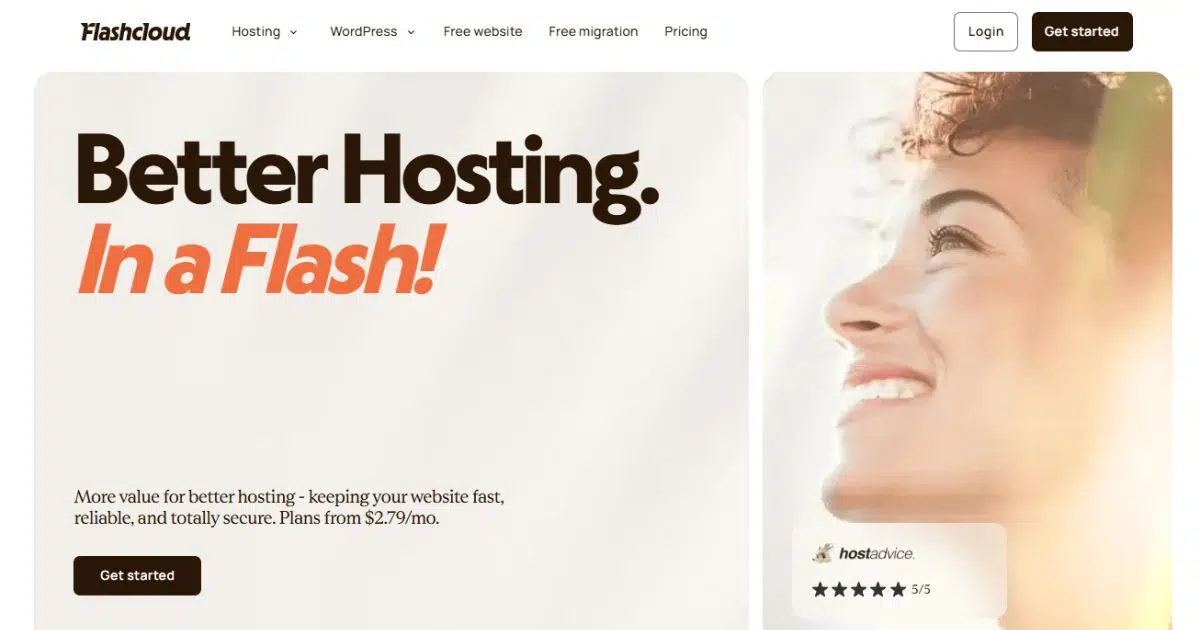
Website: https://flashcloud.com/
Flashcloud Pros & Cons
Flashcloud Pros
- Excellent bundled value for the price
- Free domain for life on eligible plans
- Free migration plus compensation for unused hosting
- Cloudflare, LiteSpeed Cache, and Redis pre-configured
- Smooth client dashboard and cPanel access
- Anytime prorated money-back guarantee
- Reasonable and clearly disclosed renewal pricing
Flashcloud Cons
- Introductory prices increase at renewal
- Still a relatively new and unproven hosting brand
- No Windows Server hosting option
Flashcloud is a relatively new US-registered (Wilmington, Delaware) web hosting company operated by FlashCloud LLC. The company was founded by Nickola Naous and Neycho Tepavicharov, who say they bring nearly two decades of hosting-industry experience to the business. Flashcloud offers shared, WordPress, VPS, and dedicated hosting, and its current platform uses technologies such as LiteSpeed, NVMe storage, Cloudflare CDN, server-level caching, and cPanel. The company positions its services around simplified hosting management and bundled features, including daily backups, free migration, domain registration and renewal on eligible plans, SSL, and a free starter website. Flashcloud is still a young provider compared with long-established hosting brands, so its long-term operating track record remains limited despite the founders’ prior industry experience.
Is Flashcloud a good web host?
Yes. Flashcloud is one of the more interesting affordable shared hosting providers we have tested recently, particularly for beginners, creators, and small businesses that want hosting to work without spending much time configuring it.
Our experience with Flashcloud has been positive mainly because the company gets the basics right. The hosting environment is easy to navigate, cPanel remains available when you need traditional server controls, Cloudflare and multiple caching layers are configured for you, and useful extras such as 30-day backups, a free domain for life, migration assistance, and an anytime prorated refund are included rather than pushed as upgrades.
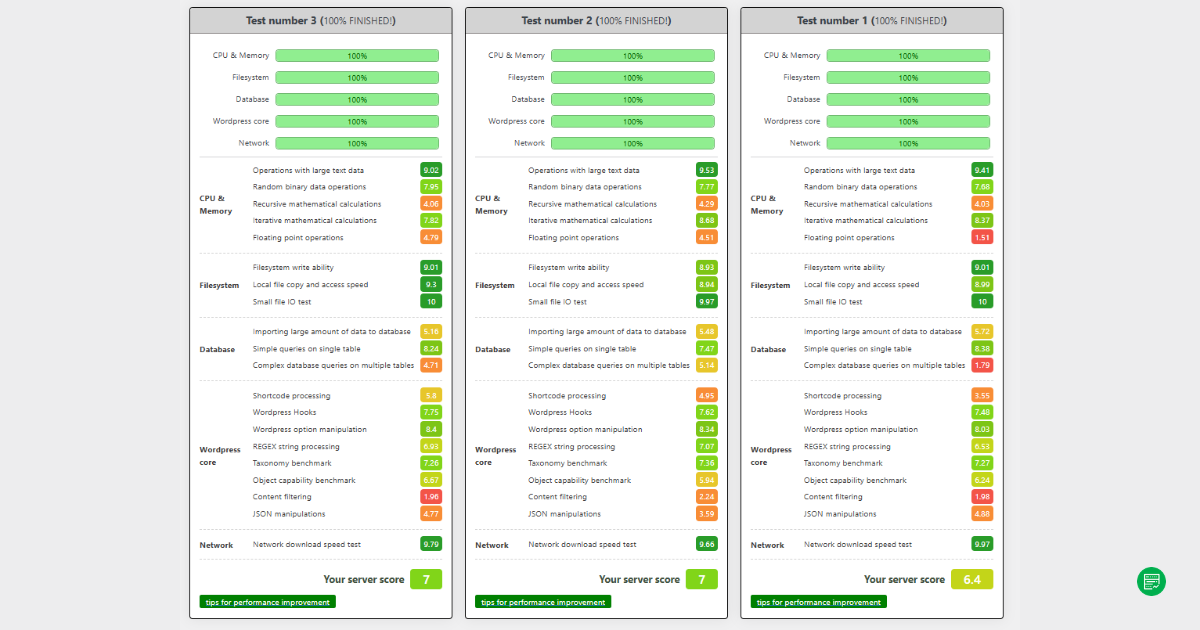
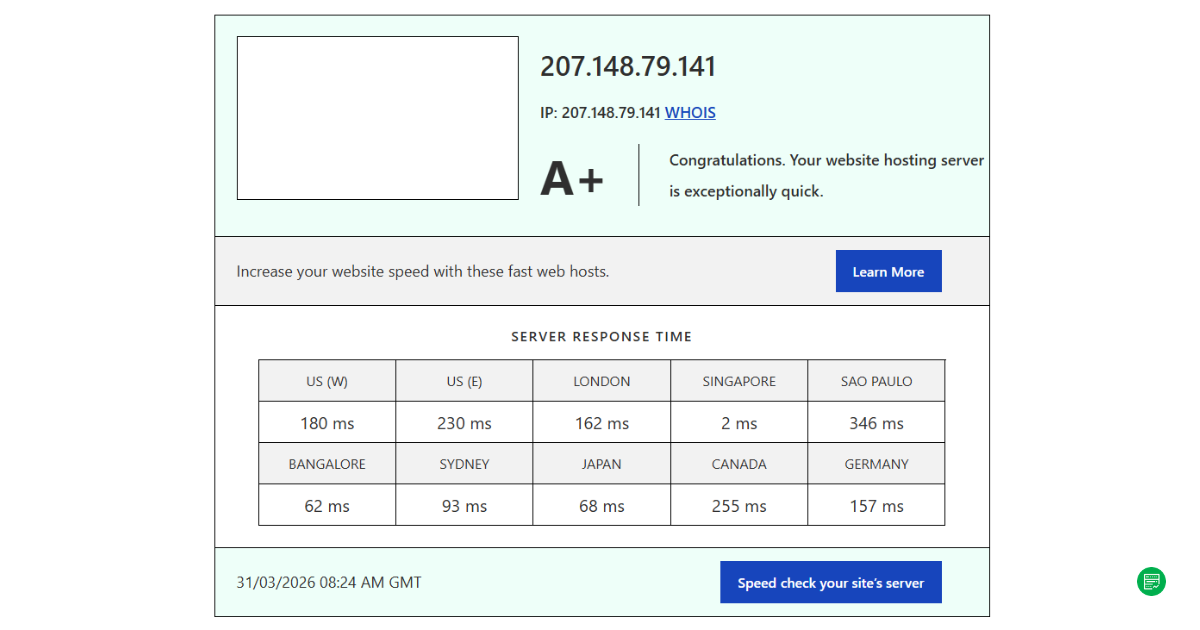
Performance is good enough for the audience Flashcloud is targeting. On our Scale shared hosting account, WordPress Benchmark scores settled around 6.4–7.0, our Singapore server received an A+ rating in Bitcatcha, and the test site recorded 100% uptime during our first month of monitoring. Raw CPU processing is not the strongest part of the shared environment, but Flashcloud compensates with Cloudflare CDN, LiteSpeed Cache, Redis object caching, and NVMe storage.
What has impressed us just as much is the company’s willingness to improve the product. During our first round of testing, some Cloudflare controls were difficult to discover. Flashcloud later redesigned parts of its client dashboard and made proxy control, development mode, and cache purging much easier to access. We also saw the company review its CloudLinux I/O allocations after our initial filesystem benchmark results.
We would still draw a line between what we have tested and what Flashcloud claims its higher-end services can handle. We think Flashcloud is a strong fit for normal websites, creators, small businesses, and relatively modest online stores. We have not yet seen enough evidence to recommend its shared hosting for large WooCommerce stores, SaaS applications, or other consistently compute-heavy workloads. Flashcloud offers VPS and dedicated servers for those cases, but we have not tested those services ourselves.
How reliable is Flashcloud’s uptime and speed?
Flashcloud performed well in our real test environment. To check Flashcloud performance, we host a WordPress + WooCommerce test site on its Scale shared hosting plan in Singapore. Across our latest WordPress Hosting Benchmark runs, overall scores ranged from approximately 6.4 to 7.0. WordPress core operations remained consistent, and filesystem performance became particularly strong after Flashcloud reviewed its CloudLinux LVE I/O allocations.
CPU-heavy operations were less impressive. We would describe raw backend processing as adequate rather than exceptional. The practical difference is that Flashcloud does not expect every request to reach PHP and the database uncached: Cloudflare handles edge delivery, LiteSpeed Cache handles page-level caching, and Redis stores frequently requested WordPress objects in memory.
Network performance was stronger. Our Singapore server received an A+ Bitcatcha rating, including response latency of roughly 2 ms from Singapore. Flashcloud offers server locations across the US, Europe, and Asia, so readers should not interpret that 2 ms figure as a global result. Server proximity matters.
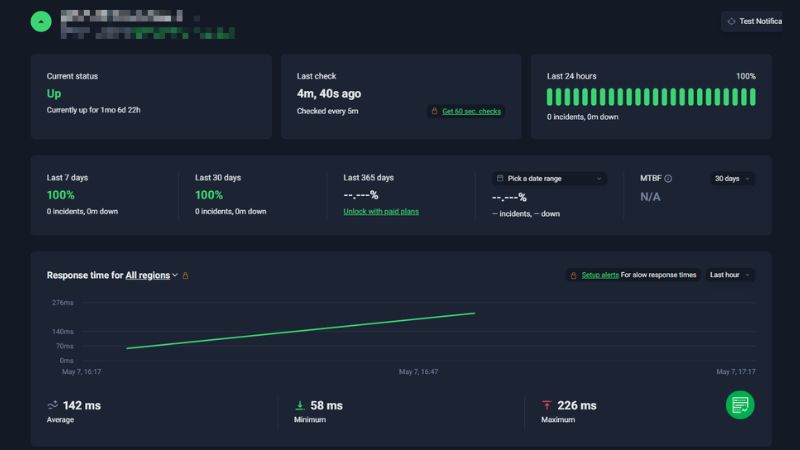
We have also monitored the site at five-minute intervals. During our first 30 days, Flashcloud recorded 100% uptime with no observed outage, while average monitored response time was around 142 ms.
For our full methodology, individual benchmark categories, filesystem testing story, Bitcatcha results, and uptime data, see our dedicated Flashcloud Performance Test.
Does Flashcloud keep your websites secure?
Flashcloud includes most of the security features we expect from modern shared hosting without requiring users to configure each component separately.
Current shared hosting plans include automatic SSL certificates, Cloudflare CDN, DDoS protection, a web application firewall, malware scanning and removal, daily backups, and proactive server monitoring. Flashcloud also includes domain privacy where supported.
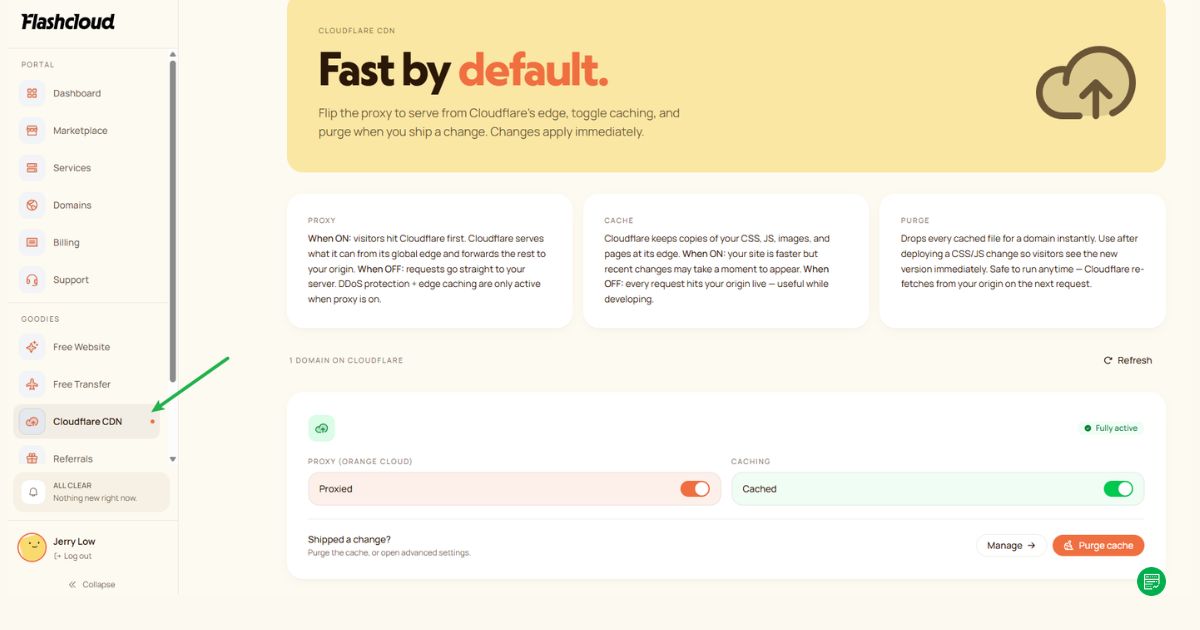
Cloudflare is particularly useful for less technical users because websites can start behind its proxy without manually connecting a separate Cloudflare account. Flashcloud’s newer client dashboard also exposes the relevant controls more clearly: users can manage proxy status, enable development mode when troubleshooting, and purge cached content.
How helpful is Flashcloud’s customer support?
Flashcloud provides 24/7 support through live chat, ticket, and email, and advertises an average response time of under 15 minutes. The company positions its support around direct access to hosting staff rather than AI-only assistance.
We have interacted extensively with Flashcloud during this review process, particularly when discussing our benchmark results and Cloudflare controls. What stood out was the team’s willingness to investigate technical feedback instead of simply disputing an unfavorable result. Their engineers reviewed the CloudLinux filesystem limits behind our initial benchmark result, and the company later improved the visibility of its Cloudflare controls.
That is encouraging, although our communication with the company during an editorial review should not be treated as the same experience a normal support customer receives. We therefore put more weight on the support features available to regular accounts than on our direct relationship with the team.
Is Flashcloud’s pricing worth the value?
Yes. Flashcloud’s hosting pricing is competitive largely because of what is bundled into the plans, not simply because of the headline introductory rate.
The Start plan (shared hosting) includes NVMe storage, Cloudflare CDN, LiteSpeed, multilevel caching, daily backups with 30-day history, domain email, SSL, migration, and a free domain for life on eligible extensions. Flashcloud also includes an anytime prorated refund rather than restricting refunds to the usual initial trial window.
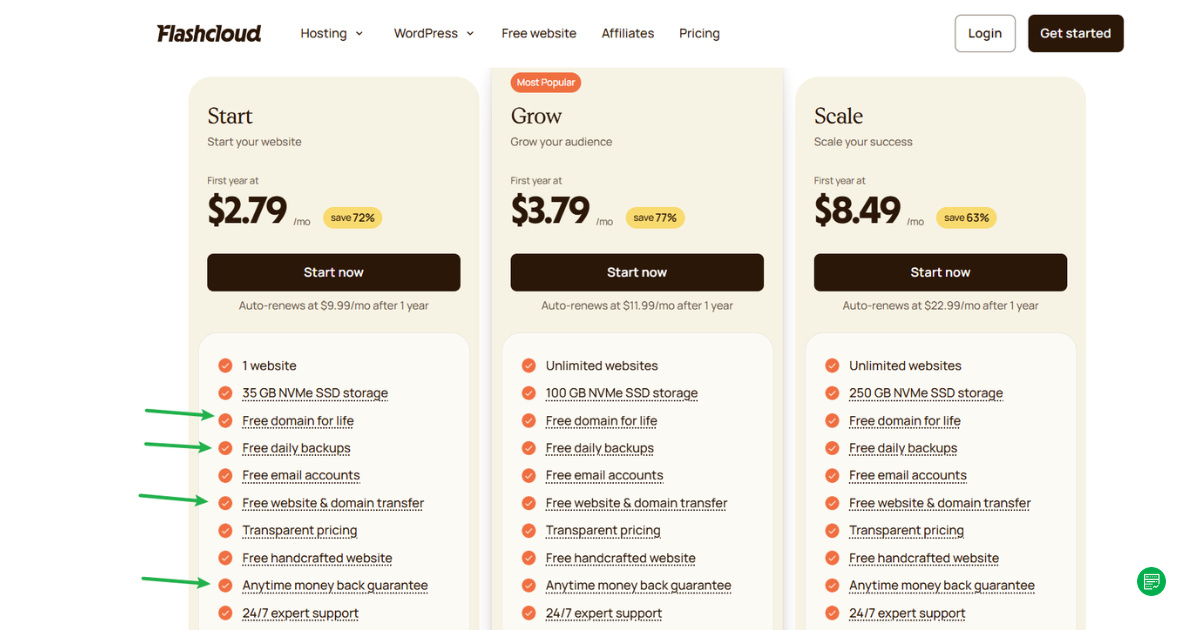
Prices do rise after the initial term. We do not consider this unusual (introductory discounts followed by higher renewal rates are standard across shared hosting) but you should compare hosts using the renewal price, not just the first-year offer.
What we like is that Flashcloud displays its renewal rate alongside the introductory price and says the standard renewal rate does not keep increasing year after year. Longer three-year terms can also carry different introductory and renewal prices, so check the term selected before checkout.
Flashcloud Shared Hosting Pricing
At the time of our latest check, Flashcloud’s annual shared plans were $2.79 – $8.49 per month at signup and $9.99 – $22.99 per month at renewal. The company also offers monthly and three-year billing, and promotional rates can vary by term.
For most ordinary websites, Grow is likely the practical middle ground. Start works when you only need one website, while Scale gives considerably more storage and room for multiple projects. Our own WordPress and WooCommerce test site runs on Scale.
Flashcloud VPS Hosting Pricing
Flashcloud offers three VPS resource tiers, and pricing varies according to server location.
During our research, Flashcloud VPS signup prices started from $31.49 to $88.99 per month, with standard renewal prices of $36.99 to $104.99 per month.
The important difference from shared hosting is resource allocation. VPS hosting gives a site dedicated CPU and RAM rather than competing entirely within a shared resource pool. For a growing store, busy membership site, or application with substantial uncached processing, this is the Flashcloud tier we would investigate next.
What do users think about Flashcloud?
Flashcloud currently displays strong user feedback across several third-party review platforms, with many comments focusing on customer support and ease of getting started. Its website currently references more than 90 reviews aggregated across platforms.
We would treat this as encouraging rather than definitive. Flashcloud is still much less established than large hosts with years of operating history and thousands of independent reviews. For us, that shorter track record is one of the reasons firsthand testing matters more than aggregate ratings alone.
The pattern we see so far does, however, fit our own experience: Flashcloud is concentrating on customers who want the hosting company to remove technical friction rather than simply hand them a server account.
For additional insights, please refer to user reviews section below.
Is Flashcloud a good option for beginners?
Yes. Beginners are the audience that benefits most from Flashcloud’s current approach.
WordPress can be deployed without manually building a caching stack, Cloudflare is already connected, backups run automatically, SSL is provided, and users can manage their service through a relatively simple client dashboard. Flashcloud also retains cPanel underneath, so users are not trapped inside a completely proprietary management system.
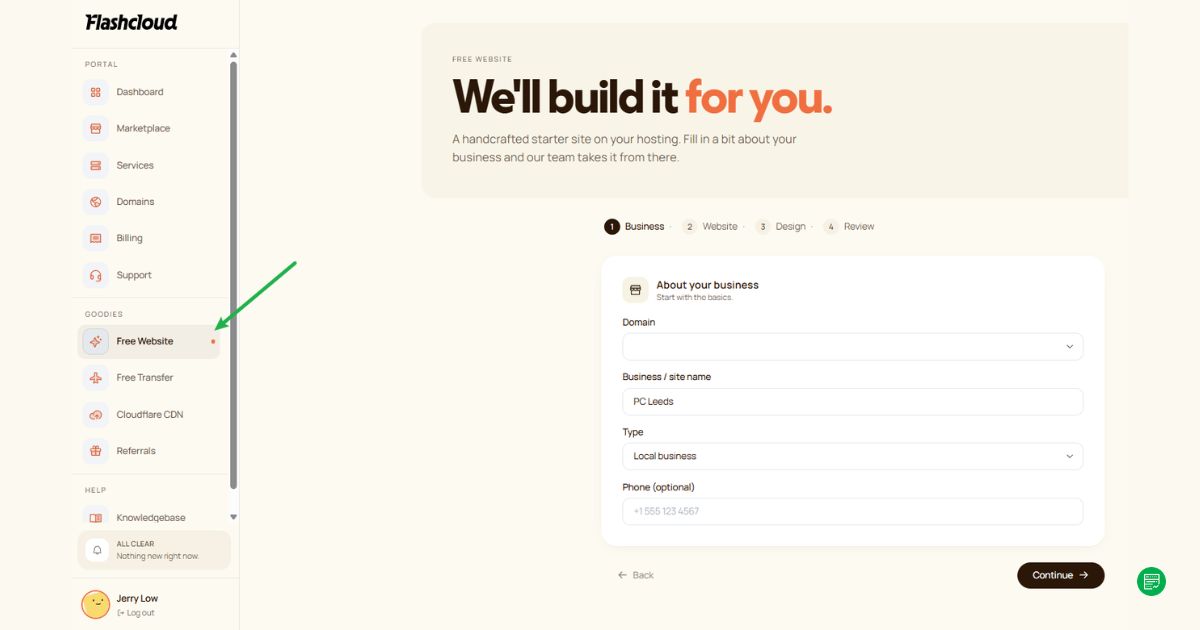
In addition to this, Flashcloud offers a free handcrafted website service, where users can submit their website requests directly through the client portal (see two screenshots below). This is a notable advantage for beginners or small business owners who prefer a done-for-you setup rather than building everything themselves.

The dashboard itself has improved since we began testing. Cloudflare controls that we initially overlooked are now much easier to find, and users can manage the proxy, purge cache, or enable development mode from the client area.
That combination is why we describe Flashcloud as managed-lite. It removes a lot of setup work without hiding the underlying hosting account entirely.
Is Flashcloud a good choice for small businesses?
Yes. Flashcloud is particularly compelling for small businesses that want their website, domain, email, backups, security, and basic performance optimization packaged together.
The free domain for life, unlimited domain email on current shared plans, daily backups with 30-day data retention, free website migration, built-in Cloudflare CDN, and anytime refund all reduce the number of separate services a small business has to manage. Flashcloud even advertises a free handcrafted starter website with hosting plans – which can be a huge time-saver for busy business owners.
The main boundary with Flashcloud, however, is workload. A brochure site, local business site, professional service website, small content site, or modest WooCommerce shop fits what we have observed. A business running a large transaction-heavy store or resource-intensive web application should look beyond the shared tier.
Is Flashcloud suitable for web developers?
Flashcloud’s shared hosting is more developer-capable than its beginner-focused positioning might suggest.
Accounts include cPanel, SSH, WP-CLI, FTP/SFTP access, staging support, and standard WordPress management tools. The updated Cloudflare controls also give developers the ability to disable proxying when necessary, use development mode, and purge edge cache without leaving the Flashcloud client area.
However, the underlying product is still shared hosting. Developers who need predictable CPU allocation, custom server services, deep stack control, or consistently heavy uncached processing should consider Flashcloud VPS or dedicated hosting instead.
Can you host custom email with Flashcloud?
Yes. Flashcloud includes domain-based email accounts with its shared hosting plans.
Users can create addresses such as [email protected] and manage mailboxes, forwarding, and autoresponders within the hosting environment.
How easy is it to get started with Flashcloud?
Flashcloud is easy to get started with, and this has become one of the strongest parts of the product during our time using it.
The service uses a two-layer interface. The Flashcloud client dashboard handles your account, subscription, billing, services, and Cloudflare controls. cPanel remains available for traditional hosting tasks such as files, databases, email accounts, domains, and lower-level configuration.
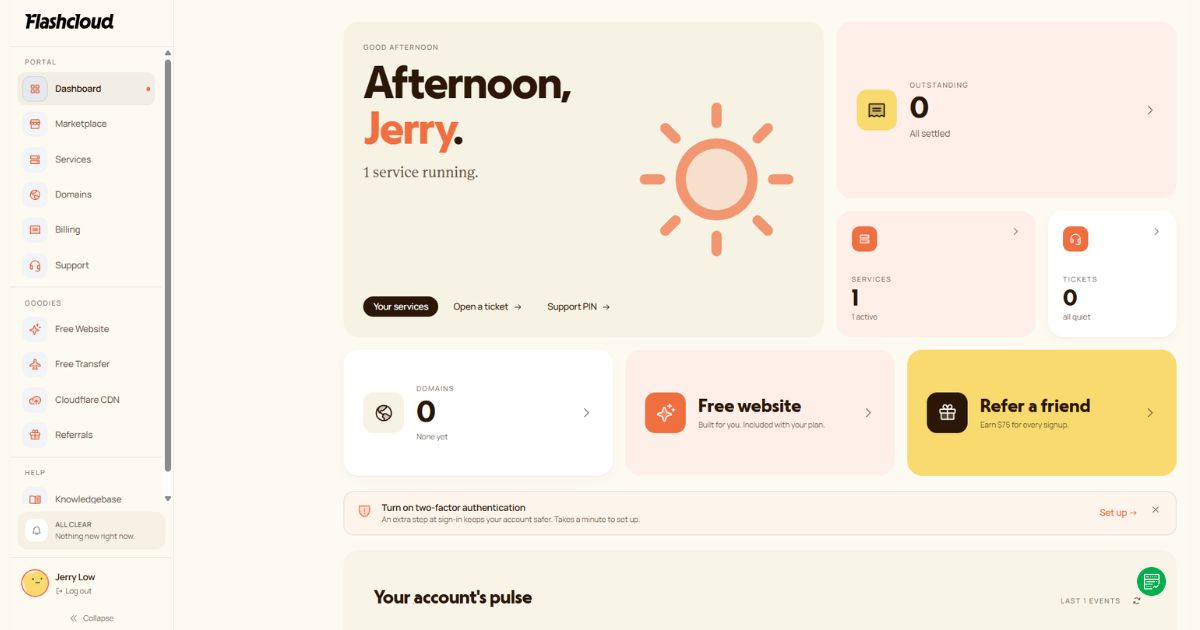
That arrangement works well because beginners do not need to live inside cPanel for everyday account management, while experienced users can still access the familiar server-management interface.
We have also seen Flashcloud improve this dashboard during our review period. The newer interface makes Cloudflare functionality much easier to discover than it was when we first opened the account. Proxy status, cache control, and development mode now sit within a clearer self-service workflow.
For users migrating an existing site, Flashcloud offers free migration covering the website, domain, email, and databases. The company also offers compensation for up to six months of unused hosting time with the previous provider, which is an unusually generous way to reduce the cost of switching.
Does Flashcloud offer a free trial or refund guarantee?
Yes, Flashcloud offers a Anytime-day free trial period. If you are not satisfied with their services for any reason, you can cancel within this period and receive a full refund.
Try now: Visit & sign up at Flashcloud official website
What features does Flashcloud include?
Which control panel does Flashcloud use?
Flashcloud uses cPanel for hosting management and its own client dashboard for account-level functions.
cPanel handles files, databases, domains, email, SSH access, and other server functions. The Flashcloud dashboard manages subscriptions, billing, service access, and integrated features such as Cloudflare.
Where are Flashcloud’s servers located?
Flashcloud operates servers in North America, Europe, and Asia. Specific data centers are located in USA, Germany, and Singapore. A server location affects latency — hosting in the USA reduces response time for North American visitors, while servers in Europe or Asia improve speed for customers in those regions. If your audience is global, pairing Flashcloud’s servers with a CDN helps deliver consistent performance worldwide.
Does Flashcloud scale well with traffic spikes?
Yes, Flashcloud includes several technologies that help shared hosting handle ordinary fluctuations in visitor traffic: Cloudflare CDN, LiteSpeed, page caching, and Redis object caching. These layers can substantially reduce how many requests reach PHP and the database. Cached pages and static assets are therefore much easier to serve than uncached transactions or dynamic application requests.
For projects that need more power, Flashcloud offers VPS and dedicated hosting plans that can scale vertically with additional CPU cores, memory, and storage. This gives a clearer path for growing online stores, high traffic blogs, or even busy forums to handle sustained demand.
How does Flashcloud handle backups and restores?
Flashcloud includes daily automatic backups with 30 days of retention across its shared hosting plans, including the entry tier.
That is one of our favorite parts of the package. Backup retention is frequently shortened or restricted on low-cost shared hosting, while Flashcloud keeps a full month of restore history available.
Restoration is available through the hosting environment, and Flashcloud describes backups as covering the website, files, and email. Buyers should still maintain an independent backup for business-critical websites rather than relying exclusively on one provider’s backup system.
Does Flashcloud include free domain and SSL?
Yes. Flashcloud includes both SSL and an eligible domain that renews free for as long as the qualifying hosting service remains active.
The domain offer is especially notable because most hosting promotions cover only the first registration year. Flashcloud states that eligible domains continue to renew without a separate fee while the customer remains on the service.
SSL certificates are automatically provisioned and renewed, so ordinary users do not need to purchase or manually install a certificate.
Does Flashcloud offer free website migration?
Yes. Flashcloud provides free migration and says its team can transfer websites, domains, email, and databases without charging a migration fee.
The unusual part is the compensation program. Flashcloud says customers switching from another host can receive compensation for up to six months of unused hosting, reducing the problem of paying two providers while an old contract is still running.
For someone unhappy with an existing host but reluctant to waste prepaid hosting time, this is one of Flashcloud’s strongest incentives.
How much does Flashcloud cost?
Flashcloud is affordable at signup, but buyers should budget around the renewal price rather than judging the service entirely from its introductory discounts.
Its shared hosting currently spans Start, Grow, and Scale, while the broader product range extends to VPS and dedicated hosting. WordPress and WooCommerce products use the same general shared-hosting infrastructure rather than representing completely separate server classes.
Flashcloud Plans & Pricing
| Hosting Type | Signup Price | Renewal Price |
|---|---|---|
| Shared Hosting | $2.79 – $8.49/mo | $9.99 – $22.99/mo |
| VPS Hosting | $31.49 – $88.99/mo | $36.99 – $104.99/mo |
| Dedicated Hosting | $174.99 – $314.99/mo | $194.99 – $349.99/mo |
| WordPress Hosting | $2.79 – $8.49/mo | $9.99 – $22.99/mo |
What Should You Know About Flashcloud’s Pricing Structure?
Flashcloud uses a signup-renewal pricing model. Plans appear cheap at signup ($2.79/mo for basic shared hosting), but renewal prices rise to the standard rate ($9.99/mo). You should compare both signup and renewal costs to understand long-term value.
Note: Because hosting fees change regularly, always confirm the latest Flashcloud prices on the official site before signing up.
Final verdict: Should you choose Flashcloud?
Flashcloud is easy for us to recommend to beginners, creators, freelancers, and small businesses that want an affordable hosting account without having to assemble the performance and security stack themselves.
Our confidence comes from actually using the service. Flashcloud’s shared hosting delivered stable WordPress performance, excellent regional latency from our Singapore deployment, and 100% uptime during our first month of monitoring. The interface is easy to work with, and we have watched the company improve parts of the dashboard in response to usability feedback.
The main caveat is scale. Flashcloud’s shared hosting has not yet proven itself to us as a platform for very large ecommerce stores, SaaS products, or other consistently resource-heavy applications. That does not mean it cannot handle them; it means our evidence does not support that recommendation yet. VPS or dedicated hosting would be the more logical Flashcloud products to evaluate for those workloads.

What Do Users Think About Flashcloud?
From the Flashcloud user reviews we've gathered, 0 users gave a positive recommendation, whereas 0 users expressed concerns or chose not to recommend it. These insights were collected through HostScore’s internal feedback system and public review portal, with all responses reviewed to ensure authenticity and relevance.
Are You an Existing Flashcloud User? Share Your Experience
Share your thoughts and help our readers to make better decision with Flashcloud!
Click here to submit your review