

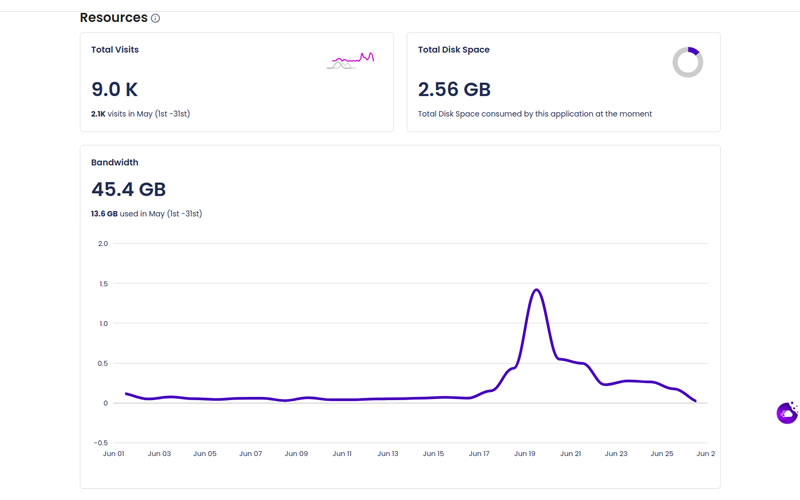
Cloudways has introduced a comprehensive monitoring feature, empowering users to track both application-level and server resource usage real time in their Cloudways Autonomous account. This update helps users manage resources efficiently by providing detailed insights into disk, database, and bandwidth consumption, along with traffic patterns and folder breakdowns.
Three Key Features to Know
1. Application Monitoring
Users can access specific metrics for each application by navigating to the Applications tab, selecting their app, and clicking Monitoring.
- Disk usage, database size, and bandwidth are broken down for each app, helping users optimize performance.
- The monitoring feature also shows insights such as MySQL database usage and file size statistics, ensuring transparency in resource utilization.
- Additionally, HTTP Monitoring is available for analyzing traffic spikes or abnormal patterns.
2. Plan Resource Monitoring
For an overview of your server’s resource consumption, users can go to the Servers tab. This section displays metrics like overall disk usage, bandwidth consumption, and the number of visitors for all applications hosted on the server.
- You can check the disk usage under Settings & Packages for insights on how much server space remains.
- It also helps with database breakdowns for deeper control and helps users know when scaling resources may be necessary.
3. CloudwaysBot Alerts
Users receive proactive notifications when they’re nearing their resource limits, ensuring no surprise overages. The CloudwaysBot sends timely warnings via the platform’s notification system, allowing businesses to stay within allocated resources or upgrade as necessary.
How to Access
For Application Monitoring:
- Go to the Applications tab under Cloudways Autonomous.
- Select the desired application.
- Click on Monitoring to access detailed resource metrics.
For Plan Monitoring:
- Go to the Servers tab.
- Click on the server name and navigate to Settings & Packages to check the disk usage, bandwidth consumption, and visits.
This new feature simplifies server management by giving users greater visibility into how their resources are allocated across multiple apps. It also allows businesses to plan for scaling needs more effectively.
