The Main Differences Between GoDaddy and Wix
The main differences between GoDaddy Hosting and Wix Site Builder come down to transparency, usability, and the overall experience offered to users who just want a reliable, hassle-free website.
GoDaddy provides traditional hosting services, which give users access to platforms like WordPress or Joomla — but the experience is bogged down by aggressive upsells, confusing product bundles, and misleading pricing tactics. Many essential features like DDoS protection, malware scanning, and domain privacy are either trial-based or hidden behind additional fees.
Wix, by contrast, is an all-in-one site builder that includes hosting, design tools, and content management in a single platform. It’s not without flaws — you’re locked into their system once you start, and advanced users may find it limiting — but Wix is more transparent with pricing and offers a more streamlined experience for most non-technical users.
While neither is perfect, Wix ultimately provides a smoother, less predatory experience than what you often get with GoDaddy.
Compare GoDaddy vs Wix
| Feature | GoDaddy Hosting | Wix Site Builder |
|---|---|---|
| Starting Price | $6.99/month | $17/month |
| Free Plan | No | Yes (with Wix-branded domain) |
| Templates Available | Depends on CMS used | 800+ |
| Customization | High (via CMS and coding) | Moderate (drag-and-drop interface) |
| eCommerce Support | Varies by CMS | Advanced eCommerce suite |
| Technical Management | User-managed | Wix-managed |
| SEO Tools | Varies by CMS | Advanced (custom meta, redirects, etc.) |
| Customer Support | 24/7 phone/chat | 24/7 live chat, callback, help center |
For Beginners: Wix is Better
For individuals new to website creation, Wix offers a more intuitive and streamlined experience. Its drag-and-drop editor allows users to design and customize their websites without any coding knowledge. Wix also provides a wide range of pre-designed templates catering to various industries, making it easier for beginners to get started.
Watch video below (by Wix officials) to learn how to make a website using Wix.
While GoDaddy offers hosting services compatible with various CMS platforms, setting up and managing a website through these systems can be complex for beginners. Tasks such as installing the CMS, managing updates, and handling security require a certain level of technical proficiency.
It’s important to note that once a website is built on Wix, it cannot be transferred to another hosting provider. This means users are committed to Wix’s platform for the lifespan of their website.
For Small Business Hosting
If we’re being honest, neither Wix nor GoDaddy is the best long-term solution for small businesses — especially all you need is a simple business information website. However, if you had to choose between the two, Wix is the better pick. It offers more flexibility, better design tools, and a stronger app ecosystem for your website.
That said, there’s a smarter option for budget-conscious businesses: hosting a simple WordPress site with a budget hosting provider like HostArmada or Hostinger. It’s more affordable in the long run, gives you full ownership and control, and lets you scale with minimal restrictions.
Wix does pack in features like built-in SEO tools, eCommerce options, and design flexibility, which can work well for businesses that need an all-in-one setup and want to skip the technical stuff. But keep in mind — once you’re on Wix, you’re locked into their ecosystem, which can be limiting later on.
GoDaddy, meanwhile, offers the basics but feels dated. Its limited design options and bare-bones eCommerce tools might work for side projects or short-term sites, but they’re not ideal for serious growth.
In short: Wix is the better of the two, but WordPress on a solid budget web host is where you’ll get the best mix of control, value, and room to grow.
For eCommerce & Online Selling

When it comes to eCommerce, Wix stands out with a far more robust and scalable toolkit compared to GoDaddy. It’s designed to support businesses at every stage of their online selling journey — from setting up a product catalog to managing payments and driving repeat sales.
Wix allows you to manage up to 50,000 products, including both physical and digital items. You can create product variants (like sizes or colors), set custom pricing, and manage complex inventories with real-time stock tracking and low-stock alerts. It also supports multi-channel selling, letting you sync inventory across your website, social media, and marketplaces like Amazon or eBay.
Payment integration is another strong point. Wix supports over 80 global payment gateways, including PayPal, Stripe, and its own Wix Payments — giving customers more flexibility at checkout. The shopping cart and checkout experience is fully customizable, with features like express checkout and abandoned cart recovery built in to boost conversions.

On the marketing side, Wix gives you a suite of tools to promote your store, including built-in email marketing, discount codes, and promotional banners. These features are designed to help drive traffic and keep customers coming back — without relying on third-party tools.
By contrast, GoDaddy’s eCommerce features are much more limited. While it covers the basics — such as product listings, payments, and a standard shopping cart — it lacks the depth and customization options that growing online stores need. Inventory controls are simpler, marketing tools are more generic, and overall flexibility is restricted.
In short, if eCommerce is a key part of your business, Wix offers a much more complete and future-ready solution than GoDaddy.
Setting up hosting can be confusing. That’s why we created HostScore Setup Help, a done-for-you service for getting your hosting configured the right way.
We help with SSL installation, DNS & nameserver setup, WordPress install or migration, and security tuning. One-time fee. Backed by a 100% refund guarantee.
Explore Our ServicesVerdict
Between the two, Wix is the better option for users who want to get a website online without falling into pricing traps or unnecessary upsells.
While we don’t love everything about Wix — especially its lack of site portability — it still offers a more modern, feature-rich, and beginner-friendly platform for building websites and selling online.
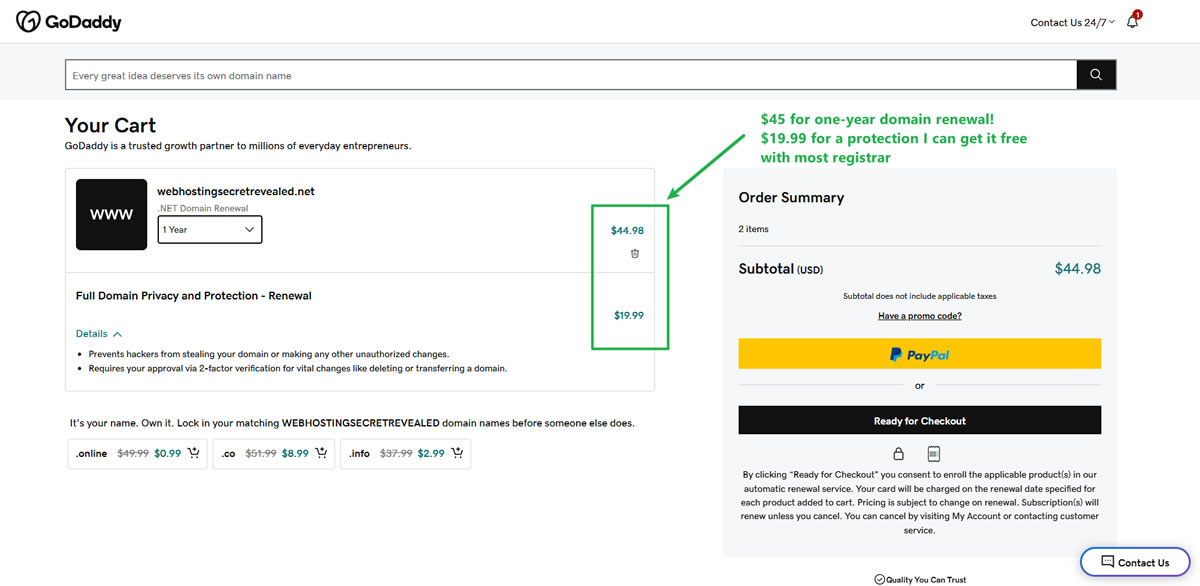
GoDaddy, on the other hand, repeatedly frustrates users with aggressive upsells, stripped-down base packages, and misleading pricing structures. Their hosting plans charge extra for features like backups, security, and malware scanning — things that many competitors offer for free. Even something as basic as domain privacy protection comes with a $19.99/year charge — a feature that’s included for free at most registrars.
If you’re building your first site or running a small business, Wix may not be perfect — but GoDaddy gives you less for more, and that’s a deal-breaker in our books.