Cloudflare owns and operates a massive network of servers. It uses these to help speed up websites, protect them from malicious attacks; and recently to house static websites for free. Ultimately, websites that use services like Cloudflare are safer and offer their users a better web browsing experience.
What is Cloudflare?

Cloudflare is a web infrastructure and security platform designed to enhance the performance and protection of websites, applications, and networks.
Their stated mission: To help build a better Internet.
Originally, it is most well-known as a Content Delivery Network (CDN). Today, it has grown past that and offers a range of services, including protection against DDoS attacks, a Web Application Firewall (WAF), and automatic HTTPS. It also helps manage DNS, optimize resources, and provide analytics to monitor site activity.
Trusted by millions of websites and web applications, Cloudflare is a comprehensive solution for users looking to improve their online presence while ensuring strong security.
How Cloudflare Works?
The heart of Cloudflare lies in the massive network of servers it has. The network is spread across over 93 countries and covers more than 200 locations. When users request content from your site, this global network of data centers caches static assets like images and scripts and delivers them from the closest location for faster loading.
At the same time, Cloudflare also:
- Filters malicious traffic, blocking DDoS attacks, bots, and other threats before they can reach your server,
- Optimizes website traffic with features like image compression, automatic HTTPS, and content delivery optimization.
- Provides real-time analytics, helping site owners monitor traffic and security events.
By combining caching, threat mitigation, and optimization tools, the platform ensures websites are faster, safer, and more reliable for users worldwide.

What are the Features of Cloudflare?
1. Content Delivery Network
Almost all Cloudflare services are integrated into its CDN product. This is what Cloudflare is famed for and what provides the bulk of the benefits illustrated in the section above. The DNS encompasses caching, traffic monitoring, HTTP/2 and HTTP/3 support, SSL, and more.
2. Domain Name Registration
Domain registration is something that most web hosting service providers normally offer. Many, however, are simply re-selling on behalf of domain name registrars – one of whom is now Cloudflare. The service is rather new. While you can buy or transfer domains to be managed by them, the former is still in Beta mode.
3. Streaming Media Hosting
Media files, especially video, are the prime category of assets suitable for Cloudflare to deliver. The global range of servers is ideal for those who want to establish such services. It also means they can deliver the service at highly competitive rates.
4. DNS Resolution via 1.1.1.1
Everyone with an Internet account makes use of DNS resolution. That’s what helps translate domain names into their actual machine-readable format. Each time you type a site address into your browser and hit enter, you’re using DNS resolution.
Natively, most DNS resolution is done by our Internet Service Providers (ISPs). However, they don’t always do a good job of it, resulting in sub-par browsing experiences. On another level, some countries enforce web censorship through their ISPs.
By using Cloudflare’s 1.1.1.1 DNS resolution, you’re not only increasing the speed of your browsing but also bypassing rudimentary ISP-level blocks.
One significant development to 1.1.1.1 is the addition of what Cloudflare calls WARP. This enhancement is an attempt by the company to enhance the security features of 1.1.1.1, essentially turning it into something akin to a VPN.
5. Local Network Protection with Magic Transit
Aside from offering websites DDoS protection, Cloudflare also offers this to businesses directly. Through a product called Magic Transit, Cloudflare is able to bring their global scale of Network protection to the level you need.
Not only intended for online networks, you can use Magic Transit to protect your local networks as well. The solution is ideal for companies which may balk at having to invest heavily in network infrastructure such as traditional hardware boxes.
6. Secure Network Access
Since they operate a network of secure servers anyhow, Cloudflare is perfectly poised to offer services in place of traditional Virtual Private Network (VPN) providers for businesses.
Those who have workers connecting from remote locations have normally needed to invest in a VPN to protect their local assets. Oftentimes, these would be cumbersome in-house adaptations of VPN applications.
Cloudflare Access offers businesses the option to subscribe to a highly secure and easy-to-use solution with the Software as a Service (SaaS) concept.
7. Network Logging and Analytics
With so many services offered over their network, Cloudflare is able to offer its users another byproduct easily as well – Analytics. With a bird’s eye view of exactly how your data is used and the way it flows, you can make adjustments to optimize the delivery of your content.
Cloudflare Analytics are highly granular, meaning you will be able to drill information down to the exact resources which are being delivered. The logs through which the data is analyzed also offers security officers a digital paper trail to follow.
8. Serverless Code Deployment
For developers or companies who manage their own software resources on a macro scale, Cloudflare can help with deployment as well. Instead of having to invest in your own infrastructure, you can make use of Cloudflare Workers.
This means you can rely on resources available on demand without having to worry about managing them. It’s fast, powerful, and highly cost-effective as well.
Benefits of Using Cloudflare
It’s understandable that there may be some confusion about Cloudflare due to its size and the way it is evolving. Essentially, they remain committed to their core mission statement of helping build a better Internet.
This means their focus is still on three key areas: Security, Performance, and Reliability.
1. Security Protection

Once you’ve added your site to Cloudflare, all the data going out or coming in moves through their servers. At that point, it can be analyzed by Cloudflare to assess potential threats.
Elements that Cloudflare looks for are the visitor’s IP address, what the requests are for, the frequency of requests, and more. Cloudflare also allows users to configure their firewalls with custom rules.
Once your site is hooked up to Cloudflare its DNS system is protected as well. If anyone were to look up your domain name, all they would see is the set of DNS provided by Cloudflare and not your real nameservers, for example.
As a whole, using Cloudflare helps prevent bot traffic, malicious intrusion, DDoS attacks, and more.
2. Improved Speed via Distributed Remote Caching

Thanks to the way Google works today, speed is something coveted by website owners around the world. Faster websites mean higher search rankings, increased conversion rates, and an overall better visitor experience.
Imagine parts of your website being cached on Cloudflare servers at multiple locations. Each time a visitor tries to access your site, Cloudflare will respond by delivering your site from the cache location closest to.
The sheer power of Cloudflare servers along with a shorter location for data travel means your site will start loading on the visitor’s browser faster than ever. Meanwhile, your own web server is given time to deliver anything else that’s not cached on Cloudflare servers.
The theory Cloudflare follows is Edge computing, which tries to bring data and computing resources as close to visitors as possible. This serves to reduce the time needed for data to traverse the Internet.
3. Better Website Reliability
Thanks to the huge number of assets it has, Cloudflare adds an additional element to your site structure. Since their servers are helping deliver portions of your site, you’re gaining depth in redundancy.
If a Cloudflare node fails for any reason, your site can still be delivered via the next closest location.
Aside from that, the distributed system also acts as a load balancer. By serving parts of your site off various servers, you are reducing the strain on your own web server. This can increase the number of concurrent visitors supported while maintaining the same level of performance.
Cloudflare Plans & Pricing
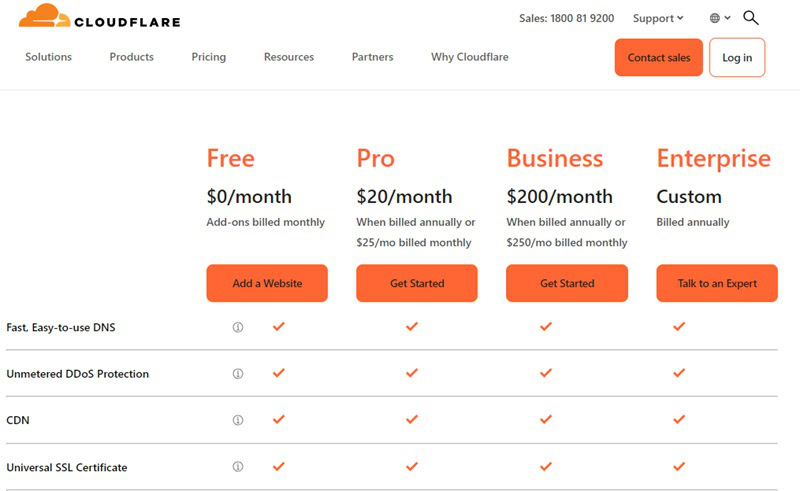
Cloudflare has four distinct tiers in pricing plans. At the most basic, it offers a free service to users. This plan is limited in some ways, but most simple sites should be able to realize benefits even on the free tier. Most importantly, it doesn’t impose bandwidth limitations on users on its free plan.
Paid plans on Cloudflare are Pro, Business, and Enterprise. Each includes an increasing number of features, with Pro costing $20/mo and Business at $200/mo. Enterprise plans are customizable and users need to discuss options and pricing with Cloudflare sales staff.
Cloudflare Plans At A Glance
| Plan | Price | Core Features | Suitable For |
|---|---|---|---|
| Free Plan | Free | Basic CDN, SSL, and DDoS protection | Ideal for personal blogs, portfolios. |
| Pro Plan | $20/month | Enhanced security with Web Application Firewall (WAF), image optimizations, more page rules. | Suitable for professional websites, high traffic blogs. |
| Business Plan | $200/month | Advanced WAF with custom rulesets, prioritized support, image and mobile optimizations. | Recommended for businesses needing advanced security and performance. |
| Enterprise Plan | Custom Pricing | 24/7/365 enterprise-grade support, 100% uptime guarantee, multi-user roles, advanced DDoS protection. | For organizations requiring enterprise-grade services, compliance, and performance |
If you are not a paid plan user or if a feature you want is not available on your plan, you often have the choice of using it as a paid extra. For example, Agro, a service that helps optimize traffic routes to further improve speed, isn’t available on the free plan.
Users who want to use only that extra feature can opt to pay $5 per website with an extra charge depending on the amount of bandwidth that’s used (around $0.10 per GB).
Setting up hosting can be confusing. That’s why we created HostScore Setup Help, a done-for-you service for getting your hosting configured the right way.
We help with SSL installation, DNS & nameserver setup, WordPress install or migration, and security tuning. One-time fee. Backed by a 100% refund guarantee.
Explore Our ServicesHow to Use Cloudflare for Your Website?
The first thing you need to understand is that Cloudflare isn’t a web hosting service provider. This means that you need to have an existing website with your own domain name and hosting before using Cloudflare.
Here’s a step-by-step guide to integrating Cloudflare with your website:
- Sign Up for Cloudflare Create a free account on Cloudflare’s website. Once registered, add your website to your Cloudflare dashboard.
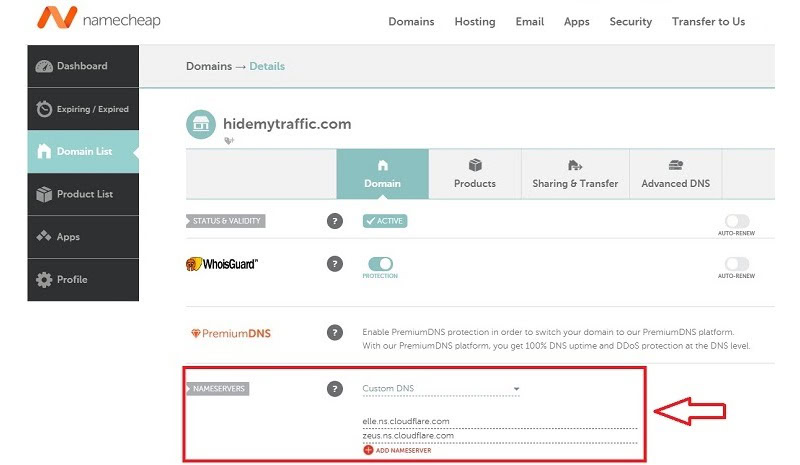
- Update Your Domain’s DNS Settings Cloudflare will provide you with a pair of nameservers during setup. Navigate to your domain registrar’s control panel (e.g., Namecheap or GoDaddy) and replace your current nameservers with the ones provided by Cloudflare. This action routes your website’s traffic through Cloudflare’s network, enabling caching, traffic filtering, and other optimizations.
- Optimize Default Settings Cloudflare’s default settings work well for most websites. However, as you become more familiar with the platform, you can explore advanced options to fine-tune your site’s security, caching, and performance.
- Integrate Cloudflare with Applications Cloudflare integrates seamlessly with many platforms, including WordPress, Magento, and Google Cloud, making it easy to set up and manage. It also supports a wide range of plugins and APIs to expand functionality.
By following these steps, Cloudflare can act as a valuable extension to your hosting setup, boosting website speed and security without requiring any major changes to your hosting environment.
For readers using WordPress, you can even manage Cloudflare directly from your WP dashboard. Follow these instructions to install Cloudflare to your WP site.
What Cloudflare Can’t Do
Despite its rather broad scope of services, Cloudflare isn’t everything. For a website owner, you need to understand that it’s not a replacement for a quality web host. Here’s what Cloudflare cannot do:
- Host Your Website: Cloudflare requires a separate hosting provider to serve your website’s files and manage your database. If your hosting provider underperforms, the improvements Cloudflare offers might not be sufficient to deliver an optimal user experience.
- Manage Domain Names: Cloudflare does not handle domain registration unless you use their registrar services. If your domain is hosted with a Cloudflare partner, management will need to occur through the partner’s control panel.
- Fix Slow Web Hosting: Cloudflare optimizes delivery by caching static files and reducing latency, but it cannot improve the underlying server speed. If your web host is unreliable, you may still face downtime or slow loading speeds.
Using Cloudflare and the Right Web Host for a Better Website Experience
Cloudflare and web hosting providers work together to create a secure, high-performing website experience. While your web host serves as the backbone of your website, Cloudflare enhances performance, security, and reliability through its global network and advanced features.
The first step is to decide the types of web hosting you want and choose a trustworthy hosting provider in that category.
Cloudflare cannot fix issues caused by slow or underperforming servers. A strong hosting provider should offer fast server response times, NVMe storage, scalable bandwidth, and reliable server uptime. These core features ensure your website performs well – even without Cloudflare.
Once the right hosting is in place, integrating Cloudflare can further enhance your website experience. As we mentioned above, Cloudflare provides caching, global content delivery, and DDoS protection. These features help improve your webpage load times and safeguard your site from cyber attacks.

Some hosting providers offer direct integration with Cloudflare, making it easier to set up and manage your website’s performance and security. Web Hosting providers like Cloudways, Kinsta, HostArmada, and Verpex simplify the process by offering built-in Cloudflare tools or easy setup directly through their control panels. Opting for one with native Cloudflare support can save time and deliver better results for your website.
In Summary
Combining speed, reliability, and security, I would say that so far, Cloudflare has indeed made good on its promise: The quest for a better Internet.
That makes it good for everyone.
| Aspect | Details |
|---|---|
| Common Perception | Cloudflare is often viewed primarily as a CDN, beneficial for speeding up blogs and small business websites. |
| Global Network | The extensive global network, while seemingly excessive, is crucial for providing widespread and effective CDN services. |
| Free Services | Offers free services to small website owners, balancing costs by serving enterprise-scale customers. |
| Business Model | This model supports small site owners and businesses by providing services they could not otherwise afford. |
| Internet Safety | Addresses growing concerns about Internet safety, enhancing protection for all users. |
| Overall Impact | Cloudflare successfully combines speed, reliability, and security, fulfilling its promise towards a better Internet. |
Cloudflare Milestones, Updates and More Details
Background: Project Honeypot and Beyond
Cloudflare didn’t begin as they are today, but rather as a project to discover the origins of email spam. Conceptualized by founders Lee Holloway and Matthew Prince, Project Honeypot was launched in 2004.
By 2009, present Chief Operating Officer Michelle Zatlyn had joined them. Together they embarked on a mission to not just track Internet threats, but defend websites against them. By the end of the year, they had raised just over $2 million in financing.
Launching privately in 2010, the Cloudflare team initially worked with a few members of the Honeypot community. The mid-next year they got unexpected news. Aside from threat defence, Cloudflare actually boosted site speeds – on average by a third.
They decided to open to the public and have not looked back since. Today, Cloudflare is valued at around $4.4 billion dollars – and growing.
Editor’s Note: Despite Cloudflare’s success, the story of Lee Holloway is one that is truly sad. Holloway suffers from frontotemporal dementia. The disease not only affected him but deeply affected all who close to him. Read his story here.
Cloudflare Financials & Investment
Cloudflare has an estimated customer base of around 2.8 million. The number is a combination of free and paying customers. Over 2019, their revenue stood at $287 million, with a Compound Annual Growth Rate (CAGR) of around 50%.
Over the past few years, it has managed to maintain a very consistent average gross profit of around 78%. For a company with over 1,000 employees and a large investment in infrastructure, that’s certainly something impressive.
Cloudflare’s Initial Public Offering

After around a decade officially in the business, Cloudflare finally went public with an IPO late in 2019. The stock was initially priced at $15 but skyrocketed to $17.90 by the end of the first trading day. Since then it has soared to over $36 (especially on the back of the Coronavirus pandemic) and things are looking bright for them.
8chan Incident
In August 2019 Cloudflare made the decision to drop the notorious forum 8chan as a customer. Matthew Prince, CEO and co-founder of Cloudflare called the site “a cesspool of hate” in his August 5, 2019 blogpost Terminating Service for 8Chan.
Widespread Service Outage
Despite its massive size, Cloudflare isn’t completely immune to problems. One such incident (caused by itself) happened in mid-2019 and resulted in widespread outages across the board lasting over 30 minutes. The problem? Software deployment has gone wrong.
Spamhaus DDoS
March 2013 saw Cloudflare’s network successfully stave off a concentrated multi-day attack against Spamhaus. At the time, it was the largest-ever DDoS attack encountered although there have been larger, more significant attacks since.
Frequently Asked Questions about Cloudflare
Is Cloudflare free?
Cloudflare offers a free tier of its CDN service with no bandwidth limitations. It also includes various services like rudimentary bot protection, HTTP/2, free SSL, and more. However, some features do have limits while others will have to be paid for.
What is Cloudflare Edge?
Cloudflare Edge refers to the concept they use for content delivery. This entails bringing data as close as possible to the delivery point (“the Edge”). The result is lower round-trip time and savings on bandwidth for websites.
Which websites use Cloudflare?
Cloudflare powers around 13% of all websites currently in existence. While the list of users is exhaustive, it does include several big-brand names such as Roche, ZenDesk, Mozilla, UpWork, 9GAG, US Xpress, and more.
Are there alternatives to Cloudflare?
There are quite a few CND providers in existence today. Notable among them are Akamai, StackPath, and Sucuri. Each often pursues their own marketing path and looks towards a specific consumer segment. Akamai for example is more involved in the ultra high-traffic segment.
Is Cloudflare the only Free CDN provider?
No. There are other free CDN service providers as well. One such example is Amazon Cloudfront which has a free tier of service (for one year). However, it should be worth noting that most other free service providers commonly impose more limitations.