
Control panels play a crucial role in website hosting, yet they often go unnoticed. The two most popular Web Hosting Control Panels (WHCP) are Plesk and cPanel.
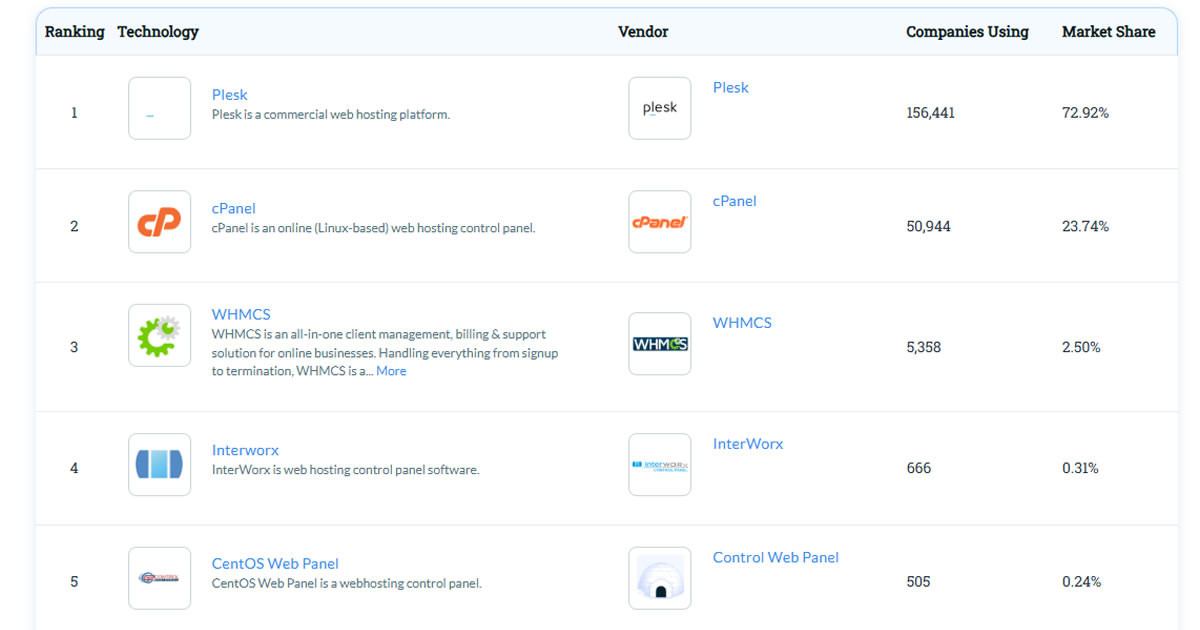
These two brands occupy a staggering approximate of around 96% market share according to Datanyze survey. Plesk is the most popular by far with 72.92% market share in 2H 2025; but cPanel also has a strong 23.74% share.
What Are cPanel and Plesk – And Why Do They Matter?
cPanel and Plesk are the two most widely used web hosting control panels (WHCPs). They allow users to manage server functions through a browser-based interface, including file uploads, domain setup, DNS records, email accounts, backups, and more.
About cPanel
Initially released in year 1996, cPanel is originally designed by J. Nicholas Koston and now owned by Oakley Capital. The software supports a wide range of Unix based OS including CentOS, Red Hat Linux, as well as FreeBSD.
cPanel is the most commonly used control panel among individual webmasters because it is often offered in most shared hosting plans.
About Plesk
Plesk was released back in year 2003. The company is originally a product of SWsoft (after SWsoft acquired Plesk Inc. in 2003), it was then re-branded as “Parallels Plesk Panel” later, and finally now shipped from its own dedicated website now (Plesk.com).
Plesk supports both Windows and Unix based operating system, this includes Debian, FreeBSD, Ubuntu, SUSE, Red Hat Linux, Windows Server 2016, and Windows Server 2019. Generally, Plesk offers better flexibility and affordable service compare to cPanel.
Plesk comes in two versions – Plesk WebPro and Plesk WebHost. Plesk WebPro is the Plesk edition targeting web professionals, features a streamlined interface and hosts up to 30 domains; Plesk WebHost comes with support for resellers, hosting plans, and unlimited domains.
Using Plesk or cPanel on Your Hosting Server
Both Plesk and cPanel are considered full-featured and user-friendly, but they differ in layout, OS compatibility, licensing models, and developer tooling. Most website owners will encounter either cPanel or Plesk bundled with their hosting plan, especially on shared or managed hosting.
That said, not all control panel implementations are equal. Some web hosts may offer limited or outdated versions, restrict certain features, or delay updates. For example, Plesk Obsidian (released in 2019) introduced major security and usability upgrades – but not all providers adopted it promptly.
So while cPanel vs Plesk is partly a matter of user preference, much of your experience also depends on what your host enables, disables, or customizes within the panel.
Why These Two Dominate the Market?
Both cPanel and Plesk are now owned by Oakley Capital, giving the company a near-monopoly on commercial control panels in the hosting industry. This has led to industry-wide license fee increases, especially affecting budget hosting providers and resellers.
While alternatives like SPanel, DirectAdmin, and CyberPanel exist, they’re less widely supported and may lack the polish or ecosystem of cPanel and Plesk.
For now, most hosting users will still encounter either cPanel or Plesk; and understanding their differences can help you choose the right fit, avoid surprise costs, and get the most from your hosting environment.
Price Comparison – cPanel vs Plesk
Choosing between cPanel and Plesk affects your hosting costs. Some users pay for panel licenses directly, while others see the cost bundled into their shared or managed hosting plans. Below, we break down how each panel is priced for self-managed users and how it influences the pricing and options offered by major hosting providers.
For VPS and Dedicated Hosting Users (Self-Managed Licenses)
When you’re managing your own VPS or dedicated server, you need to purchase a control panel license separately. Pricing is typically tiered based on the number of accounts or domains.
Plesk Pricing Overview

Plesk offers three core license types for self-managed servers:
- Web Admin: $14.20/month – Up to 10 domains
- Web Pro: $24.74/month – Up to 30 domains
- Web Host: $45.82/month – Unlimited domains, reseller support
All plans support both Linux and Windows and include core features like file manager, backups, and app installers. Prices may vary slightly depending on your VPS provider or if bundled as part of a hosting package
cPanel Pricing Overview

cPanel licenses are priced by account count and include access to cPanel (for users) and WHM (for admins):
- Admin License: $32.99/month – Up to 5 account
- Pro License: $46.99/month – Up to 30 accounts
- Premier License: Starts at $65.00/month – Up to 100 accounts
Unlike Plesk, cPanel is Linux-only, and prices have increased multiple times in recent years. Hosting resellers managing many accounts will need a Premier license or higher.
For Shared / Managed Hosting Users
If you’re using shared or managed hosting, you don’t pay for the panel directly – but it still affects plan pricing and usability.
How cPanel/Plesk Affects Hosting Costs?
Hosts that license cPanel or Plesk include the cost in their plan pricing. Providers using custom panels (like SPanel or hPanel) may offer lower prices by avoiding third-party license fees.

The basic user cPanel allows the users to control their site thorough an easy-to-navigate user-friendly interface. The features that are available will vary based on what is setup through the WHM panel.
The cPanel user interface presents a grid-style layout with grouped icons for different tasks, including file management, email setup, database tools, and domain control.
The interface may feel a bit dated, but it’s extremely stable and reliable. Some common tasks that can be performed through the user cPanel includes; uploading files, creating sup-domains, modifying DNS entries, creating/editing E-Mail accounts, and monitoring resource usage for sites hosted under that cPanel. These functions are clearly labeled and sectioned in different areas in cPanel main dashboard.
cPanel also allows basic theme customization (e.g., “Paper Lantern”), but the design remains largely function over form. Power users benefit from quick access to terminal, Cron jobs, and advanced zone editors.
Some budget hosts limit advanced panel features or restrict certain admin-level tools to reduce overhead.
Feature Comparison – Plesk vs cPanel
Compare cPanel and Plesk key features in the following table.
| Features | cPanel | Plesk |
|---|---|---|
| Operating Systems | CentOS, CloudLinux, AlmaLinux, Rocky Linux | Debian, Ubuntu, CentOS, CloudLinux, AlmaLinux, Windows Server (2016–2022) |
| Web Servers | Apache | Apache, NGINX |
| Auto Installers | Softaculous, SiteApps, Installatron, cPAddons | WordPress Toolkit (built-in), Softaculous, Joomla Toolkit |
| Auto SSL | Let’s Encrypt (built-in) | Let’s Encrypt, Symantec (optional add-ons) |
| Other Security | SSH access, IP block, Hotlink protection, ModSecurity, 2FA, Imunify360 | SSH access, ModSecurity, Web Application Firewall (WAF), 2FA, Fail2Ban, ImmunifyAV, Advisor |
| Analytics / Reporting | Analog, AWStats, Webalizer, custom graphs | AWStats, Webalizer, Live Traffic Monitor, custom usage reports |
| DNS Management | BIND, Clustering, Automatic configuration | BIND, Remote DNS, Load Balancing, Master/Slave replication, DNSSEC |
| Databases | MySQL, PostgreSQL | MySQL, PostgreSQL, MSSQL (Windows only) |
| Admin Tools | phpMyAdmin, phpPgAdmin, MySQL/MariaDB manager | phpMyAdmin, Secure MySQL Setup, multi-user and multi-db tools |
| Email Features | Exim, Courier/IMAP, POP3/SMTP | Qmail, Postfix, aliases, autoresponders, catch-all, email groups |
| Mail Clients | Horde, Roundcube, SquirrelMail (deprecated) | Horde IMP |
| Anti-Spam | SpamAssassin, BoxTrapper, custom filters | SpamAssassin |
| Anti-Virus | ClamAV (via plugin) | Kaspersky, Dr.Web (Windows plans) |
| User Roles / Permissions | Separate logins for cPanel (user) and WHM (admin) | Single panel with role-based logins for admin, user, and reseller |
| Demo Access | Click Here | Click Here |
Key Notes:
- cPanel is Linux-only and ideal for traditional shared hosting environments.
- Plesk supports both Linux and Windows, making it suitable for ASP.NET developers or multi-platform deployments.
- Both offer rich app support, but Plesk’s modern UI and bundled WordPress Toolkit give it an edge for developers.
Interface and Usability
Both Plesk and cPanel offer browser-based dashboards, but their layouts and navigation differ.
cPanel splits tasks between cPanel (for site owners) and WHM (for server admins). This separation is ideal for reseller setups but can feel fragmented for beginners managing a single site.
Plesk, on the other hand, uses a unified interface with role-based controls, making it more streamlined for users switching between administrative and site-level tasks. Its left-hand sidebar is familiar to modern app users and more mobile-friendly than cPanel’s icon grid.
If you’re new to hosting or want a cleaner UI, Plesk may be easier to learn. If you’re a long-time Linux user or reseller, cPanel offers more direct control.
Supported Operating Systems
Operating system support is one of the biggest technical differences between the two.
cPanel is built for Linux-only environments. It works with CentOS, AlmaLinux, Rocky Linux, and CloudLinux.
Plesk supports both Linux and Windows, making it the go-to option for hosting ASP.NET applications or Microsoft SQL Server. If you need Windows compatibility, Plesk is your only real choice.
Developer & App Support
Plesk and cPanel both support common tools like FTP, MySQL, and one-click installers — but they differ in how deeply they cater to developers.
Plesk supports Git integration, Docker, Node.js, and Composer out of the box (depending on the license). It’s well-suited for modern app stacks and offers advanced dev toolkits via extensions.
cPanel focuses more on traditional LAMP stack support, including PHP version control, Cron jobs, and integrations with tools like Softaculous and JetBackup. Some developer features (like Git) are available but less integrated.
If you’re building with modern JavaScript frameworks or containerized apps, Plesk offers a more developer-ready environment.
Security and User Role Management
Security features are built into both panels but differ in approach and flexibility.
cPanel + WHM allows you to manage SSH keys, firewall settings, and Two-Factor Authentication (2FA). WHM also supports brute-force detection and integrates with tools like CSF and Imunify360.
Plesk uses a more centralized system with built-in support for fail2ban, ModSecurity, role-based access controls, and 2FA. It also includes automatic updates and security advisories in the dashboard.
Plesk’s role separation is cleaner, making it easier to manage teams or clients with limited permissions. For granular server security, WHM offers more tweakable controls.
Extension Ecosystem and Automation
Both panels support extensions, but their ecosystems are built differently.
Plesk has a curated Extension Catalog with hundreds of official and third-party add-ons, including tools for SEO, security, backups, and developer workflows. Many add-ons are free or bundled with premium licenses.
cPanel leans on integrations with third-party tools like Softaculous, JetBackup, and CloudLinux for extended functionality. WHM allows automation via API and command-line scripts, making it a favorite for sysadmins.
If you want an out-of-the-box experience with everything managed via the panel UI, Plesk’s marketplace is more cohesive. If you prefer scripting and sysadmin flexibility, cPanel gives more backend control.
Visual Comparison
Inside the cPanel Dashboard

WHM for Server Admins (cPanel/WHM)
The WHM panel is designed for resellers to be able to create cPanels for subscribers. The WHM panel is generally offered to users with a reseller, VPS, or dedicated server account.
WHM provides root-level access to manage server settings, create new cPanel accounts, configure DNS zones, and monitor resource usage. It’s not designed for casual users, but it offers granular control over how accounts are provisioned and secured.
You’ll also find options for suspending users, adjusting PHP limits globally, installing SSL certificates, and configuring firewall and security modules like ModSecurity.
If you’re running a VPS or dedicated server with multiple clients, WHM is essential for delegation and account isolation.


Inside Plesk Dashboard
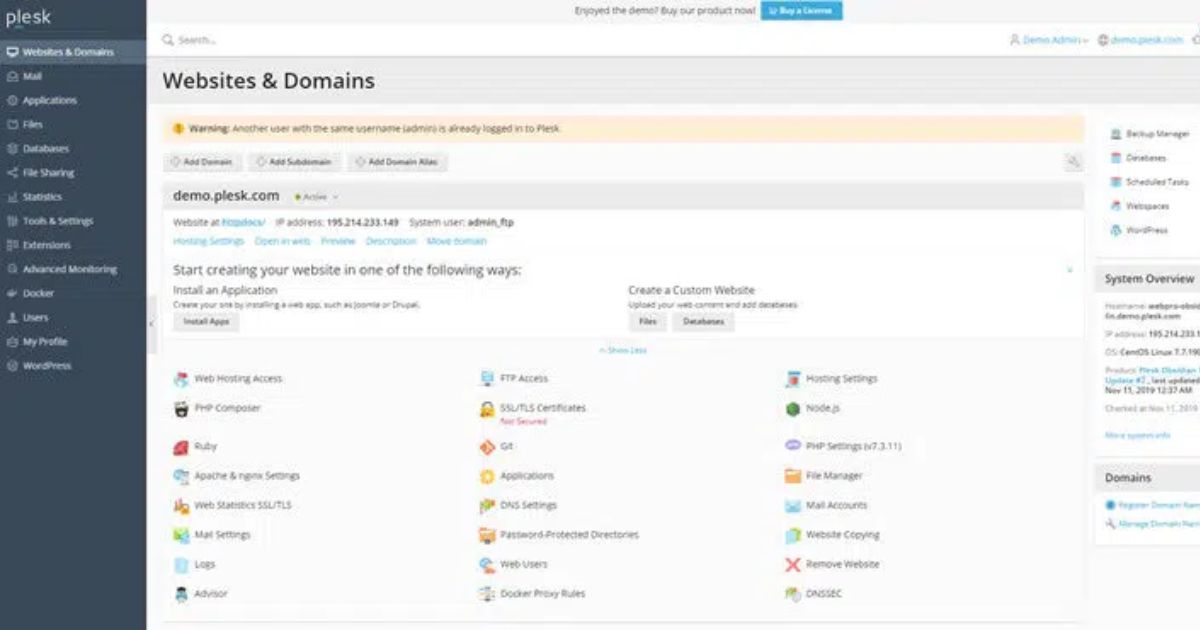
Plesk’s dashboard uses a clean, left-hand navigation system — organized by core tasks like Websites & Domains, Email, Files, Databases, and Security.
Unlike cPanel’s split approach (cPanel for users, WHM for admins), Plesk provides a unified interface for all user roles. This makes it easier to manage multiple sites, configure settings, and onboard clients or team members with role-based permissions.
If you’re using the WebPro edition (or higher), you’ll unlock access to advanced features such as:
- WordPress Toolkit: Manage core updates, plugins, themes, backups, and security from one screen.
- Git Integration: Connect repositories and deploy code changes directly from the panel.
- Docker & Node.js: Launch containers and applications without server-side CLI work.
- Multi-user Access: Delegate control to collaborators with custom permissions.
- For developers, agencies, and site managers, Plesk WebPro combines simplicity with serious flexibility. It’s especially useful if you need to manage multiple WordPress sites or build staging environments quickly.
Which Hosts Offer Plesk or cPanel by Default?
Most shared hosting providers include a control panel by default, but the one you get, cPanel, Plesk, or a custom alternative, depends on the host’s operating system, pricing strategy, and target user base.
Which Providers Offer cPanel Hosting?
cPanel remains the most common choice for Linux-based hosting. Hosts like InMotion Hosting, Hosting.com, ChemiCloud, and HostArmada offer cPanel across their shared and reseller plans. cPanel is popular because of its wide adoption, user-friendly layout, and compatibility with tools like Softaculous, JetBackup, and CloudLinux. However, as cPanel’s licensing fees have risen in recent years, some providers have adjusted pricing or reduced certain features to manage costs.
Hostinger, for example, moved away from cPanel entirely for its base plans and now offers a proprietary interface called hPanel, which mimics cPanel’s layout but is built in-house to reduce licensing overhead. The only Hostinger plans that still offer cPanel are its Business Shared Hosting (for legacy users) and cPanel Hosting as a separate product line.
Which Providers Offer Plesk Hosting?
On the other hand, Plesk is the panel of choice for Windows hosting environments, as it supports both Windows and Linux OS. Providers like Hostwinds, GoDaddy, and Ultahost bundle Plesk into their Windows shared or VPS plans. Liquid Web and IONOS also offer Plesk as a configurable option for VPS and dedicated servers, especially for users who prefer GUI-based management over command-line.
Beyond Plesk and cPanel Hosting
Some providers now give users a choice. For example, ScalaHosting allows VPS users to choose between cPanel and its proprietary SPanel – the latter being a lightweight alternative that avoids third-party fees and offers tighter integration with their infrastructure.
If you’re managing a Linux site and want familiarity, cPanel is still the standard. But if you’re running on Windows, or prefer more extensibility and cross-platform support, Plesk is likely the better fit. And if you’re price-sensitive or managing a large number of accounts, consider a host that offers custom control panels like hPanel or SPanel to lower long-term licensing costs.
Which Control Panel Is Best for You?
Choosing between cPanel and Plesk depends on your hosting environment, technical experience, and personal workflow preferences.
Overall, cPanel is a great fit for traditional shared hosting users, resellers, and those who value stability over visual polish. Plesk, on the other hand, is ideal for developers, agencies, and site owners managing diverse workloads — especially if you’re on VPS or dedicated servers.
Choose cPanel if:
- You’re hosting on Linux and want a familiar, widely supported interface
- You prefer the separation of WHM (admin) and cPanel (user) roles
- Your host includes cPanel by default (e.g., Ultahost, InMotion, HostArmada)
- You use tools like Softaculous, JetBackup, or CloudLinux
Choose Plesk if:
- You need Windows hosting or want a panel that supports both Windows and Linux
- You manage multiple WordPress sites and want built-in tools like the WordPress Toolkit
- You want modern features like Git integration, Docker support, and multi-user access in one dashboard
- You prefer a streamlined UI with fewer panel transitions

