SSL Certificates encrypt the connection between your website and its visitors. This prevents hackers from intercepting sensitive data like passwords, credit card numbers, and personal details.
There are several types of SSL Certificates: Domain Validated (DV), Organization Validated (OV), and Extended Validation (EV), each offering different levels of identity verification and trust.
Beyond securing data, SSL Certificates also improve SEO rankings, activate visible trust signals (like the padlock icon), and are easy to set up with most hosting providers. For any website handling user data, an SSL Certificate is essential.
In this guide, we’ll explain how SSL Certificates work, the different types available, their main benefits, and how to install one on your site.
Generate Free SSL Certificates from One Dashboard
Managing multiple SSLs on different platforms can be frustrating. ZeroSSL.com lets you generate and manage unlimited SSL certificates for just $10 per month – Secure your sites in just 5 minutes.
What is an SSL Certificate?

An SSL Certificate encrypts data between your web server and your visitor’s browser. This prevents third parties from reading or modifying the information in transit.
When SSL is active, your website will:
- Display a padlock icon in the browser
- Use “https://” in the address bar
These indicators help users identify that their connection is secure.
SSL Certificates are issued by trusted entities called Certificate Authorities (CAs). These organizations verify your website’s identity before granting a certificate, which assures visitors that your site is legitimate and safe to use.
How Do SSL Certificates Encrypt and Authenticate Web Traffic?
SSL certificates protect data through a process of encryption and authentication. This ensures sensitive information remains secure.
- Handshake and Authentication: When a user visits a website secured with an SSL certificate, the encryption process begins. The browser (end users) requests the SSL certificate from the server. The server then presents its SSL certificate to the browser, verifying its validity and authenticity.
- Encryption: Once authenticated, a secure session is established using unique encryption keys. All data transferred during this session is scrambled, making it unreadable to hackers or unauthorized parties.
- Decryption: The encrypted data is decoded only by the intended recipient using the unique decryption key, ensuring the data remains private and tamper-proof.
Why Do You Need an SSL Certificate?
SSL certificates play a crucial role in website security, user trust, and SEO performance.
Securing Data Transmission
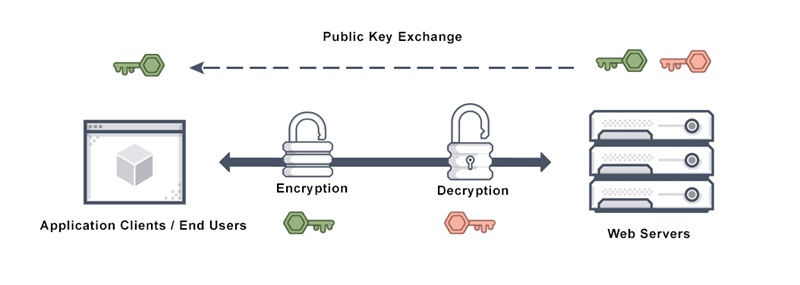
SSL certificates encrypt the information exchanged between a user’s browser and the website’s server, ensuring it remains unreadable to anyone attempting to intercept it. This is essential for websites handling sensitive data, such as payment details or personal information.
Improving SEO Rankings

Search engines like Google prioritize websites with SSL certificates, giving them a ranking boost. Installing an SSL certificate is now considered a standard practice for website operators who want to enhance their site’s SEO performance.
Building Trust with Visitors
The padlock symbol in the address bar indicates to visitors that your website is secure. This visual cue increases their trust in your site, especially when making purchases or submitting personal details online.
Meeting Legal and Regulatory Requirements

Many industries, especially eCommerce and finance, are required by law to secure their websites with SSL certificates to protect user data. SSL implementation helps businesses comply with regulations such as the General Data Protection Regulation (GDPR).
What are the Different Types of SSL Certificates?
There are five types of SSL certificates, each offering different levels of validation and security. Choosing the right one depends on your website’s purpose, size, and the level of trust you want to establish.
For businesses, starting with a Domain Validated (DV) SSL offers sufficient protection. However, if you handle sensitive information or aim to build strong customer trust, upgrading to OV or EV SSL is worth considering.
Domain Validated (DV) Certificates
Domain Validated (DV) certificates are the most basic type of SSL certificates that verify the ownership of the domain. The validation process is quick and typically involves confirming control of the domain through email or DNS settings.
Key Features:
- Offers basic encryption.
- Quick and easy to obtain.
- Cost-effective and widely used for smaller websites or blogs.
Best For
Small businesses, personal websites, and non-ecommerce platforms requiring basic security.
Organization Validated (OV) Certificates
Organization Validated (OV) certificates offer a higher level of security by verifying both the domain ownership and the legitimacy of the organization behind the website. . This involves submitting business documents for manual review.
Key Features:
- Provides moderate encryption.
- Displays company details in the certificate.
- Usually takes a few days to issue.
Best For
Corporate websites, non-profit organizations, and websites handling user data but not financial transactions.
Extended Validation (EV) Certificates
Extended Validation (EV) certificates offer the highest level of security and trust. They require a rigorous vetting process to confirm legal and operational legitimacy.
Key Features:
- Adds a visible trust indicator, such as the company name in the browser’s address bar (varies by browser).
- Strongest encryption and validation level.
- Ideal for sites prioritizing user trust and brand integrity.
Best For
eCommerce sites, banks, and high-traffic websites where trust and security are critical.
Wildcard SSL Certificates

Wildcard SSL certificates allow you to secure a primary domain and all its subdomains with a single certificate. For instance, a Wildcard SSL for example.com also covers blog.example.com and shop.example.com.
Key Features:
- Covers unlimited subdomains under a single certificate.
- Cost-effective compared to purchasing multiple SSLs.
Best For
Websites with multiple subdomains, such as businesses with distinct sections like support, blog, or e-commerce.
Multi-Domain SSL (SAN) Certificates

Multi-Domain SSL certificates, also called Subject Alternative Name (SAN) certificates, allow you to secure multiple domains with a single certificate. While a SAN SSL is typically more expensive than single-domain SSL certificates, it simplifies the SSL management process for businesses having websites under multiple domain names.
Key Features:
- Supports different domain names (e.g., example.com and another-example.com).
- Simplifies management for websites with multiple properties.
Best For:
Companies managing multiple websites or platforms under varied domain names.
How to Get an SSL Certificate for Your Website?
Ever since Google states that they are using HTTPS as a ranking factor, an SSL certificate is no longer an option for users who are serious about their websites. Whether you opt for a free or paid SSL, the process typically involves acquiring, validating, and installing the certificate. Below, we’ll break down your options to help you make an informed decision.
Free vs Paid SSL Certificates: What’s the Difference?
When it comes to securing your website, choosing between free and paid SSL certificates depends on your needs and resources. Both options encrypt data to ensure secure communication between users and your website, but they differ significantly in terms of features, trust level, and use cases.
| Feature | Free SSL Certificates | Paid SSL Certificates |
|---|---|---|
| Cost | Free | Varies ($10–$300+/year) |
| Validation Level | Domain Validation (DV) only | DV, Organization Validation (OV), and Extended Validation (EV) |
| Use Cases | Personal blogs, small websites | Ecommerce sites, business websites, financial services |
| Trust Indicators | Basic HTTPS padlock | Advanced trust indicators like business name in the browser bar (EV) |
| Features | Basic encryption | Warranties, customer support, advanced SSL types (Wildcard, Multi-Domain) |
| Warranties | None | Typically $10,000 to $1,000,000+ |
| Support | Limited or none | 24/7 customer support from CAs |
| Renewal Frequency | Every 90 days | Annually or every two years |
| Ease of Installation | Often manual or with tools like Certbot | Simplified by hosting providers or CA support |
| Subdomain Coverage | Limited to the primary domain | Wildcard SSL covers all subdomains |
Free SSL Certificates

Free SSL certificates, such as those provided by Let’s Encrypt and Zero SSL, are a popular choice for securing websites without incurring additional costs. These certificates focus solely on Domain Validation (DV), ensuring that the applicant owns the domain. However, they don’t extend to verifying organizational identity or adding advanced trust features. Free SSL certificates are typically valid for 90 days, necessitating frequent renewals, though tools like Certbot can automate the process for tech-savvy users.
Despite their limitations, free SSL certificates provide the same level of encryption strength as paid alternatives, ensuring secure communication between users and your site. However, they lack warranties, dedicated customer support, and advanced validation options, making them less suitable for high-traffic or commercial websites.
For personal blogs, hobby projects, or small informational websites, free SSL certificates offer a cost-effective way to enable HTTPS and meet basic security needs without overcomplicating the process.
Steps to Get a Free SSL Certificate with Let’s Encrypt
Let’s Encrypt is a widely used Certificate Authority that offers free SSL certificates. Here’s how you can obtain one:
- Check Hosting Provider Support Good hosting companies integrate Let’s Encrypt, making it a one-click installation (we will talk more about this below). If supported, navigate to your hosting control panel and enable SSL for your domain (and you can skip all the steps below).
- Use an SSL Management Tool In case your hosting provider does not support easy SSL installation, make use of platforms like ZeroSSL to automate the process of acquiring and renewing Let’s Encrypt certificates.
- Manual Installation (If Needed) Generate a CSR using your server or hosting control panel. Once you are done, visit the Let’s Encrypt website and follow their instructions to issue a certificate.
- Renew the Certificate Regularly Let’s Encrypt certificates expire every 90 days. Automate renewal using tools like Certbot or hosting automation.
Paid SSL Certificates

Paid SSL Certificates, on the other hand, are issued by commercial Certificate Authorities (CAs) such as SSL.com. These certificates go beyond basic domain verification, offering options for Organization Validation (OV) and Extended Validation (EV). OV certificates verify the organization’s identity, while EV certificates provide the highest level of trust by displaying the organization’s name in the browser’s address bar – a critical feature for ecommerce platforms and businesses handling sensitive transactions.
In addition to verification, paid SSL certificates often include valuable extras, such as financial warranties, round-the-clock customer support, and advanced configurations like Wildcard SSL (for subdomains) or Multi-Domain SSL (for multiple websites). Unlike free SSLs, paid certificates can have longer lifespans—up to two years—reducing the administrative burden of frequent renewals.
While paid SSL certificates require an investment, ranging from $10 to several hundred dollars annually, they offer significant benefits for businesses. For websites where trustworthiness, data security, and user confidence are priorities, paid certificates provide a comprehensive solution that aligns with professional and commercial needs.
Steps to Purchase an SSL Certificate from a CA
Purchasing an SSL certificate from a Certificate Authority (CA) involves a few key steps:
- Select the Right SSL Certificate Decide on the type of certificate based on your needs (DV, OV, EV, Wildcard, or Multi-Domain). Research reputable CAs such as DigiCert, Comodo, or Sectigo.
- Generate a Certificate Signing Request (CSR) A CSR is a block of encoded text generated by your server that contains your domain information. Good modern web hosting control panels (such as cPanel or Plesk) provide tools to generate a CSR.
- Submit the CSR to the CA During the purchase process, you’ll be asked to paste your CSR. Fill out your domain and business details (if applying for OV or EV).
- Complete the Validation Process For DV SSL, you only need to validate your domain ownership via email or DNS settings. For OV and EV SSL, additional checks on your business credentials, such as company documents or phone verification.
- Download and Install the SSL Certificate Once approved, the CA will issue the certificate. You’ll receive files to install on your server. Use your hosting control panel or ask your hosting provider for help.
- Verify and Test the SSL Installation Check your SSL status using tools like SSL Labs or browser security indicators.
How Web Hosting Providers Help You Manage SSL Certificates?
Web hosting providers simplify SSL certificate management by automating installation, renewal, and activation. Most modern hosts include free SSL as part of their standard plans, reducing both cost and complexity for users.
At HostScore, we track dozens of providers that support built-in SSL. Popular options like Hostinger, ScalaHosting, GreenGeeks, Cloudways, Verpex, InMotion Hosting, and Kinsta all include free SSL certificates (usually via Let’s Encrypt or AutoSSL) that are integrated directly into their control panels.
This integration allows users to:
- Install SSL with one click
- Avoid manual CSR generation or validation
- Rely on automated certificate renewals
By offering free SSL, hosting companies cater to smaller websites, personal blogs, and startups that need basic encryption without the added cost of a paid certificate. If you’re comparing hosting plans, make sure free SSL is included – it saves time, removes technical friction, and boosts your site’s trustworthiness.
Which Hosting Features Make SSL Easier to Manage?
Choosing a host with SSL-friendly features can prevent downtime and manual errors. Look for these attributes when evaluating a hosting provider:
- Automatic SSL Installation and Renewal Many hosts now automate SSL installation and renewal, especially for Let’s Encrypt certificates with 90-day lifespans. Providers like GreenGeeks and Hostinger ensure your certificates stay active without any manual steps.
- Integrated Let’s Encrypt or AutoSSL Support Built-in SSL provisioning tools allow you to enable encryption instantly. With hosts that support Let’s Encrypt or AutoSSL, you won’t need to generate CSRs or upload certificate files manually. Most also include auto-renewal features by default.
- Dedicated IP Availability for EV SSL If you plan to use an Extended Validation (EV) SSL certificate, you’ll typically need a dedicated IP address. Some hosting providers offer this as an add-on or bundle it into premium plans—an important feature for more advanced or enterprise-grade setups.
- Control Panel Integration (e.g., cPanel, Plesk, Custom Panels) SSL integration within your control panel makes management much easier. Whether it’s cPanel, Plesk, or a custom dashboard, a user-friendly interface allows non-technical users to manage certificates without backend access.
Final Thoughts: SSL Is No Longer Optional
An SSL certificate is one of the simplest yet most effective ways to secure your website. Whether you’re running a blog, business site, or online store, HTTPS ensures that visitor data stays encrypted and protected.
Today, SSL is also tied directly to SEO rankings, browser trust signals, and compliance standards. It’s no longer a “nice-to-have,” but a must-have.
If you’re not sure how to install or configure SSL, we can help. HostScore offers a complete SSL installation service for just $15 per site – ideal for beginners or busy site owners who want it done right the first time.
Let our team install SSL for you →