

What Is VPS Hosting?
It’s a type of web hosting that gives each user an isolated slice of a physical server with dedicated CPU, RAM, and storage, even though the hardware is shared.
Think of it like renting an apartment in a larger building. You share the structure with others, but your space is private and fully under your control. VPS hosting works the same way: it provides virtual server environments that act like independent servers, giving you more control and stability than shared hosting without the cost of a dedicated server.
What Can You Use a VPS For?
VPS hosting supports a wide range of use cases that require more power or flexibility than shared hosting can offer. It’s ideal for:
- Medium-to-high traffic websites
- eCommerce stores that need stable performance and better security
- WordPress or LMS sites with heavy plugins or custom code
- Standalone email servers for business domains
- Development and testing environments
- Self-hosted VPNs or cloud storage solutions
How Does VPS Hosting Work?

How VPS Hosting Uses Virtualization Technology?
VPS hosting relies on virtualization software (called a hypervisor) to divide a physical server – often called a bare-metal server – into multiple isolated virtual machines (VMs).
Popular hypervisors include KVM, VMware ESXi, Xen, and Microsoft Hyper-V. These tools allocate fixed portions of CPU, memory, storage, and bandwidth to each VPS instance. The result: Each user gets a “mini server” that behaves like a standalone machine.
Each VPS typically includes:
- Operating system (OS) – You can install Linux (e.g., Ubuntu, CentOS, Debian) or Windows Server.
- Storage allocation – Typically SSD or NVMe, depending on the host.
- System resources – CPU cores and RAM are guaranteed and reserved.
- Root access – Full administrative control for software installation and server configuration.
Unlike containers (e.g., Docker), which share the host OS kernel, VPS environments are fully isolated — making them better suited for projects that need OS-level customization, stronger security boundaries, or custom server software.
How Does VPS Differ from Shared Server Architecture?
In shared hosting, all accounts reside within the same operating system and environment. They use the same memory pool and CPU cores. There’s minimal isolation – if one site experiences a traffic spike, gets infected by malware, or consumes too much CPU, everyone else on the server suffers.
With VPS hosting, your virtual server is fully compartmentalized:
- Your allocated CPU and RAM are reserved and ring-fenced.
- Other users cannot access your files or interfere with your processes.
- You can reboot, install firewalls, or configure PHP and NGINX settings without affecting anyone else.
This isolation improves security, stability, and customization. If you run resource-intensive apps (like WooCommerce or custom APIs), VPS prevents noisy neighbors from draining your performance.
Different Types of VPS Hosting
VPS hosting is broadly categorized into two types: Managed VPS and Unmanaged VPS.
While these categories define the level of control and responsibility you have, other factors like the choice of operating system (Linux or Windows) affects compatibility with the software you plan to use.
Additionally, the control panel access (such as cPanel, Plesk, Webmin, etc.) also play a crucial role in your hosting experience. These elements, combined with the managed service or self-managed service, shape the overall hosting environment for VPS.
| Type | Description | Best For |
|---|---|---|
| Managed VPS Hosting | The hosting provider takes care of server maintenance tasks, including updates, security patches, and offering full support. | Users who prefer a hands-off approach to server management. |
| Unmanaged VPS Hosting | The user is responsible for managing all aspects of the server. This offers more control but requires a higher level of technical knowledge. | Developers or businesses with IT teams. |
| Linux VPS Hosting | VPS that runs on the Linux open-source operating system, offering flexibility and cost-effectiveness. | Most users, developers, and businesses using common web technologies like PHP, Apache |
| Windows VPS Hosting | VPS that runs on Windows Server, required for specific Microsoft technologies like ASP.NET and MSSQL. | Users needing Microsoft software compatibility. |
| Cloud VPS Hosting | VPS hosted in a cloud environment, offering greater scalability, redundancy, and high availability. | Websites expecting rapid growth or fluctuating traffic. |
VPS vs Other Hosting Types
VPS vs Shared Hosting
Shared Hosting is often the starting point for many website owners. It is the most affordable option because multiple websites share the same server and its resources. However, this also means you have limited control, and performance can suffer if other sites on the server experience traffic spikes or issues.
VPS hosting, on the other hand, offers a significant upgrade. With VPS, you get dedicated resources and your own virtual environment. This provides better speed, improved uptime, and the ability to install and configure software as needed. If your site is outgrowing the limitations of shared hosting, a VPS is usually the next best step.
VPS vs Dedicated Hosting
Dedicated Hosting gives you the entire physical server to yourself. This means maximum control, performance, and security. It’s best suited for enterprise-level applications or websites that require high levels of customization and resource capacity. The downside is the price — dedicated servers are the most expensive hosting option.
VPS hosting offers many of the benefits of a dedicated server but at a much lower cost. It uses virtualization to give you your own space and resources on a shared server. For most businesses and developers, VPS provides more than enough power without the high price tag of a dedicated solution.
VPS vs Cloud Hosting
Cloud Hosting and VPS hosting can look similar on the surface, but they are built differently. VPS is hosted on a single physical machine and has fixed resources. This makes pricing straightforward, but scalability is limited unless you upgrade to a higher plan. Cloud hosting spreads your website or app across multiple servers in a network. This allows for better uptime, automatic failover, and near-instant scalability. You pay for what you use, which can be cost-effective or unpredictable.
VPS hosting is often easier to manage and budget for, especially if your resource needs are consistent. Cloud hosting is better for projects that demand high availability and flexible scaling.
When Should You Choose VPS Hosting?
VPS hosting is best for users who have outgrown shared hosting but don’t yet need the full power of a dedicated server.
Complex WordPress Sites
One of the most common applications is hosting WordPress websites. While shared hosting can handle basic blogs or small sites, dynamic WordPress sites – especially those using WooCommerce or LMS plugins – require more server resources and fine-tuned performance. VPS allows you to customize PHP limits, increase memory, and run advanced caching or security tools. This results in faster load times, fewer errors, and a better user experience.
eCommerce & Email Servers
Businesses also turn to VPS hosting for hosting email servers and eCommerce platforms. With root access, you can configure custom mail servers or install applications like ERPNext, Odoo, or NextCloud. This level of control isn’t possible on shared servers.
Development Platforms
VPS is also a strong choice for developers. It provides an isolated environment to build, test, and deploy web apps, APIs, and staging environments. You can install any stack – LAMP, Node.js, Python, Ruby on Rails, and more – and even automate deployments via Git or CI/CD tools.
Game Servers
Gamers benefit from VPS hosting too. Many use VPS to run private game servers (such as Minecraft or Rust), launch multiplayer experiences, or develop cloud-based software platforms. The ability to allocate specific CPU cores and RAM ensures a smoother, more predictable performance.
Overall, if your workload needs flexibility, root access, or consistent performance, VPS hosting provides a cost-effective and scalable solution.
What to Expect from a VPS Hosting Provider?
A VPS hosting provider is a company that offers virtual private server services to individuals, developers, and businesses. These providers manage the physical infrastructure and virtualization technology that powers VPS environments. When you rent a VPS, you’re getting a portion of a physical server that behaves like an independent machine – with its own operating system, dedicated resources, and full control.
VPS providers make it easy to deploy and manage your own server without owning hardware. This is ideal for growing websites, app developers, eCommerce stores, and anyone needing more control than shared hosting offers.
How to Choose a VPS Hosting Company?
When selecting a VPS hosting provider, look beyond just price. Start with uptime. A good VPS provider should offer at least 99.9% uptime backed by an SLA.
Next, evaluate customer support. Is help available 24/7? Do they offer live chat, ticket systems, or managed support?
Server locations are equally important. Hosting your VPS near your target users can significantly reduce latency. Also, look at available types of hosting solutions and scalability. Can you upgrade or downgrade resources easily as your needs grow?
Finally, choose providers with transparent pricing and no hidden fees.
What’s Included in a VPS Hosting Plan?
VPS hosting plans vary widely based on the provider, resource allocation, and whether the plan is managed or unmanaged. Most plans follow a tiered structure, where higher tiers offer more CPU cores, RAM, storage, and features. Entry-level plans are suitable for basic websites or development projects, while premium and managed VPS solutions cater to businesses with mission-critical workloads.
Below is a simplified breakdown of what you can typically expect at each pricing tier:
| Plan Tier | Price Range | vCPUs | RAM | Storage | Bandwidth | Common Features |
|---|---|---|---|---|---|---|
| Entry-Level / Unmanaged | $5 – 10/mo | 1 vCPU | 1–2 GB | 10 – 50 GB SSD | 1 – 2 TB | Root access, unmanaged, Linux OS |
| Mid-Tier | $15 – 80/mo | 2–4 vCPUs | 4–8 GB | 50 – 200 GB SSD/NVMe | 2 – 5 TB | Optional control panel, improved performance |
| Premium | $50+/mo | 4–8+ vCPUs | 8–32 GB | 100 – 500 GB NVMe | 5 TB –Unlimited | Managed support, backups, security tools, staging |
Higher-tier VPS plans may also include advanced features such as DDoS protection, automatic snapshots, staging environments, or containerized app support.
If you’re not sure which tier fits your use case, check out our Best VPS Hosting Guide – we test, benchmark, and compare top providers to help you make the right call.
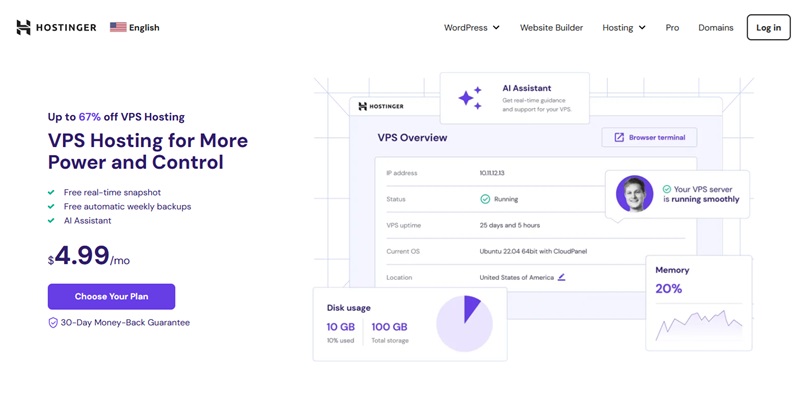
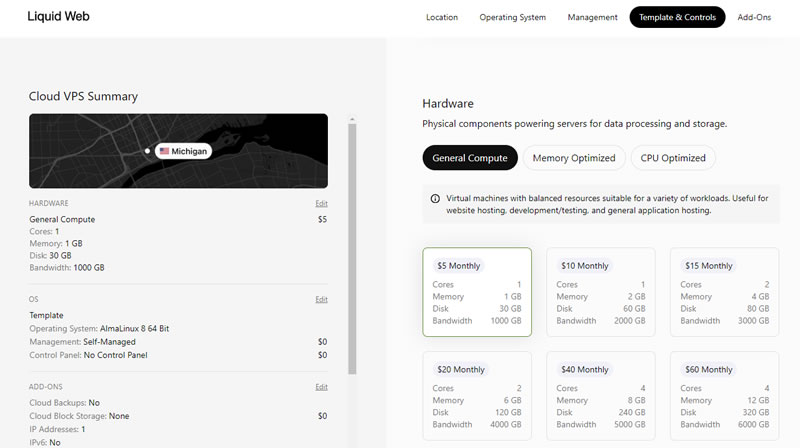
Examples of VPS Plans and Specs

Is VPS Hosting Right for You?
VPS hosting strikes a balance between shared and dedicated hosting. VPS host offers better performance, control, and security than shared hosting; but at a more affordable price than a dedicated server. It’s an ideal solution for growing businesses, web developers and agencies, or eCommerce and high-performance sites.
If you need better performance, control, and uptime than shared hosting provides, VPS hosting is likely the right choice.

