Hostinger
Fast, innovative, beginner-friendly hosting for up to three websites from $2.99/mo. Includes a 30-day money-back guarantee.
84.9%

One.com
All-in-one hosting with email, daily backups, and beginner-friendly tools from $2.99/mo; 15-day money-back guarantee.
84.9%
Flashcloud
Managed-lite cPanel hosting with daily backups and migration help from $2.79/mo. Includes a 30-day money-back guarantee.
84.3%
InMotion Hosting
Business-focused cPanel hosting with 100 GB NVMe storage and email from $1.99/mo. Includes a 45-day money-back guarantee.
80.2%
HostArmada
Managed cPanel hosting with broad server-location choices from $1.99/mo. Includes a 45-day money-back guarantee.
81.1%
Verpex
Global cPanel hosting with daily off-site backups and free migrations. Includes a 30-day money-back guarantee.
82.2%
Hostinger

Hostinger Review
Hostinger began in 2004 as Hosting Media in Kaunas, Lithuania. The company’s early breakthrough came in 2007 with the launch of 000webhost.com, a free hosting platform that attracted millions of users before being retired. In 2008, it expanded with Hosting24.com, followed by the official launch of the Hostinger brand in 2011.
That same year, Hostinger introduced hPanel, its custom-built control panel designed as a simpler alternative to cPanel. By 2016, the company moved into cloud hosting, offering scalable solutions beyond traditional shared hosting. Growth accelerated quickly — by 2021, Hostinger employed more than 1,000 people worldwide. Today, it operates as a global hosting provider with 10+ international data center locations and a reputation for budget-friendly pricing and continuous product innovation.
Exclusive Hostinger Coupons – Save 10% or 15%!
Use promo code ‘HOSTSCORE’ for 10% off any plan — Or go big with promo code ‘HOSTSCORE15’ on a 4-year plan and unlock 15% off. Longer subscription = bigger savings. Claim Your Hostinger Deal Here!
Shared Hosting Pricing & Key Features
Hostinger Pros
- Affordable entry plan at $2.99/month for 3 websites, plus 15% off with HOSTSCORE15.
- Global network of data centers in Europe, Asia, North America, and South America
- Excellent AI ecosystem with AI Builder (new!), Hostinger Agent with memory, OpenClaw, Hermes, n8n, and Paperclip
- User-friendly hPanel with API and MCP access for AI-assisted hosting management
- Developer API and MCP integration – Hostinger Connector lets Claude, Cursor, Codex, and other MCP-compatible tools manage websites
- Multiple payment methods accepted, including crypto and digital wallets
Hostinger Cons
- The lowest price requires 48 months upfront and renews at $10.99/month
- Advanced Agent features and managed AI applications may require separate paid plans
- Hostinger AI Builder sites have limited portability compared with WordPress websites
- Hostinger does not support Windows hosting.
One.com

One.com Review
One.com is a Denmark-based web hosting company founded in 2002. It offers shared hosting, WordPress hosting, domain registration, business email, Website Builder, Aida AI tools, VPS hosting, and business website services for individuals and small businesses.
For shared hosting, One.com works best for beginners and small businesses that want a simple, bundled setup. Its plans include SSL, daily backups, unlimited email accounts, WordPress tools, and access to AI-assisted website creation.
In our hands-on test, the Explorer shared hosting plan scored 8.8/10 across three WordPress benchmark runs, earned an A+ global response grade, and passed our 100-user / 1-minute load test with no errors. The main trade-offs are its 1 to 5 website limit, annual billing, and weaker fit for high-traffic online stores.
Learn more details in our One.com review.
Shared Hosting Pricing & Key Features
One.com Pros
- Affordable signup pricing from $2.99/month, with reasonable renewal at $8.99/month
- Daily backups included across shared hosting plans
- Unlimited email accounts included, even on lower-tier plans
- Free SSL included, with One.com listed as a Let’s Encrypt Silver Sponsor
- Aida AI and Website Builder help beginners create websites faster
- Public system status page improves transparency
One.com Cons
- Shared hosting plans support only 1–5 websites, depending on plan
- First-term pricing is cheaper than renewal pricing
- Best suited for beginners and small business sites, not advanced performance tuning
Flashcloud

Flashcloud Review
Flashcloud is a newer web hosting provider built around a simplified, bundle-first approach to hosting. The platform focuses on reducing complexity by combining key services such as CDN, caching, and security into a single environment, rather than requiring users to configure multiple tools. Its shared hosting plans are designed for ease of use, with a clean dashboard and pre-configured performance features that help users get online quickly.
The company positions itself around transparency and usability, aiming to address common frustrations such as unclear pricing and fragmented feature setups. Flashcloud operates across multiple global server locations and supports a range of hosting solutions, including shared hosting, WordPress hosting, and VPS plans for users who need more dedicated resources.
Shared Hosting Pricing & Key Features
Flashcloud Pros
- Strong bundled value: free domain, 30-day backups, migration, anytime refund
- Built-in Cloudflare and caching tools
- Modern, responsive client portal
- NVMe storage across shared hosting plans improves baseline performance
- Free domain (for life), email hosting, and daily backups included in base plans
- Simple onboarding experience suitable for beginners and non-technical users
Flashcloud Cons
- Pricing varies by billing term and may increase after promotional period
- Performance tuning options are limited compared to VPS or cloud platforms
Verpex

Verpex Review
Founded in 2018 by a team with prior ventures later acquired by GoDaddy, Verpex offers cPanel-based cloud hosting with a focus on speed and security. Privately funded and fast-growing, the company now hosts over 300,000 websites on 1,200 servers. Its growth has been driven by competitive pricing, a strong support team, and a customer-first approach that appeals to freelancers, agencies, and small businesses worldwide.
Shared Hosting Pricing & Key Features
Verpex Pros
- Budget-friendly entry pricing on shared and VPS hosting plans
- 45-day money-back guarantee on shared/reseller plans (longer than industry standard)
- Daily backup included in all shared hosting plans at no extra cost
- Unlimited free site migrations
- Choice of 8 global data centers across five continents
- Wide hosting selection including Windows, reseller, and managed servers
Verpex Cons
- Steep renewal pricing after the first term (up to 90% higher than intro rates)
- Short refund window on managed VPS (7 days compared to 30+ with some competitors)
HostArmada

HostArmada Review
HostArmada is a web hosting provider known for its transparent practices and customer-centric approach. Established in 2019 and led by founder Daniel Walton, the company offers a range of hosting solutions, including shared, VPS, and dedicated hosting, with a focus on performance, security, and scalability. Headquartered in Delaware, the company operates multiple global data centers to serve a diverse customer base.
Shared Hosting Pricing & Key Features
HostArmada Pros
- Competitive pricing
- Daily remote backups with up to 21 days of restore points
- NGINX server and NVMe storage for all shared hosting plans
- 45-day money-back guarantee
- Free malware scans and Web Application Firewall (WAF) on all shared hosting plans
- Supports hosting of legal adult content websites
- Wide range of server locations
HostArmada Cons
- Price increases upon renewal
- Entry-level plan supports only one website
- Advanced speed features like dynamic caching are limited to the highest-tier shared plan
- No Windows Server hosting option
InMotion Hosting

InMotion Hosting Review
InMotion Hosting, founded in 2001 by Sunil Saxena and Todd Robinson in Los Angeles, has grown into a well-established U.S. hosting provider. Built by industry veterans, the company emphasizes reliable infrastructure, practical features, and customer-friendly support.
Shared Hosting Pricing & Key Features
InMotion Hosting Pros
- Affordable entry pricing
- Developer stack on all shared hosting plans (Python/Node/Ruby, Git, SSH)
- Built-in hack, DDoS, and malware protection
- Long 90-day money back guarantee refund window (best in market)
- Free SSL, email, and site migration
InMotion Hosting Cons
- Lower shared hosting plans lack advanced speed features
- Higher renewal rates across shared, VPS, and reseller plans
- No Asia-based data center
- No Windows Server hosting option
Setting up hosting can be confusing. That’s why we created HostScore Setup Help, a done-for-you service for getting your hosting configured the right way.
We help with SSL installation, DNS & nameserver setup, WordPress install or migration, and security tuning. One-time fee. Backed by a 100% refund guarantee.
Explore Our ServicesHow Much Does Shared Hosting Cost?
Entry-level shared hosting typically costs around $2 to $5 per month during the introductory term. The same plans generally renew for approximately $6 to $15 per month after the initial discount expires.
These advertised monthly prices do not always represent a monthly payment. Most shared hosting providers calculate the rate by dividing the total contract price by 12, 36, or 48 months, with the entire amount charged at signup.
How Do Signup and Renewal Prices Compare?
The table below compares the cheapest advertised rate for each entry-level plan. It also shows the required commitment, initial payment, and price after renewal.
| Provider | Entry Plan | Signup Price | Initial Term | Amount Due at Signup | Renewal Price | Increase |
|---|---|---|---|---|---|---|
| Hostinger | Premium | $2.99/mo | 48 months | $143.52 | $10.99/mo | 268% |
| One.com | Starter | $2.99/mo | 12 months | $35.88 | $8.99/mo | 201% |
| Flashcloud | Start | $2.79/mo | 12 months | $33.48 | $9.99/mo | 258% |
| InMotion Hosting | Launch | $4.99/mo | 12 months | $57.48 | $14.99/mo | 213% |
| HostArmada | Start Dock | $1.99/mo | 36 months | $71.64 | $9.95/mo | 400% |
| Verpex | Bronze | $3.00/mo | 12 months | $36.00 | $6.00/mo | 100% |
Note: Prices were checked in September 2026 and are shown in US dollars. Taxes, domain renewals, optional add-ons, currency conversion, and bank charges are excluded. HostArmada currently adds two free months to its 36-month Start Dock term.
The percentage increase can look alarming, but it does not tell the whole story. HostArmada has the largest percentage increase, yet its $9.95 renewal price remains lower than the entry-plan renewals at Hostinger and InMotion Hosting.
The initial term also affects long-term cost. Hostinger requires the largest upfront payment, but the $2.99 rate remains locked in for four years. One.com and FlashCloud require much smaller first payments, although customers reach the higher renewal price after only one year.
Which Shared Hosting Plan Offers the Best Long-Term Value?
Long-term value depends on the renewal price and what the plan continues to include. Website limits, storage, email accounts, backup retention, server resources, support access, and domain renewal costs can justify paying more for one plan than another.
Verpex currently publishes the lowest entry-plan renewal rate at $6 per month, followed by One.com at $8.99. HostArmada and FlashCloud renew at similar rates, but FlashCloud includes 30 days of daily backups and renews eligible domains without a separate domain fee. HostArmada provides clearly stated CPU, RAM, and backup allocations.
Hostinger offers attractive long-term value for buyers willing to commit for four years because the introductory rate applies for longer. InMotion Hosting has the highest entry-plan renewal price in this comparison, but Launch includes two websites, 100 GB of NVMe storage, email hosting, migration assistance, and developer tools.
Compare the complete package rather than choosing the smallest renewal increase. A plan that costs slightly more may still provide better value if it removes the need to purchase email, backups, security, or migration separately.
Can Foreign Transaction Fees Increase the Final Price?
Foreign transaction fees can make shared hosting cost more than the amount displayed at checkout. These fees are normally charged by the customer’s bank or card issuer when a payment is processed in another currency or through a foreign merchant.
Currency conversion can create another cost. A hosting provider, PayPal, or card network may offer to convert the transaction into your home currency using an exchange rate that includes a markup. Visa explains that dynamic currency conversion should disclose the exchange rate and any additional fees (read here).
Before paying, check the final billing currency, applicable taxes, merchant location, and your card’s foreign transaction policy. HostScore displays hosting prices in US dollars and excludes taxes, optional services, currency-conversion costs, and fees charged by banks or payment providers.
What Is Shared Hosting and How Does It Work?
Shared Hosting is a type of web hosting where multiple websites are hosted on a single physical server. Each website on the server shares the same pool of server resources, including CPU, RAM, storage, and bandwidth. This web hosting model allows providers to reduce operational costs, making it one of the most affordable and beginner-friendly hosting options on the market.
With shared hosting, website owners don’t have to worry about server management, as the hosting provider handles server maintenance, software updates, and security.

Shared Hosting Pros & Cons
Pros
- Low cost and beginner-friendly
- No technical skills required
- Free SSL, website builders, and email hosting
- Easy to manage via cPanel or control panel
- 24/7 support and knowledge base
- Risk-free trial with money-back guarantee
Cons
- Fair usage limits on “unlimited” plans
- Performance affected by “noisy neighbors”
- Security risks from shared server environment
- Limited server control and customization
Key Features to Consider in Shared Hosting
Not all shared hosting plans offer the same value. When comparing providers, it’s important to evaluate more than just the headline price. Look closely at what’s included, what’s limited, and what could affect your site in the long run.
Below are the most important features to compare before signing up.
Pricing and Renewal Terms

Shared hosting pricing includes the introductory rate, required billing term, upfront payment, and renewal rate. The final amount may also include domain renewals, optional add-ons, taxes, currency-conversion costs, or foreign transaction fees charged by your bank.
Why it matters: A low advertised rate may require several years of payment upfront and increase substantially after the first term. International buyers can also pay more than the displayed price when the transaction involves another currency or a foreign merchant.
Practical Tip: Compare the amount due at signup, the next renewal invoice, and the estimated cost over several years. Check the checkout currency and ask your card issuer about foreign transaction fees before completing an international purchase
Storage and Bandwidth Limits
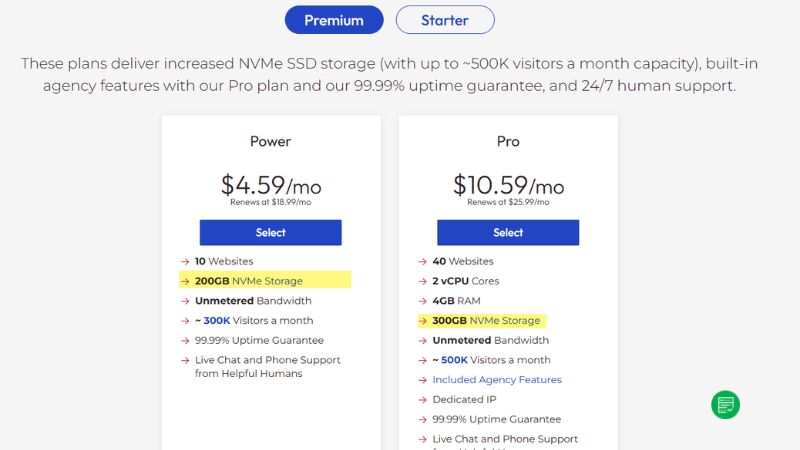
Storage refers to the amount of space your files, emails, and databases can occupy on the server. Bandwidth is the amount of data your site can transfer to visitors each month.
Why it matters: Sites with large media files or growing traffic may hit limits quickly. Unlimited bandwidth may sound appealing, but it’s often subject to fair use policies. NVMe SSD storage accelerates read/write performance and reduces load times significantly compared to standard SSDs, which benefits content-heavy or dynamic sites.
Practical Tip: For basic blogs or small business sites, 10 – 50GB NVMe SSD storage is usually enough. Check for scalable plans if you expect future growth or media-heavy content.
PHP & Server Resource Limits

Shared hosting plans restrict PHP memory, account RAM, CPU usage, PHP workers, entry processes, I/O, and IOPS. The PHP memory limit controls how much memory one PHP process can consume, while account RAM applies to the hosting account’s combined workload.
Why it matters: Low resource limits can cause WordPress administration, imports, backups, page builders, and resource-intensive plugins to slow down or fail. Storage and bandwidth figures alone do not reveal how much processing capacity the plan provides.
Practical Tip: Check both the default and maximum PHP memory limits, along with CPU, RAM, PHP workers, and I/O. Confirm whether you can change these values yourself or must contact support. Do not treat account RAM and PHP memory as interchangeable figures.
Website Builder

Flashcloud integrates Sitejet AI to help users generate a complete website from a single prompt. The tool builds page structure, layouts, and initial content, allowing users to launch a working site without manual setup.
Why it matters: AI-assisted builders reduce setup time, especially for users without design or development experience. Instead of configuring themes and plugins, you can start with a ready-made structure and refine it later.
Practical Tip: Treat AI-generated output as a draft. You’ll still need to adjust content, branding, and layout to match your business goals and improve SEO performance.
Domain & Subdomain Support
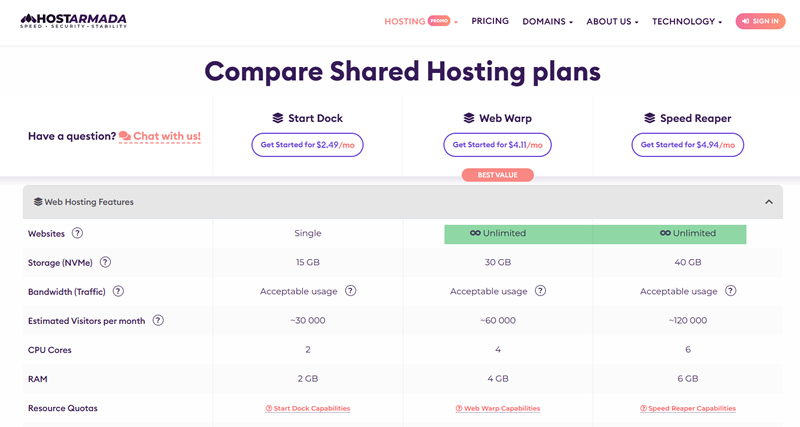
Domain support refers to whether the host allows you to connect your primary domain and manage subdomains (e.g., blog.yoursite.com) within the same account.
Why it matters: Some low-tier plans only allow hosting a single website, while others support multiple domains and unlimited subdomains.
Practical Tip: If you plan to launch multiple websites or organize sections of your site under subdomains, look for plans that include domain aliasing and subdomain management tools.
Cancelation Policy
Hosting cancellation may involve disabling automatic renewal, ending the service immediately, or allowing it to expire at the end of the paid term.
Most shared hosting providers let customers stop renewal through their account dashboard, but the required notice period and timing options differ. In our list, One.com requires the most advance planning because missing its 30-day deadline can trigger another renewal. InMotion Hosting also adds friction when immediate closure is required. The other providers offer relatively straightforward self-service processes, although customers should always export their website, database, and email before cancelling.
| Provider | Cancellation Process | Important Condition |
|---|---|---|
| Hostinger | Disable automatic renewal from hPanel. Hosting remains active until the paid term ends. | Domains, email, and other subscriptions have separate renewal controls. |
| One.com | Cancel from the Control Panel and choose whether to retain the domain. | Cancellation must be submitted at least 30 days before the subscription ends. |
| Flashcloud | Choose immediate cancellation or cancellation at the end of the billing period. | Data is retained for 14 days, but the provider’s post-30-day refund terms currently conflict. |
| InMotion Hosting | Submit an online cancellation request after completing a short survey. | Online cancellation sets the plan to expire. Immediate cancellation requires contacting Customer Service. |
| HostArmada | Submit an immediate or end-of-term request through the Client Area. | Cancelling hosting does not automatically cancel the associated domain. |
| Verpex | Submit a cancellation request through the client dashboard and select immediate or end-of-term cancellation. | Support must be contacted if the customer later wants to reverse the request. |
Why it matters: A money-back guarantee does not necessarily mean cancellation is simple. Some providers require advance notice, support contact, or additional steps before stopping renewal. Immediate cancellation may also delete website and email data or forfeit unused prepaid time.
Practical Tip: Check whether cancellation is self-service, how much notice is required, and when your data will be deleted. Download your files, databases, and email first, then confirm separately that automatic renewal has been disabled for the hosting plan, domain, and paid add-ons.
Email Hosting Capabilities
Email hosting lets you create email accounts that use your domain (like [email protected]), often bundled with your hosting plan.
Why it matters: Having branded email addresses adds professionalism and is essential for businesses. Free email hosting saves you the cost of third-party services.
Practical Tip: Choose plans that support multiple email accounts, webmail access, and forwarding options. Bonus if they integrate with email clients like Outlook or Thunderbird.
Control Panel (cPanel or custom)
The control panel manages your website, domains, email accounts, files, databases, and app installations from one dashboard. Some shared hosts use cPanel, while others build their own panels to simplify the experience.
Why it matters: A good control panel lowers the learning curve. This is especially important for beginners who want to install WordPress, create email accounts, or manage domains without touching code.
Practical Tip: Look for cPanel, Plesk, or modern custom dashboards. Hostinger uses hPanel, ScalaHosting uses SPanel, and One.com provides its own beginner-friendly control panel for managing websites, domains, email, backups, and WordPress tools in one place.
Backup Retention and Restore Options
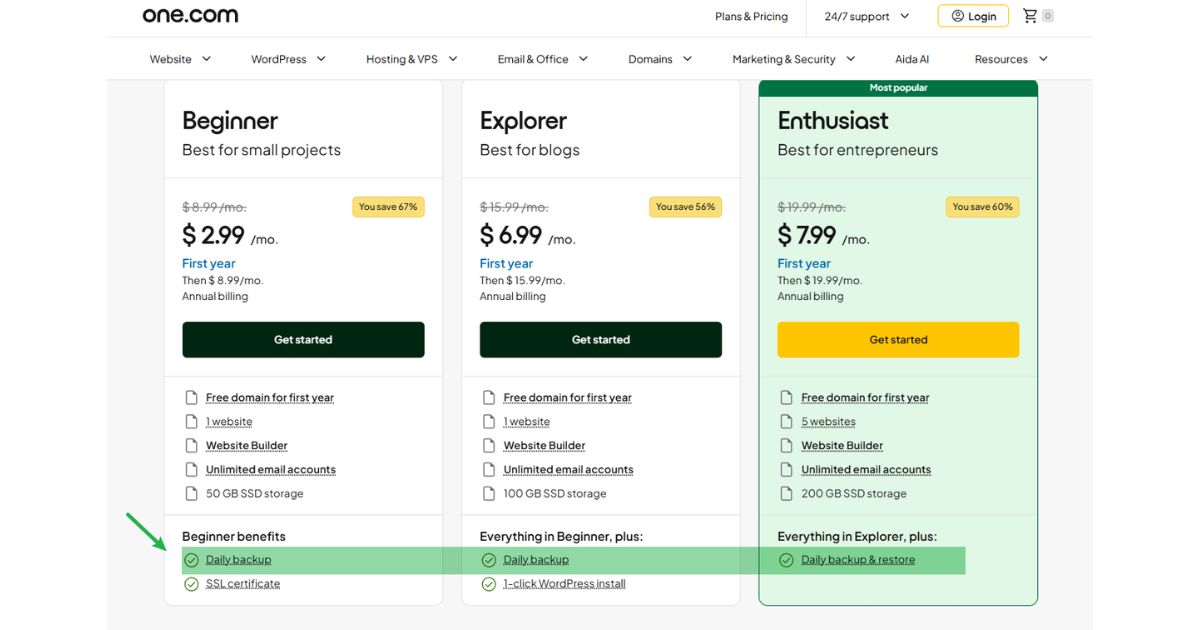
A hosting backup creates a recoverable copy of website files, databases, and sometimes email. Providers differ in backup frequency, retention period, covered data, restoration method, and whether copies are stored away from the live server.
Why it matters: “Daily backups” provide limited protection if only one copy is retained, email is excluded, or restoration requires an additional fee. Backups stored on the same server can also be affected by a larger hardware or account failure.
Practical Tip: Look for daily backups with at least 14 to 30 days of restore points, self-service restoration, and storage on separate infrastructure. Confirm whether files, databases, and email are included, and maintain an independent backup outside your hosting account.
Security Features (SSL, Isolation)
Security features in shared hosting often include free SSL certificates, malware scanning, and account isolation to prevent one user’s problems from affecting others.
Why it matters: Basic security helps prevent data leaks, hacks, and SEO penalties. Not all shared hosts isolate user accounts well, which can put your site at risk.
Practical Tip: Choose a provider that includes SSL by default and mentions account isolation or containerized environments (like CloudLinux or LiteSpeed isolation).
Network Protocol Support
Network protocols determine how browsers, applications, and administrators connect to the hosting server. Relevant shared hosting protocols include HTTP/2, HTTP/3 and QUIC, TLS 1.3, SSH, SFTP, and IPv6.
Why it matters: Modern HTTP and TLS protocols can improve connection speed and security, while SSH and SFTP provide safer access for file management and development tasks. However, some features may be limited to higher plans or delivered through a CDN instead of the hosting server.
Practical Tip: Prioritize SFTP over standard FTP and check whether your plan includes SSH if you need WP-CLI, Git, or command-line access. When comparing HTTP/3 or TLS support, determine whether it comes from the origin server, an integrated CDN, or both.
Support Team Origin and Technical Depth
Hosting support differs by channel, availability, language, technical scope, and escalation process. Some teams handle only account and control-panel questions, while others assist with migrations, WordPress errors, malware recovery, and server-side troubleshooting.
Why it matters: A fast initial reply provides little value if the agent cannot diagnose the problem or escalate it to a server administrator. The team’s location may affect language and working hours, but it does not determine technical quality by itself.
Practical Tip: Check which support channels are included with the entry plan and whether phone, chat, and tickets operate around the clock. Before signing up, ask a specific technical question to evaluate the quality of the response. Treat the team’s origin as “not publicly disclosed” unless the provider confirms it.
Money-Back Guarantee Policy

A money-back guarantee lets you try the service with reduced risk. Most shared hosts offer 30-day trials, though some extend this up to 45 or 90 days.
Why it matters: Flexible refund policies reduce commitment risk, especially for beginners who are still testing hosting performance, support quality, and ease of use.
Practical Tip: Always check the refund scope. Domains, add-ons, and usage beyond certain limits may not be refundable depending on the provider’s policy.
Scalability and Upgrade Paths

Scalability refers to how easily you can transition from shared hosting to a more powerful environment like VPS or cloud hosting.
Why it matters: Even small sites can outgrow shared hosting over time. A good host should support seamless upgrades without downtime.
Practical Tip: Look for providers that also offer managed VPS or cloud plans so you don’t have to migrate away entirely as you grow.
Shared Hosting vs VPS, Cloud, and Dedicated Hosting
Shared, VPS, cloud, and dedicated hosting differ mainly in how they allocate server resources, how much technical control they provide, and how easily they scale. Shared hosting offers the simplest and least expensive starting point, while the other hosting types provide greater isolation, flexibility, or infrastructure control for more demanding workloads.
| Hosting Type | Resource Allocation | Server Control | Scaling | Management Requirements | Best Suited For |
|---|---|---|---|---|---|
| Shared Hosting | Multiple accounts share the same server and its CPU, memory, storage, and I/O capacity. | Limited to the control panel and features allowed by the provider. | Upgrade to a larger shared plan or migrate to another hosting type. | Low. The provider manages the server, operating system, and core software. | Personal sites, blogs, portfolios, and small business websites with modest resource requirements. |
| VPS Hosting | Each virtual server receives an allocated share of CPU, RAM, and storage. | Root access and custom server configurations are normally available. | Add resources to the VPS or migrate to a larger virtual server. | Moderate to high on unmanaged plans; lower with managed VPS hosting. | Growing WordPress sites, WooCommerce stores, learning platforms, and custom applications that need isolated resources. |
| Cloud Hosting | Resources come from a pool of interconnected physical infrastructure rather than one conventional server. | Varies from simplified managed platforms to full infrastructure-level control. | Resources can often be increased more quickly, although automatic scaling depends on the platform. | Varies considerably between managed cloud hosting and self-managed cloud infrastructure. | Websites, SaaS products, membership platforms, and applications with variable traffic or availability requirements. |
| Dedicated Hosting | One customer receives the resources of an entire physical server. | Full control over the operating system, software stack, security rules, and hardware configuration. | Upgrade individual components or deploy additional physical servers. | High unless server management is purchased from the provider. | Large workloads, specialized applications, private infrastructure, and organizations with strict isolation or configuration requirements. |
Learn more about the different types of web hosting.
Frequent Asked Questions
Shared hosting works well for many small websites, but its performance and limitations vary by provider and plan. These answers address common questions about resources, software, infrastructure, and scaling.
Is Shared Hosting Suitable for WordPress?
Yes. Shared hosting is suitable for most new blogs, portfolios, and small business websites running WordPress. Look for current PHP support, automatic WordPress installation, caching, SSL, backups, and enough PHP memory for your selected themes and plugins. Resource-intensive WooCommerce stores, membership sites, and learning platforms may outgrow shared hosting sooner because they generate more database queries and uncached requests.
What Happens If I Reach My Inode Limit?
Reaching the inode limit prevents the hosting account from creating additional files or directories. Uploads, email delivery, caching, software updates, and automated backups may stop working, although the exact response depends on the provider. Check inode usage through the hosting control panel. Old backups, cache files, staging copies, and unused email commonly consume large numbers of inodes. If routine cleanup does not provide enough capacity, move to a plan with a higher limit.
How Much Traffic Can Shared Hosting Handle?
Shared hosting does not have a universal visitor limit. Capacity depends on the plan’s CPU, RAM, PHP workers, entry processes, caching configuration, and the number of visitors making simultaneous requests.
A cached blog can support considerably more traffic than a WooCommerce store or membership website on the same plan. Monitor resource usage and test how the site performs under concurrent traffic instead of relying only on an advertised monthly visitor estimate.
Can I Choose Where My Website Data Is Hosted?
Some shared hosting providers allow you to select a server location during signup, while others assign the location automatically. Choosing a data center near your primary audience can reduce network latency and improve initial response times.
If your visitors are distributed across several regions, connect the website to a CDN. Before ordering, check whether changing the server location later requires a migration or support request.
Is a CDN Included With Shared Hosting?
Some shared hosting plans include an integrated CDN, while others provide only a connection or setup option for a third-party service. The CDN caches static assets such as images, stylesheets, and scripts on edge servers closer to visitors.
Check whether the included CDN has bandwidth, traffic, or feature restrictions. A CDN can improve global content delivery, but it will not resolve slow database queries, insufficient PHP workers, or other origin-server limitations.
Can I Change the PHP Version and Memory Limit?
Most shared hosting providers let users select a PHP version through the control panel. PHP memory and execution limits may also be adjustable, although the provider normally sets a maximum value that customers cannot exceed.
Use a currently supported PHP version that remains compatible with your website software. Test themes, plugins, and custom code before changing versions, and do not confuse the PHP memory limit with the total RAM allocated to the hosting account.
How Does Shared Hosting Isolate My Account From Other Users?
Shared hosting platforms can use technologies such as CloudLinux LVE and CageFS to separate accounts and restrict their CPU, memory, I/O, and filesystem access. These controls reduce the chance that one customer’s website consumes resources needed by other accounts.
Account isolation improves stability and security, but it does not eliminate every shared-hosting risk. Website owners must still maintain updates, strong passwords, secure plugins, and independent backups.
When Should I Upgrade From Shared Hosting?
Upgrade when the website repeatedly reaches CPU, RAM, PHP worker, entry-process, inode, or I/O limits. Other warning signs include slow uncached pages, failed background tasks, checkout delays, database errors, and poor performance during traffic spikes.
A higher shared plan may be enough when you only need additional resources. Consider managed VPS or cloud hosting when you need stronger isolation, more consistent performance, custom server software, root access, or greater control over scaling.
Still Not Sure? Use Our Hosting Resources & Tools
If you’re unsure which type of hosting fits your needs, try these free tools & resources:
- Hosting Cost Calculator: Estimate your monthly spending across hosting types
- Web Hosting Checker: Analyze an existing host’s stack and CDN setup
- Host Reviews: See uptime, speed, and plan-level features across providers
These resources help you match your project goals with the right infrastructure before you commit to a plan.