

The Key Differences between SiteGround and Bluehost
The key differences between SiteGround and Bluehost come down to performance reliability, transparency in pricing, and depth of WordPress hosting features.
BlueHost is often recommended for beginners and endorsed by WordPress.org. It provides an easy onboarding experience, free domain, and familiar cPanel-based management. However, in our experience, their server performance is average, support can be inconsistent, and the company has a habit of sneaky upsells — including add-ons like “Pro Email” that start as free trials but later appear as surprise charges (more about this later).
SiteGround, on the other hand, delivers better reliability and support. While its pricing is undeniably expensive (especially at renewal), the structure is more transparent — what you see is what you get. The company no longer blocks sign-ups from countries like Malaysia or India (a policy it enforced in previous years) these days, and its polished Site Tools dashboard is a cPanel alternative built with ease of use in mind.
SiteGround

Our Take
SiteGround offers strong uptime, fast support, and a refined experience tailored to WordPress users. Its platform is easy to use and packed with performance-enhancing features. Although its pricing has gone up a lot over time, SiteGround continues to deliver on reliability and user experience — making it a reasonable pick for small business sites that need dependable performance and hands-on support.
BlueHost

Our Take
BlueHost is usable, polished, and beginner-friendly, but we generally do not recommend it for most HostScore readers. Its dashboard and WordPress setup are easy, but our testing and checkout review found enough speed, renewal, and upsell concerns to make us cautious.
For Beginners Looking for Affordable Hosting: Bluehost Is Cheaper to Start With
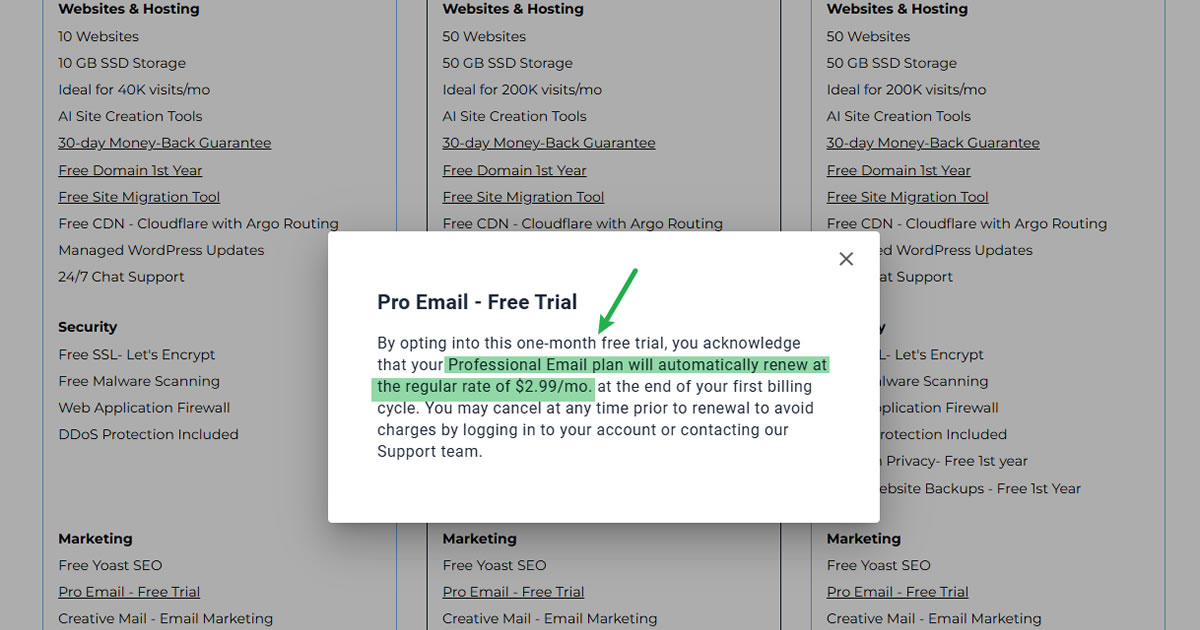
Bluehost offers the smoother, cheaper entry point for beginners. The onboarding process is straightforward, you get a free domain and SSL, and it’s easy to get a WordPress site live without much technical knowledge. Its user base is massive, thanks in part to strong branding and the WordPress.org seal of approval.
However, there are caveats:
- Renewal prices increase sharply.
- There’s no monthly billing — only long-term contracts.
- Many features come with upsells, and Bluehost sneakily charges for services like “Pro Email” after the initial trial.
SiteGround is more expensive from the get-go, but you won’t find hidden trial fees down the line. Their support is also more dependable for users who might need help beyond basic setup.
Compare Bluehost and SiteGround Price
| Hosting Type | BlueHost | SiteGround |
|---|---|---|
| Shared Hosting | $3.99 - 14.99/mo | $3.99 - 10.69/mo |
| VPS Hosting | $4.69 - 25.99/mo | $ - /mo |
| Dedicated Hosting | $144.19 - 315.19/mo | $ - /mo |
| Cloud Hosting | $65.00 - 230.00/mo | $100.00 - 400.00/mo |
| Managed WP Hosting | $3.99 - 14.99/mo | $3.99 - 10.69/mo |
| Windows Hosting | $ - /mo | $ - /mo |
| Coupon | - | - |
| Coupon Details | - | - |
Verdict: Bluehost is better for budget-conscious beginners, but SiteGround is more trustworthy and helpful if you’re willing to pay more.
For Advanced Users Looking for VPS / Cloud Hosting

If you’re seeking serious cloud or VPS performance, you’ll want to look beyond both SiteGround and Bluehost.
SiteGround’s cloud hosting is fast and secure, with features like auto-scaling and managed backups. But it comes with high price tags and limited flexibility. Bluehost’s VPS and dedicated offerings feel dated, lack root-level control, and don’t justify their cost.
Both fall short for developers or businesses needing modern, scalable infrastructure. Better options exist — like ScalaHosting, Cloudways, and Kinsta for managed cloud hosting experience; or Vultr, Digital Ocean, and Hostman for cheap unmanaged cloud.
For WordPress Users: SiteGround Offers a More Professional-Grade Experience

Both Bluehost and SiteGround promote WordPress hosting — but we find SiteGround delivers the stronger experience for serious users.
SiteGround’s stack includes Google Cloud infrastructure, daily backups, WP-specific caching tools, and knowledgeable WordPress support. It’s built for users running WooCommerce, LMS platforms, or client sites that demand uptime and support consistency.
Bluehost does enough for casual bloggers and beginners — but if your site scales or runs into trouble, the limitations become obvious. Their performance is average, and the support isn’t always helpful when issues get technical.
In short:
- Bluehost works for hobbyists and simple projects.
- SiteGround is a better long-term platform for WordPress professionals and businesses.
Verdict
SiteGround clearly beats Bluehost on support quality, hosting reliability, and WordPress-specific features — but you’ll pay a premium. Bluehost is a more affordable entry point and great for first-timers, but its upselling tactics, dated infrastructure, and weaker support make it harder to recommend for long-term or serious use.
More About the Companies
SiteGround

Established in 2004 by a group of university friends led by Ivo Tzenov, SiteGround has flourished into a prominent web hosting entity based in Sofia, Bulgaria. Boasting a workforce exceeding 600 employees, SiteGround proudly hosts almost three millions domains worldwide. With a powerful infrastructure spanning 11 data centers across 8 countries, the company offers an array of hosting solutions including shared, cloud, and enterprise hosting, alongside domain registration services.
SiteGround Pros
- Outstanding hosting uptime and speed performance
- Excellent customer support
- Powered by Google Cloud Platform
- 1-click CDN included in all shared plans
- Specialized WordPress support staff
- Automatic geo-distributed daily backups
- White-label user dashboard and private DNS in GoGeek plans
SiteGround Cons
- Expensive renewal pricing
- Limited storage in shared hosting plans
- Still using traditional SSD instead of NVMe storage
- Staging tool not included in entry-level shared plan
- No Windows Server hosting option
BlueHost

Bluehost is a long-running web hosting and domain services company founded by Matt Heaton and Danny Ashworth in 2003 and now owned by Newfold Digital, LLC. The company sells shared hosting, managed WordPress hosting, VPS, cloud hosting, dedicated hosting, domains, email, security tools, and website services. It is one of the better-known WordPress hosting brands, partly because of its long relationship with WordPress.org, but today it operates as part of a much larger hosting group rather than as an independent boutique provider.
BlueHost Pros
- Easy account dashboard for beginners
- WordPress setup is fast and automatic
- cPanel is still available when needed
- Free SSL was auto-installed in our test account
- NVMe storage, free CDN, and WordPress tools are included in all shared plans
BlueHost Cons
- Speed performance slower than expected
- Renewal prices are much higher
- Email setup is misleading and can push users toward paid Pro Email
- Heavy (and some misleading) upsells during checkout and inside the portal
- Better value exists elsewhere for many use cases

