
When you’re a small business owner, appearing at the top of Google’s local search results is the most reliable way to get calls, website visits, and foot traffic from people in your area. But many businesses overlook that hosting decisions, such as server location, speed, and reliability, directly affect how well you rank locally. This guide shows you how to connect hosting and website setup with proven local SEO tactics, so you can climb the rankings and reach more customers nearby.
1. Choose a Hosting Provider With Data Centers Near Your Target Customers

Most small businesses don’t realize their website’s physical server location can dramatically impact load times for local users. For example, if your business targets Berlin customers but your website is hosted on a server in the Singapore or Australia, it can add 1 – 2 seconds of delay – which not only frustrates users but also sends negative signals to Google, which favors faster-loading local sites in ranking algorithms.
What you can do today:
- Before purchasing hosting, check if the provider offers data centers in or near your target region. Hosting providers like Hostinger and Ultahost both offer wide choices in server locations across Asia, Europe, United States, and beyond.
- Use a tool like Bitcatcha Server Speed Checker to measure response times from your region. Aim for under 200ms TTFB (time to first byte) locally.
- Check with the host if they use good peering and network routes to your region, as some “nearby” data centers can still have poor latency due to bad routing.
2. Use Hosting That Enables Fast Mobile Load Times on Local Networks

Google’s mobile-first indexing means your site’s mobile performance is critical. Over 60% of local searches happen on mobile, and if your site takes more than 3 seconds to load, most visitors will abandon it.
Many shared hosting plans can’t handle the processing demands of modern mobile sites, especially if you use page builders or WordPress themes with lots of scripts.
What you can do today:
- Choose hosting with modern performance features: HTTP/2 or HTTP/3 support allows browsers to request multiple files simultaneously, dramatically speeding up mobile page loads.
- Make sure your hosting provider supports recent PHP versions like PHP 8.1 or later as outdated PHP slows down WordPress or CMS sites.
- Look for server-level caching (e.g., LiteSpeed Cache) or Redis support, which reduces the load on your server and speeds up delivery of dynamic pages.
- Regularly test your mobile site speed with tools like WebPageTest from your local city, and look for the “First Contentful Paint” (FCP) and “Largest Contentful Paint” (LCP) times. Aim for FCP under 1.5s and LCP under 2.5s on a 4G connection.
- Compress images before uploading and enable lazy loading; even the best hosting can’t compensate for massive image files that choke mobile connections.
- Consider using optimized WordPress themes and plugins designed for speed instead of bloated builders.
3. Optimize and Track Your Google My Business (GMB) and Local Citations
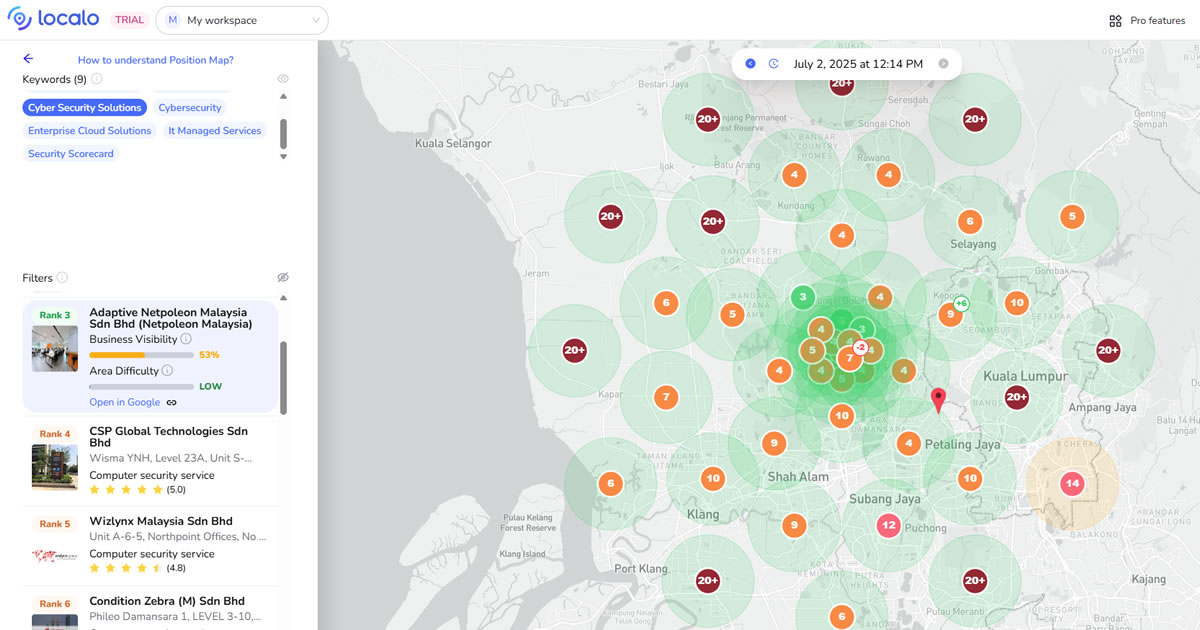
Even if your website is perfectly optimized, you won’t rank in the local map pack without a verified, complete GMB profile. Inconsistent information across directories (citations) can also lower your credibility with Google, confusing the algorithm about your business’s legitimacy and location.
Exclusive Offer, Use Promo Code: JERRY10
Use promo code JERRY10 at checkout on Localo to get 10% off for the lifetime of any plan – perfect for tracking your local rankings and boosting your business’s local SEO! Click here to order with discount!
What you can do today:
- Claim, verify, and fully complete your Google My Business profile: add detailed business categories, correct NAP (name, address, phone), business hours, and upload high-quality, geotagged photos of your store, office, or staff.
- Write a compelling business description that naturally includes your primary keywords and location.
- Post updates on your GMB profile regularly (at least monthly) – Google rewards active profiles with better visibility.
- Audit your existing online listings on local directories like Yelp, Yellow Pages, Foursquare, and TripAdvisor. Update inconsistent or outdated NAP details – even small differences like “Suite 5” vs “#5” can confuse Google’s crawlers.
- Use citation tools or services to identify missing or inaccurate listings.
- Monitor your actual rankings across different parts of your service area with a tool like Localo. Localo shows where your GMB profile ranks in Google Maps at neighborhood level, allowing you to spot weak zones and optimize specific city landing pages or citations accordingly.
- Encourage happy customers to leave reviews on your GMB profile.
4. Configure Server Settings for Local Relevance and Data Accuracy

Many businesses forget that technical server and CMS settings can send confusing signals to Google. If your server timezone is set incorrectly, your schema markup may show wrong business hours. Likewise, if your site language or currency doesn’t match your actual market, Google may not consider your business relevant to local searchers.
What you can do today:
- Access your hosting control panel or CMS settings and set your timezone to your business location (e.g., Asia/Kuala_Lumpur). This ensures business hours in schema, order timestamps, and event times match your actual schedule.
- Set your website’s default language and currency in WordPress, Shopify, or your CMS – these meta signals help Google determine the region you serve. For example, an English (en-MY) site with prices in MYR tells Google you’re a Malaysian business.
- Check your structured data (schema) with Schema.org Validator. Ensure fields like address, opening hours, and phone number reflect local details accurately.
- Add LocalBusiness schema on your homepage and important landing pages. Include
areaServed,address, andgeoproperties for precise location targeting. - Keep your CMS and server time settings synced; mismatches between your site’s timezone and server timezone can cause scheduling issues for posts, forms, and events.
5. Build Optimized City or Area-Specific Landing Pages

One of the biggest missed opportunities in local SEO is relying on a single generic “Contact Us” page for all locations. Businesses that serve multiple cities or neighborhoods rank better when they have unique landing pages optimized for each service area.
What you can do today:
- Create separate landing pages for each major city or neighborhood you target, with unique content: city-specific service details, testimonials from local clients, local landmarks, and photos of your team working in that area.
- Include location keywords naturally in page titles, meta descriptions, and headings.
- Use LocalBusiness schema on each location page with the specific address and phone number for that area.
- Link each city landing page from your main site navigation or footer to ensure Google can crawl and index them.
- Host these pages on a plan that can handle increased visitors without performance drops; if you expect spikes (e.g., from local ads), scalable VPS or cloud hosting is safer than budget shared hosting.
- Monitor these pages’ load times separately since plugins or scripts might impact them differently.
Conclusion
Local SEO isn’t just about keywords or adding your business to Google Maps – it’s about giving clear, consistent signals to Google and potential customers that you’re a reliable, locally relevant business. Hosting underpins everything: your site’s speed, stability, and technical relevance are directly tied to where and how you host.
Start by choosing a host with regional servers, configuring server and CMS settings for local relevance, creating optimized city landing pages, and actively managing your GMB and citations. By combining hosting best practices with proactive local SEO, your small business can climb local rankings and bring more nearby customers through your doors.


