

Summary: Is 20i Autoscale Hosting worth the extra cost?
Short answer: Yes. 20i Autoscale Hosting is worth the price for users who need real performance without server headaches.
In our tests, 20i’s platform handled a WooCommerce store under simulated traffic (1,000 users over 60 seconds) with over 95 percent success rates and no critical errors. Response times remained stable even during peak load, supported by built-in edge caching, dynamic scaling, and smart optimization tools.
Benchmark scores averaged 6.3 out of 10, with standout results in file and database operations. While CPU-heavy tasks scored lower, that reflects the testing tool’s limitations rather than real-world capability. 20i’s infrastructure uses multi-core Xeon CPUs and containerized environments to scale resources automatically and isolate each site.
If your business relies on uptime, fast page loads, or PHP application stability, 20i Autoscale delivers a dependable, managed platform that justifies its premium pricing.
20i Autoscale Hosting Pros & Cons
| Pros | Cons |
|---|---|
| Real-time autoscaling for CPU, RAM, and PHP workers | No visibility into real-time server usage |
| Stable WooCommerce performance under stress | No white-label/agency tools (available in Reseller plan instead) |
| Excellent WooCommerce stability under heavy load | Pricing may be high for smaller / low-traffic sites |
| CDN & Global Edge Caching preconfigured | No support for non-PHP stacks (e.g., Node.js) |
| Fast and helpful live chat support | |
| No manual resource tuning required |
What Is 20i Autoscale Hosting?
20i Autoscale Hosting is a managed cloud hosting solution that automatically adjusts server resources (including CPU, RAM, and PHP workers) based on real-time demand. Unlike traditional shared or VPS hosting, Autoscale doesn’t impose fixed resource limits per account. Instead, each website runs inside its own isolated container, and resources are scaled dynamically to meet current traffic conditions.
20i Autoscale is engineered to support all PHP-based applications, including WordPress, WooCommerce, Joomla, Magento, and Laravel. The platform bundles in several performance features by default: Global Edge Caching, server-side caching via StackCache, and a built-in Web Optimization suite accessible via the My20i dashboard.
How 20i Autoscale Hosting Works

20i Autoscale Hosting works by monitoring your site’s usage patterns and allocating more compute resources instantly during traffic spikes with no manual intervention needed. Each site is isolated from others, eliminating the noisy neighbor issues common in shared environments.
While Redis is not available on the Autoscale plan (it’s only included with 20i’s Managed Cloud Hosting), key optimization tools like dynamic caching and CDN delivery are preconfigured for fast, scalable performance.
20i Autoscale Hosting Pricing
Pricing starts at £30/month for a single website and scales up to £400/month for users managing up to 50 websites under one plan. Each tier includes all core features, with additional site slots and bandwidth allocated proportionally.
This makes 20i Autoscale a compelling option for WooCommerce stores, PHP developers, and growing businesses that need a hands-off, scalable infrastructure without diving into server management.

Testing 20i Autoscale Hosting Services
Our WooCommerce Test Setup
To simulate a realistic eCommerce deployment, we built a WordPress site using WooCommerce with sample product data. The catalog included product images, pricing variations, and category logic to reflect the kind of dynamic content found in a real store.
We used the “Kiosko” child theme on Storefront, a WooCommerce-optimized, lightweight design that mirrors what many small-to-medium stores use in production. Only essential plugins were installed to avoid inflating server resource usage unnecessarily.
| Server | Configuration |
|---|---|
| Plan | 20i Autoscale Plan 1 (£30/month) |
| Data Center | London, UK |
| Caching Stack | Global Edge Caching: Enabled |
| Server-side Dynamic Cache: Enabled | |
| StackCache Plugin: Enabled in WordPress | |
| 20i Web Optimization: Enabled via My20i dashboard (see screenshot below) |
This configuration reflects a common best-practice setup for performance-focused WooCommerce sites. All tests were conducted after configuring and activating 20i’s built-in optimization tools to evaluate how well the platform performs under real-world stress.

WordPress Performance Benchmark
To assess backend responsiveness under typical conditions, we used the WordPress Hosting Benchmark Tool, which measures a server’s ability to execute various WordPress-related tasks. These include filesystem I/O, database queries, CPU calculations, and internal WordPress functions like shortcode processing and object manipulation.
Results:
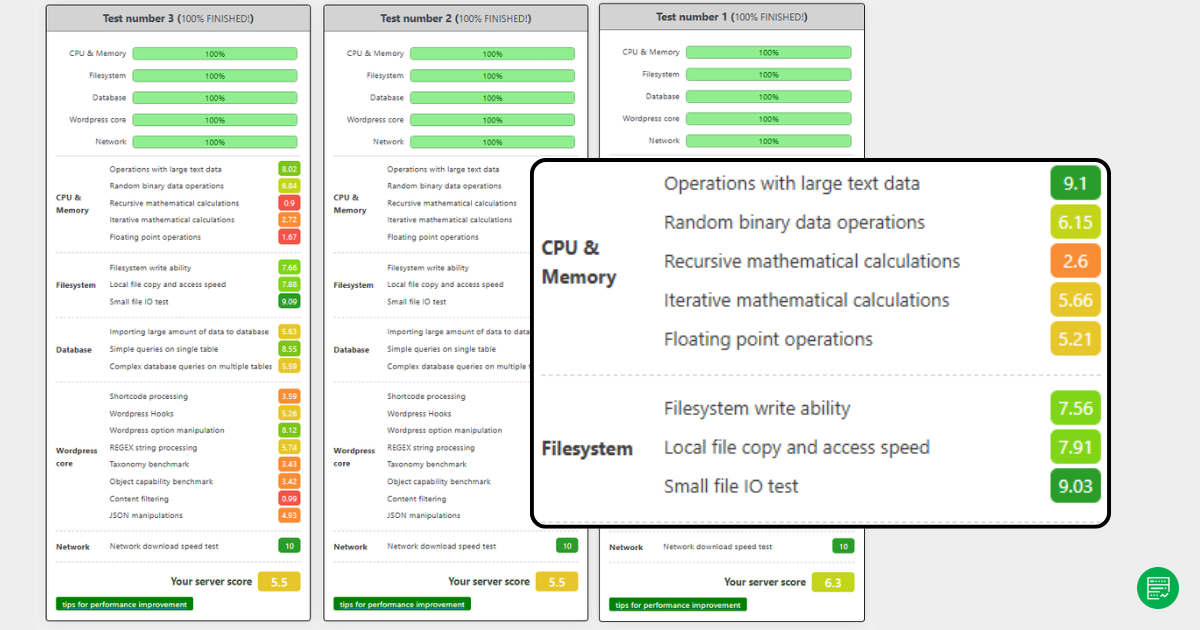
The 20i Autoscale environment returned a server score of 6.3 out of 10, with notably strong results in file operations and single-table database queries. For example:
- Filesystem I/O scored between 7.5 and 9.0, showing fast read/write access.
- Simple database queries scored 8.47, while complex multi-table operations averaged 5.9, a respectable result for WooCommerce scenarios.
Performance in CPU-bound operations and WordPress core functions showed more variability. Recursive math, floating-point calculations, and object capability benchmarks scored in the mid-5 range, while string parsing and taxonomy handling trailed slightly lower. These dips can partly be attributed to the single-threaded nature of the testing tool, which doesn’t reflect how 20i’s platform leverages its multi-core Xeon CPUs under actual load.
In practice, this means that while the raw benchmark results provide a conservative view of backend speed, they underrepresent the platform’s real-world performance, especially in high-concurrency environments. For WooCommerce site owners and PHP developers, tasks like cart processing, product filtering, and session management should feel snappy – particularly when supported by caching.
This benchmark helps set performance expectations from a cold-start or uncached perspective, but it doesn’t fully capture how 20i Autoscale scales dynamically with traffic or concurrent PHP processes (which is where it shines).
Loader.io Load Testing (1,000 clients over 1 minute)
To evaluate how 20i Autoscale handles live traffic surges, we ran two stress tests using Loader.io. The target URLs were the WooCommerce homepage and the /shop page – two resource-intensive areas where performance typically dips during peak activity.
Homepage Test Results
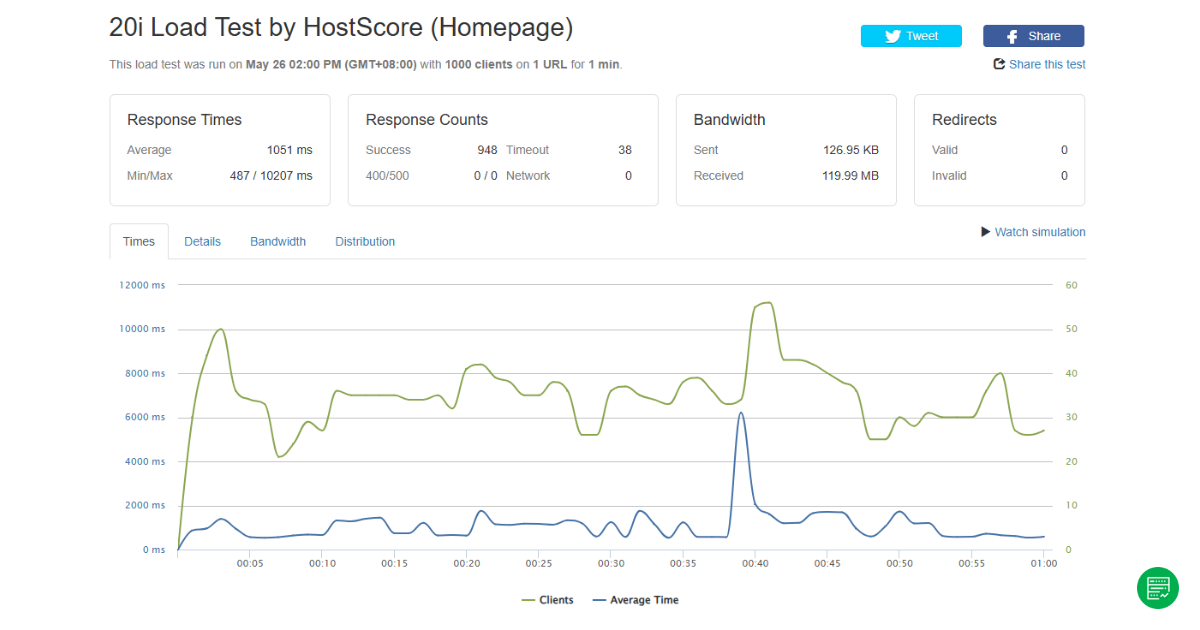
The homepage load test averaged a response time of 1,051 milliseconds, with a minimum of 487 ms and a peak latency spike of 10,207 ms. Out of 1,000 client requests, 948 completed successfully, while 38 timed out, resulting in a 96.2% success rate. No 400, 500, or network errors were reported.
Despite some timeouts and spikes, the server remained stable, and the majority of requests were fulfilled without error. These results suggest that while the platform does stretch under load, it retains core stability even when stressed.
Shop Page Test Result

The /shop page test returned a slightly higher average response time of 1,080 milliseconds, with 975 successful requests and 19 timeouts. The latency graph showed multiple small spikes but remained below 3 seconds for most of the run. Again, the test completed with zero 400/500 errors.
From a user experience perspective, this performance level is acceptable for most WooCommerce scenarios – particularly during promotional surges or high-cart traffic periods. The infrastructure scaled without crashing and delivered consistent uptime.
Who Is 20i Autoscale Best For?
20i Autoscale is ideal for users who need responsive performance during traffic surges but prefer not to manage server infrastructure. With real-time scaling, site isolation via containers, and built-in performance tools, the platform suits several user types.
1. WooCommerce Stores That Can’t Afford Downtime
20i Autoscale is a strong fit for online stores that experience unpredictable traffic spikes – whether from seasonal sales, influencer campaigns, or marketing blasts. During our stress tests simulating 1,000 concurrent visitors, the server stayed stable. We observed only minor timeouts and no 500 errors. Even when response times edged past one second, uptime remained solid.
This kind of stability matters for WooCommerce sites. A resilient infrastructure means your checkout page won’t crash just as sales peak.
2. Developers Running Custom PHP Applications
20i isn’t just for WordPress. If you’re building SaaS tools, membership platforms, or custom apps using frameworks like Laravel, CraftCMS, or Magento, Autoscale offers solid backend support with PHP versions from 5.3 up to 8.4.
Each site runs in its own container, shielding it from noisy neighbors and improving reliability. You get the flexibility of modern deployment with the convenience of a dashboard that handles PHP configuration, caching, and other dev essentials.
3. Small Teams or Agencies Managing Multiple Sites
Autoscale supports hosting for up to 50 websites under one account – useful for developers, freelancers, and agencies managing multiple clients.
Because the infrastructure scales automatically, you don’t have to worry about hitting CPU or memory limits during traffic surges. Daily backups, staging environments, and integrated caching reduce the need for constant oversight, letting your team focus on building rather than maintaining.
4. Site Owners Without a Technical Background
If you’re running a WooCommerce store, LMS, or blog without sysadmin skills, 20i takes care of the heavy lifting. From CDN integration to edge caching and performance tuning, everything is built into the My20i dashboard.
You won’t get root access – and that’s by-design. The platform is tailored for users who want reliable, fast hosting without touching the backend.
Our Final Verdict
20i Autoscale Hosting is a high-performance option for users who want scalable infrastructure without needing to manage it themselves. It combines intelligent resource scaling with built-in caching, CDN delivery, and support for modern PHP stacks, making it a strong choice for demanding websites.
In our load tests, the hosting environment handled 1,000 simultaneous users with minimal disruption. The homepage and shop page both maintained success rates above 95 percent. While average response times hovered around one second, the platform remained stable and avoided server-side errors. For eCommerce operators or web applications sensitive to load times, this level of responsiveness is a real advantage.
Our WPBenchmark score came in at 6.3 out of 10, with strong results in file input and output and database operations. While CPU-bound and WordPress-specific logic returned more mixed scores, the testing tool’s single-threaded design does not reflect how 20i’s infrastructure behaves under real-world concurrency. In practice, 20i’s autoscaling and multi-core setup will handle high traffic loads better than raw benchmarks suggest.
Is 20i Autoscale Hosting Plan Right for You?
This hosting plan is best suited for WooCommerce stores, PHP-based web applications, and site owners who need hands-off performance tuning. With support for PHP versions up to 8.4 and container-based isolation per site, it provides flexibility and speed in a fully managed environment.
It is not intended for small blogs, static sites, or projects where cost is the primary concern. But for businesses where uptime and page speed impact revenue, 20i Autoscale offers strong technical value in a simple monthly package.
Pros and Cons
| Pros | Cons |
|---|---|
| Real-time autoscaling for CPU, RAM, and PHP workers | No visibility into real-time server usage |
| Stable WooCommerce performance under stress | No white-label/agency tools (available in Reseller plan instead) |
| Excellent WooCommerce stability under heavy load | Pricing may be high for smaller / low-traffic sites |
| CDN & Global Edge Caching preconfigured | No support for non-PHP stacks (e.g., Node.js) |
| Fast and helpful live chat support | |
| No manual resource tuning required |

