
Imagine you run an online store during the busy year-end shopping season. Suddenly, your website crashes. Customers can’t access your products or make purchases, and they start leaving. Your sales drop, and your brand’s reputation suffers.
This is where uptime guarantees from web hosting companies become crucial. These guarantees ensure your website runs smoothly without interruptions.
In this article, we will explain what web hosting uptime guarantees are, why they matter, and how they impact your website and web hosting choices. Let’s get started!
What Does an Uptime Guarantee Mean?
An “uptime guarantee” is a commitment made by your web hosting provider to ensure that your website will be operational and accessible for a certain percentage of the time. For example, Hostinger offers a “99.9% uptime guarantee” – which means your website is guaranteed to be functional 99.9% of the time.
Uptime guarantee is critical for those looking for a reliable web hosting service. This – basically refers to every web hosting shopper – you wouldn’t want your web host to be unreliable, right?

Four Levels of Uptime Guarantees
Uptime guarantees exist in different levels, typically ranging from 99% to 99.999%. Each level offers a different degree of reliability for your hosting server and networks.
99% Uptime Guarantee
A 99% uptime guarantee means your website is assured to be up and functioning 99% of the time. However, this translates to approximately 3.65 days of potential downtime in a year.
99.9% Uptime Guarantee
Also known as the “three nines”, a 99.9% uptime guarantee is usually considered the industry standard. A 99.9% uptime guarantee ensures your site will be up for 99.9% of the time. This may sound only slightly better than 99% but this small difference in percentage means your site’s potential downtime is reduced to around 8,76 hours a year.
99.99% Uptime Guarantee
A 99.99% uptime guarantee further narrows the downtime to just about 52.56 minutes per year.
99.999% Uptime Guarantee
A 99.999% uptime guarantee offers near-perfect reliability with a meager 5.26 minutes of downtime per year.
Table: Downtime vs Uptime (What Those Nines Mean)
| Uptime Guarantee | Short Description | Potential Downtime |
|---|---|---|
| 99% | Your website is up and running 99% of the time. | ~3.65 days/year |
| 99.9% | Known as the “three nines,” this is the industry standard. | ~8.76 hours/year |
| 99.99% | Even more reliable, reducing downtime significantly. | ~52.56 minutes/year |
| 99.999% | Near-perfect uptime, ensuring minimal disruption. | ~5.26 minutes/year |
The small differences in uptime percentages have a big impact. For example, a 99% uptime means your website could be down for several days a year, while 99.9% uptime means only a few hours of downtime. This small increase makes your website much more reliable and improves the user experience.
How Do Hosting Companies Achieve 99.9% or Higher Uptime?
Web hosting companies use several methods to achieve high uptime guarantees. One way is by using high-quality, reliable hardware. Just like a well-made car is less likely to break down – a good server is less likely to crash.
Another method is through redundancy. Having well-thought-out backup systems ready to take over if the main ones fail helps keep their service running smoothly. It’s like having a spare tire in your car – if you get a flat, you can quickly switch to the spare and keep going.
What’s Included in a Hosting SLA?
Hosting companies have quite a lot of work to do (read: extra business cost) to keep their uptime guarantee. How do you know they will honor their word?
Enter Service Level Agreement (SLA).
The SLA is an agreement between the user and the web host. It spells out exactly what they promise to deliver – including that all-important uptime guarantee. Something like “We pledge to keep your website live and functional at least 99.9% of the time”.
But that’s not all. Words are cheap. An SLA is only meaningful if it also outlines what the company will do should it fails to deliver. Usually, you’ll get some form of compensation, like credit towards your hosting fees or cash back.
When choosing a web host, make sure to read the SLA carefully. It’s important to understand what the web host promises and what you’ll get if they don’t deliver.
Limitations and Misconceptions about Uptime Guarantees
99.9% Uptime Sounds Great, But What Does It Actually Mean?
As mentioned above – the percentages in uptime guarantees can be misleading. A 99.9% uptime might sound impressive, but it actually allows for about 8.76 hours of downtime per year. That’s nearly a full business day your website could be offline, which might not be acceptable if you’re running a high-traffic online store that requires 24/7 availability.
How Do Hosts Calculate Uptime?
Secondly, the means of calculating uptime varies among web hosting services. Some may not count certain types of downtime, such as maintenance windows, network outages, or issues caused by third-party apps or services. It’s crucial to understand what exactly is included in the uptime calculation before making a decision. Siteground hosting, for instance, runs a long list of events that do not count as “downtime” in their Terms of Service (see screenshot below).

Why Uptime Refunds Rarely Cover Real Losses
Thirdly, compensation for downtime often falls short.
Many web hosting companies offer service credits (ie. get one month free if we go below 99.9% uptime) if they fail to meet their uptime guarantee. These compensations typically do not fully compensate for your loss. Losses in business revenue, damage to your company/website reputation, drops in search engine rankings, as well as customer inconvenience – all these issues caused by the website’s unavailability are not compensated.
When an Uptime Guarantee Isn’t Backed by Real Infrastructure
Word is cheap – an uptime guarantee is only as good as the hosting company’s infrastructure and support. A company can promise near-perfect uptime, but if they don’t have reliable servers, redundant systems, and a responsive customer service team, that guarantee might not mean much in practice.
So, while uptime guarantees are an important factor to consider when choosing a web host, it’s equally critical to look beyond the numbers.
This leads us to the next section of our article…
What Should You Look for in a Host’s Uptime Guarantee?
When you’re choosing a web host, one of the first things you’ll want to look at is their uptime guarantee. This is often shown as a percentage, like 99.9% – it’s how often they promise your site will be up and running. A higher percentage is better because it means less downtime.
However, don’t just take their word for it.
Ask if they have data to back up their claim. Some hosting providers can provide reports to show you their past uptime performance. Look at this data over a few months to see if their uptime is consistently high.

For an unbiased opinion on a web host’s uptime, read hosting user reviews from trustworthy sources.
Once you have signed up for a new web host, consider tracking your site using third-party uptime monitoring tools, such as UptimeRobot and Pingdom. These services regularly check if your site is up and running and can give you a more accurate picture of a web host’s uptime.
How Important Is Uptime Compared to Other Hosting Factors?
Uptime is one of the most critical hosting metrics. Your site can’t convert, rank, or engage visitors if it’s offline. But it’s not the only factor that matters.
But uptime isn’t the only metric to watch. Performance, customer support, security features, and pricing all play a role in long-term hosting satisfaction. A web host might offer great uptime on paper, but still fall short if their support is slow or their servers underperform under traffic spikes.
That’s why it’s important not only to compare uptime guarantees, but to actively track them once your site is live.
How to Monitor Your Website’s Uptime?
Even if your web host advertises a 99.9% uptime guarantee, it’s smart to verify that claim yourself. Fortunately, uptime monitoring is easy and often free.
Here are two main ways to track uptime:
1. Use Free Uptime Monitoring Tools

Tools like UptimeRobot, StatusCake, and Better Uptime ping your site at regular intervals (e.g. every 5 minutes) and alert you if it goes down. These tools often provide:
- Uptime percentages over 24 hours, 7 days, or 30 days
- Downtime logs with timestamps
- Email or SMS alerts
2. Use Your Hosting Dashboard (If Available)
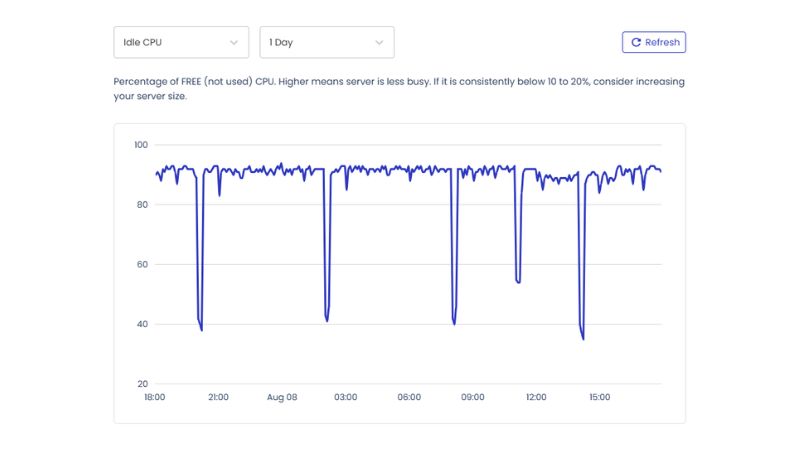
Some hosts include built-in monitoring inside their dashboards. For example:
- Cloudways provides real-time server metrics and downtime alerts.
- Kinsta includes uptime checks as part of its platform-level monitoring.
Make sure to check whether your host offers this natively or whether you’ll need to set it up yourself.
Why It Matters?
Tracking uptime lets you:
- Hold your host accountable to their SLA
- Catch hidden issues (e.g. server reboots, intermittent outages)
- Know when it’s time to switch providers
Over time, having independent uptime data gives you leverage, especially if you’re promised compensation for extended downtime but need proof.
Uptime Monitoring Tools Compared
| Tool | Free Tier Included | Check Interval | Alerts | Key Features |
|---|---|---|---|---|
| UptimeRobot | Yes (50 monitors) | 5 minutes | Email, Slack | Simple UI, basic analytics |
| StatusCake | Yes (1 monitor) | 5 minutes | Email, Discord | Page speed + SSL monitoring included |
| Better Uptime | Yes (10 monitors) | 3 minutes | Email, SMS | Incident timelines, on-call schedules |
Final Thoughts
An uptime guarantee is only as strong as your ability to verify it. With free tools and smart monitoring, you can keep your hosting provider honest and ensure your visitors always reach your site when it matters.
As you compare hosting plans, prioritize uptime alongside speed, support, and scalability. A reliable web host won’t just promise 99.9% – they’ll help you prove it.

