

On the surface, GoDaddy and Bluehost seem like solid picks for beginners: Big names, low entry prices, and WordPress-friendly marketing. But look closer, and you’ll notice the cracks.
GoDaddy leans heavily on its domain business and bombards users with upsells for essentials like backups, malware scanning, and domain privacy — things many other hosts include for free. Bluehost, meanwhile, takes a similar approach under the Newfold Digital umbrella (yes, the same folks behind HostGator), sneaking in paid add-ons and inflated renewal prices during checkout.
While the two differ in ownership and user interface, they share a common theme: upselling over value, average-at-best performance, and support that’s often more frustrating than helpful. If you’re just starting out, prepare for a rocky ride once the honeymoon pricing ends.
Compare GoDaddy & BlueHost Hosting
BlueHost

Our Take
BlueHost is usable, polished, and beginner-friendly, but we generally do not recommend it for most HostScore readers. Its dashboard and WordPress setup are easy, but our testing and checkout review found enough speed, renewal, and upsell concerns to make us cautious.
GoDaddy
Our Take
GoDaddy may be one of the biggest names in web hosting, but size doesn’t equal quality. While the brand is widely recognized, our experience shows that its hosting services are overpriced, limited in features, and packed with upsells. Even for domain registration — once GoDaddy’s core strength — better value and transparency can be found elsewhere at providers. We do not recommend GoDaddy for web hosting or domain services.
If You Seek Cheap Hosting…
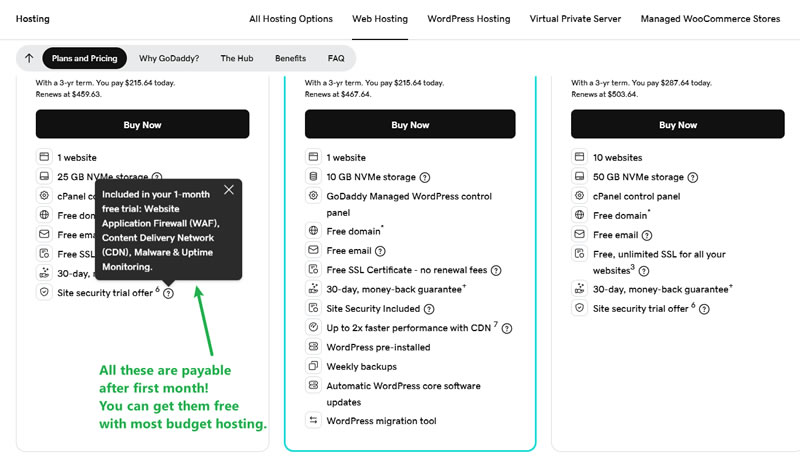
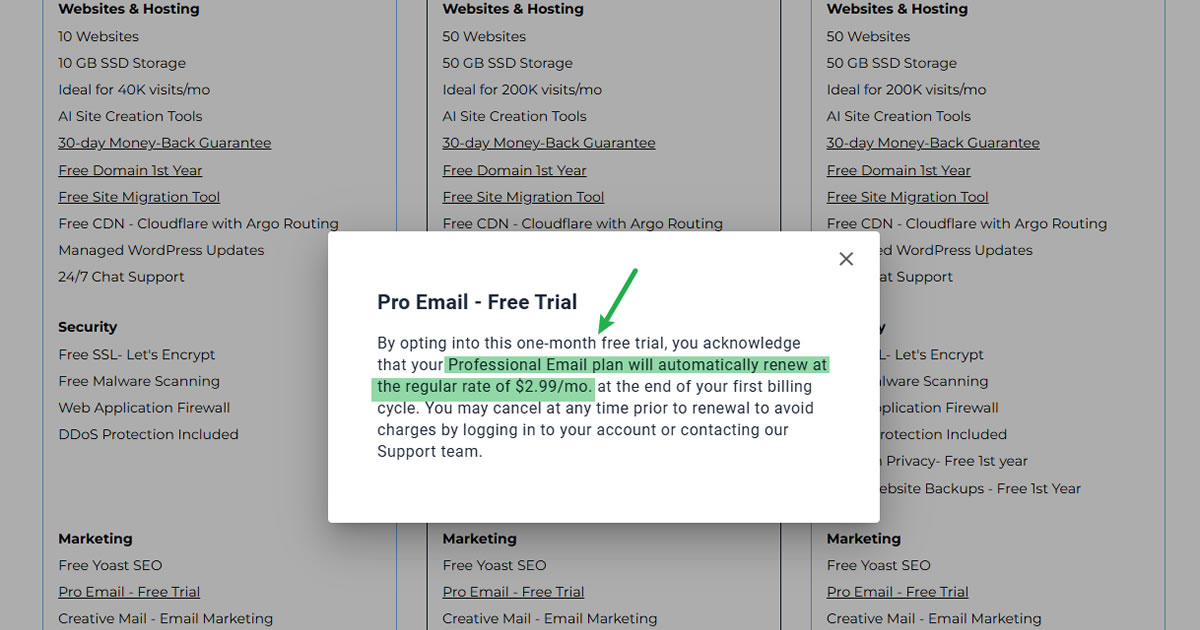
When it comes to budget hosting, neither GoDaddy nor Bluehost provides good long-term value in our book.
Both companies lure users in with intro rates around $2.95 – $5.99/month, but those prices jump significantly at renewal. Essential features like backups, malware protection, and performance boosts are either paywalled or only free for a short trial period.
If you truly want cheap, reliable hosting, providers like Hostinger, HostArmada, or NameCheap offer cleaner pricing, better performance, and fewer surprise charges.
| Hosting Type | BlueHost | GoDaddy |
|---|---|---|
| Shared Hosting | $3.99 - 14.99/mo | $5.99 - 54.99/mo |
| VPS Hosting | $4.69 - 25.99/mo | $8.99 - 199.99/mo |
| Dedicated Hosting | $144.19 - 315.19/mo | $ - /mo |
| Cloud Hosting | $65.00 - 230.00/mo | $ - /mo |
| Managed WP Hosting | $3.99 - 14.99/mo | $5.99 - 12.99/mo |
| Windows Hosting | $ - /mo | $ - /mo |
| Coupon | - | - |
| Coupon Details | - | - |
For Small Business Hosting: Both Are Below Average

Neither GoDaddy nor Bluehost is ideal for small businesses.
Bluehost has better WordPress integration, and its dashboard is slightly easier to navigate for beginners. But support is hit-or-miss, and server speed isn’t impressive. GoDaddy has global reach and offers a range of business add-ons — but customer service is slow, upsells are relentless, and performance is average for the price.
There are better alternatives for small business users who need consistent uptime, straightforward pricing, and actual value.
For WordPress Users: Bluehost is Slightly Better, But Still Not Great

Bluehost is officially recommended by WordPress.org — but don’t let that badge fool you.
It offers basic WordPress features like one-click installs and custom dashboards, but lacks deeper optimization or performance tuning.
GoDaddy’s WordPress plans are even more restrictive. Core features like backups, SSL, and malware scans are free only for the first month — then become costly add-ons.
If you’re a serious WordPress user, you’re better off with managed WordPress hosts for better speed, tools, and WordPress-expert support.
For Advanced Users: Neither Host Offers Enough Control

Both GoDaddy and Bluehost fall short for advanced users.
You won’t get root access, high-performance VPS setups, or serious dev tools unless you upgrade significantly — and even then, the control is limited compared to other providers. Their platforms are built for mass-market simplicity, not customization.
If you need staging environments, Git, custom stacks, or high-availability options, look toward a developer-friendly host like Cloudways, ScalaHosting, or Hostman.
Verdict: Pick Something Better Than Both
It is not about choosing a winner when we compare BlueHost to GoDaddy — it’s about avoiding two bad options. GoDaddy and Bluehost have global name recognition and slick marketing, but behind the curtain, it’s upsells, slow servers, and subpar support. If you’re serious about your website, choose a host that prioritizes performance and honesty — not just advertising.
More About SiteGround & GoDaddy
BlueHost
Bluehost is a long-running web hosting and domain services company founded by Matt Heaton and Danny Ashworth in 2003 and now owned by Newfold Digital, LLC. The company sells shared hosting, managed WordPress hosting, VPS, cloud hosting, dedicated hosting, domains, email, security tools, and website services. It is one of the better-known WordPress hosting brands, partly because of its long relationship with WordPress.org, but today it operates as part of a much larger hosting group rather than as an independent boutique provider.
BlueHost Pros
- Easy account dashboard for beginners
- WordPress setup is fast and automatic
- cPanel is still available when needed
- Free SSL was auto-installed in our test account
- NVMe storage, free CDN, and WordPress tools are included in all shared plans
BlueHost Cons
- Speed performance slower than expected
- Renewal prices are much higher
- Email setup is misleading and can push users toward paid Pro Email
- Heavy (and some misleading) upsells during checkout and inside the portal
- Better value exists elsewhere for many use cases
GoDaddy

Founded in 1997 by entrepreneur Bob Parsons, GoDaddy emerged as a powerhouse in web hosting and domain registration. Originally known as “Jomax Technologies,” it swiftly rebranded to “GoDaddy” in 1999. GoDaddy’s rise to prominence was fueled by bold marketing campaigns, including memorable Super Bowl ads, solidifying its position as one of the world’s largest domain registrars. Under the leadership of Aman Bhutani, who assumed the CEO role in 2011, the company embarked on global expansion and diversified its product offerings.
In 2015, GoDaddy made history with its IPO debut on the New York Stock Exchange, signaling a new chapter in its journey. Today, GoDaddy continues its trajectory of international expansion, strategic acquisitions, and unwavering support for small businesses, cementing its status as an industry leader.
GoDaddy Pros
- Brand recognition & wide product suite
- User-friendly dashboard (cPanel)
- Global phone support – Local support lines in many countries
GoDaddy Cons
- Aggressive upselling – Many essential features are paywalled or trial-based
- Overpriced domain renewals – .com renewals up to $45/year with $19.99/year WHOIS privacy
- Expensive entry-level plans
- Slow, layered customer support
- Poor value for beginners and small businesses

