

Choosing the right database hosting provider directly impacts your application’s performance, reliability, and scalability. Whether you run a small CMS website or power a high-traffic SaaS backend, your database host determines how quickly queries execute, how securely data stores, and how efficiently your stack expands with demand.
Based on performance, use-case compatibility, and pricing flexibility, Atlantic.Net ranks as our top recommendation for overall database hosting. It delivers secure, compliance-ready infrastructure that supports mission-critical data environments.
Cloudways serves as a strong alternative for developers who need flexible scaling, support for MySQL, MariaDB, and PostgreSQL, and seek deeper configuration control without maintaining raw cloud infrastructure.
Refer to the comparison table below to see how each provider compares in terms of database support, storage configuration, management level, and pricing structure.
| Hosting Provider | Best For | Database Support | Infra & Storage | Service Type | Backups & Redundancy |
|---|---|---|---|---|---|
| Atlantic.Net | Healthcare, finance, compliance-ready apps | MySQL, MariaDB, PostgreSQL (custom setups on request) | Dedicated VMs, NVMe SSD, optional GPU | Managed or unmanaged | Encrypted backups, HIPAA-ready |
| Cloudways | Dev teams, WordPress + app DB stacks | MySQL, MariaDB, Redis | DO/AWS/GCP + Redis, NGINX, staging env | Fully managed | Snapshot backups, staging sync |
| Kinsta | SaaS, headless CMS, external DB APIs | MySQL, PostgreSQL (external DB service) | GCP, container-based, usage billing | Fully managed | Auto backups, DB region config |
| Hosting.com | Legacy app hosting, custom DB clusters | MySQL, MS SQL, Oracle (via dedicated servers) | Bare metal, hybrid cloud | Unmanaged / Semi-managed | Varies by custom setup |
| Hostinger | Budget shared sites with DB needs | MySQL | hPanel + SSD storage | Shared or VPS | Weekly auto backups |
Note: While our HostScore ratings provide a general overview of host performance, there are other factors you should consider for your specific needs. Our top database hosting selections in this article address this by offering tailored suggestions for different requirements.
1. Atlantic.Net
https://www.atlantic.net/cloud-platform/
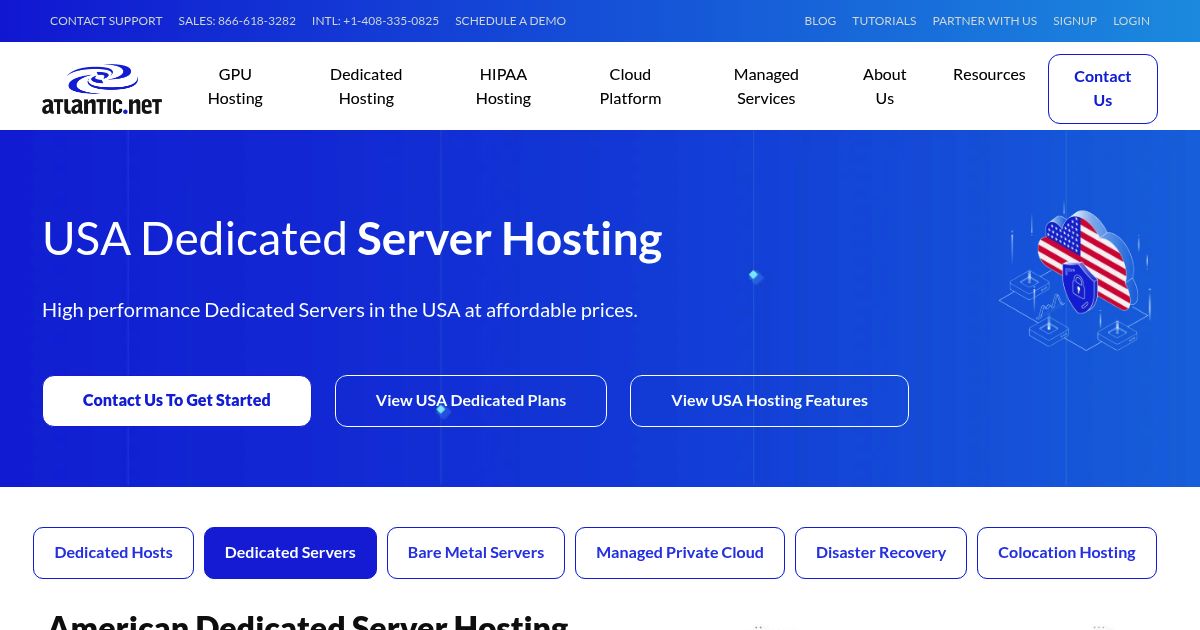
Atlantic.Net provides HIPAA-ready cloud infrastructure with optional managed services tailored to industries that require high data security. Its VPS and dedicated environments support custom database configurations and allow for encryption, role-based access, and scalable performance for applications in healthcare, finance, and government.
How Much Do Atlantic.Net Plans Cost?
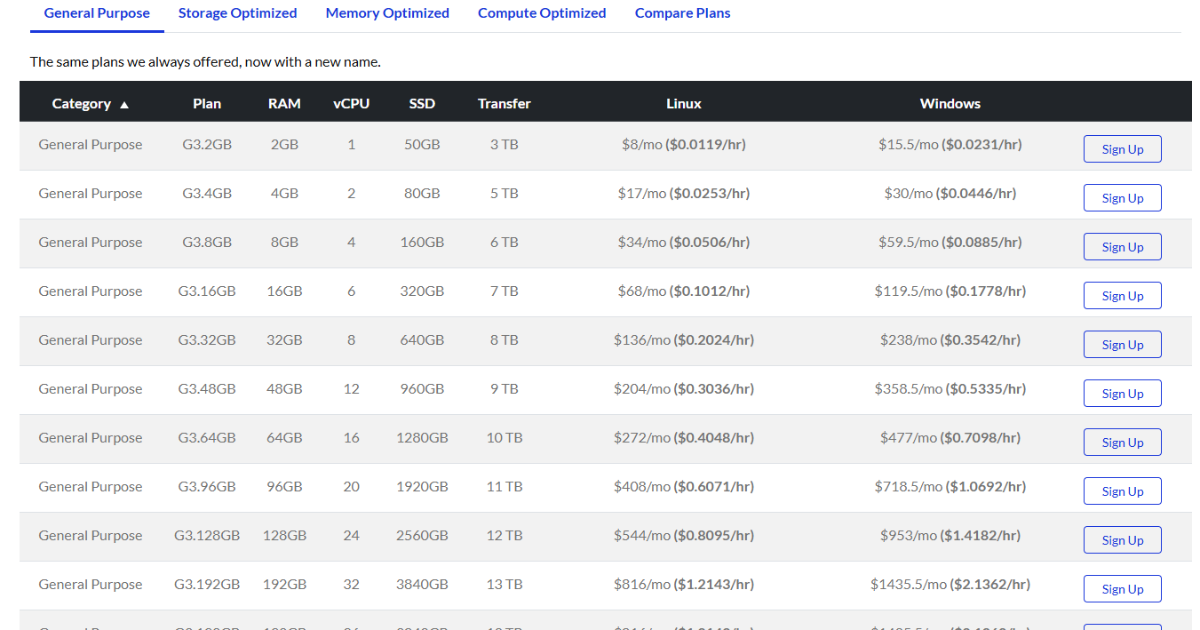
Atlantic.Net’s General Cloud plans start at $15.50/month for 1 vCPU, 2GB RAM, and 50GB SSD. Managed database setups, including backups and compliance add-ons, are available but require custom pricing. Dedicated servers and GPU-powered options are billed separately with monthly and hourly flexibility.
Database Tools and Use Cases (HIPAA, Financial, Healthcare)
Atlantic.Net supports MySQL, PostgreSQL, and other engines through custom VM deployments. Managed clients get automated backups, encrypted storage, and firewall control, while developers on self-managed plans have full OS-level control. Its compliance certifications make it suitable for EHR apps, financial platforms, or regulated systems that require auditable hosting.
Atlantic.Net Overall Pros & Cons
Atlantic.Net Pros
- Flat monthly pricing with no renewal gimmicks.
- Supports Linux and Windows operating systems.
- HIPAA and SSAE 18 compliant U.S. data centers.
- Offers both managed and self-managed options.
- Live and always available phone support
Atlantic.Net Cons
- No data centers in Europe and Australia.
- Live chat technical support is not available.
2. Cloudways

https://www.cloudways.com/
Cloudways is a managed cloud hosting platform that supports MySQL and MariaDB across multiple IaaS providers, including Linode, AWS, and Google Cloud. It is ideal for developers who want high-performing databases with flexible scaling, easy staging, and zero sysadmin overhead.
How Much Do Cloudways Plans Cost?
Pricing starts at $14/month on DigitalOcean’s Basic plan with 1GB RAM and 1 vCPU. Higher-performance plans (e.g., DO Premium or AWS) start from around $28/month. All plans include managed support, backups, and database monitoring tools.
Database Features, Scaling, and Staging Tools
Cloudways includes built-in Redis object caching, staging environments, cloning, and Git deployment tools. Developers can optimize MySQL via PHP-FPM settings, scale resources vertically, and manage multiple applications per server — making it suitable for Laravel, WordPress, and API-first stacks with custom database usage.
Cloudways Overall Pros & Cons
Cloudways Pros
- Reliable server uptime and speed performance
- Good abstration over complex cloud server setups with integrated dashboard
- High scalability; Autonomous plan supports auto-scaling
- Easy server cloning, site staging, and website transfer
- Host unlimited websites and applications in one account
- 30% discount for first two months with coupon "HOSTSCORE"
Cloudways Cons
- Getting expensive - Prices increased steadily for the past few years
- Limited trial period
- Excellent technical support, but poor billing practices and support
3. Kinsta

https://www.kinsta.com/
Kinsta offers managed application and database hosting on Google Cloud Platform, supporting modern DevOps workflows and language flexibility. While best known for its WordPress hosting, Kinsta now supports standalone databases and headless deployments.
How Much Do Kinsta Plans Cost?
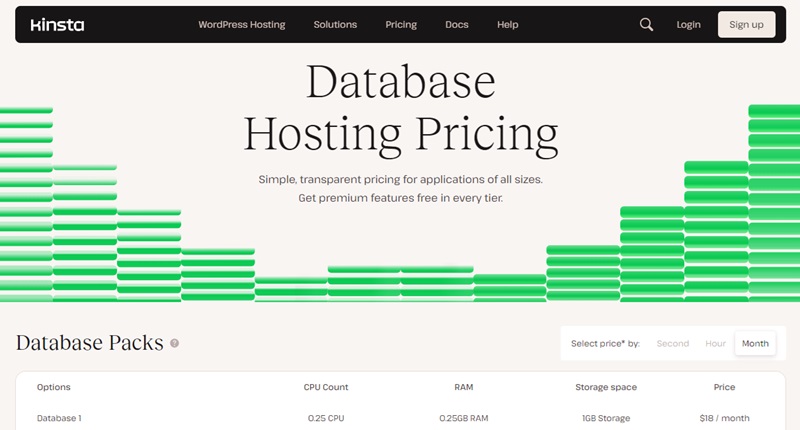
Application hosting starts at around $20/month on a usage-based billing model. Database hosting is offered as a separate service with pricing based on region, database type, and storage. PostgreSQL and MySQL are supported with hourly billing and autoscaling tiers.
Databases, CI/CD Automation, and DevOps Integrations
Kinsta allows developers to connect external databases to applications via REST or internal API, manage deployments with Git integration, and automate builds with Dockerfiles. The platform supports up to 19 programming languages and 4 database types, with one-click backups and granular access control via web UI or CLI.
Kinsta Overall Pros & Cons
Kinsta Pros
- Outstanding uptime and speed backed by Google Cloud’s premium tier network.
- 300+ CDN locations worldwide through Cloudflare Enterprise integration.
- Advanced firewall, DDoS protection, and built-in malware scanning.
- Specialized WordPress support in English, Portuguese, Spanish, Italian, French, German, Japanese, Danish, Dutch, and Swedish.
- Free site migration assistance handled by Kinsta’s support team.
- MyKinsta dashboard with detailed analytics, staging environments, and one-click tools.
- Free premium Cloudflare features, including HTTP/3, wildcard SSLs, and edge caching at no extra cost.
Kinsta Cons
- Pricing is expensive and less suitable for those managing multiple small sites.
- No built-in email hosting, requiring a separate provider.
- Certain WordPress plugins are restricted due to performance or security issues.
4. Hosting.com

https://www.hosting.com/
Hosting.com offers traditional VPS, hybrid cloud, and dedicated server plans that support database-heavy applications requiring consistent performance. It’s best suited for legacy systems or enterprises that require physical control over hardware.
How Much Do Hosting.com Plans Cost?
Hosting.com database hosting starts at $4.99/month, which includes database isolation with dedicated CPU and virtual memory. All plans include SSD storage and soft resource limits.
Pros and Limitations for DB Hosting at Scale
Hosting.com supports a wide range of database and database tools on their platform, including Adminer, Cassandra, Chive, CockroachDB, Couchdb, Derby, Hypertable, HBase, Hadoop, JasDB, MariaDB, MongoDB, MySQL, MyWebSQL, PostgreSQL, SQLite, and more. While the flexibility is great, you need to be aware that Hosting.com DB hosting plans are fully self-service. It’s best suited for sysadmin or experienced developers who know what they are doing.
Hosting.com Overall Pros & Cons
Web host not found.
5. Hostinger

https://www.hostinger.com/
Hostinger offers beginner-friendly shared and cloud hosting with MySQL support, fast SSD & NVMe SSD storage, and built-in caching. Its low-cost plans make it a strong option for small websites, basic applications, and users who need reliable database hosting without enterprise-level complexity.
How Much Do Hostinger Plans Cost?
Shared hosting starts at just $2.99/month, including MySQL databases, automatic backups, and a free domain on annual plans. For better performance, Hostinger’s Cloud Startup plan begins at around $9.99/month, offering isolated resources, dedicated IP, and priority support.
Database Tools, Scaling, and Dev Features
Hostinger includes phpMyAdmin, remote MySQL access, and automatic daily backups across most plans. Although it lacks support for NoSQL engines like MongoDB, its managed control panel and LiteSpeed-based stack help accelerate MySQL queries. Cloud plans support vertical scaling of RAM and CPU, which benefits heavier backend workloads or WordPress sites with large databases.
Hostinger Overall Pros & Cons
Hostinger Pros
- Affordable entry plan at $2.99/month for 3 websites, plus 15% off with HOSTSCORE15.
- Global network of data centers in Europe, Asia, North America, and South America
- Excellent AI ecosystem with AI Builder (new!), Hostinger Agent with memory, OpenClaw, Hermes, n8n, and Paperclip
- User-friendly hPanel with API and MCP access for AI-assisted hosting management
- Developer API and MCP integration - Hostinger Connector lets Claude, Cursor, Codex, and other MCP-compatible tools manage websites
- Multiple payment methods accepted, including crypto and digital wallets
Hostinger Cons
- The lowest price requires 48 months upfront and renews at $10.99/month
- Advanced Agent features and managed AI applications may require separate paid plans
- Hostinger AI Builder sites have limited portability compared with WordPress websites
- Hostinger does not support Windows hosting.
What Is Database Hosting and Why It’s Different from Normal Hosting?
What is Database Hosting?
Database hosting is a hosting service that allocates dedicated server resources for storing, managing, and retrieving data from structured or unstructured databases. It supports engines such as MySQL, PostgreSQL, MongoDB, Redis, and enterprise-grade systems like Oracle or time-series databases.
The hosting environment is optimized for query performance, data reliability, and secure access across applications that depend on dynamic, real-time information. Providers typically configure infrastructure to handle concurrent transactions, replicate data safely, and restore it quickly in case of failure.
How Does It Differ from Traditional Web Hosting?
Traditional web hosting primarily serves static content such as HTML, CSS, and media files. Database hosting, by contrast, prioritizes I/O performance and processes real-time read/write operations continuously.
It relies on fast storage (often NVMe SSDs), allocates higher CPU and RAM resources, and isolates the database layer from front-end workloads. This separation improves security, reduces contention, and stabilizes application response under heavy load.
Benefits of Using Specialized Database Hosting
Opting for dedicated or optimized database hosting improves site and app responsiveness, especially for dynamic workloads. Key benefits include:
- Faster query processing due to isolated resources and tuned configurations
- Improved reliability and uptime, especially for mission-critical apps
- Better scalability, enabling you to handle traffic spikes or larger datasets
- Advanced tools such as real-time backups, query monitoring, and database replication
- Security and compliance options like encryption at rest, SSL connections, and access controls
Types, Pricing Models, and Database Options
What Are the Different Types of Database Hosting?
There are various types of database hosting, each catering to different needs based on the scale, control, and resources required. Below is a table summarizing the key characteristics of each type:
| Hosting Type | Description | Best For | Management Level |
|---|---|---|---|
| Shared Hosting | Hosts the database and website on the same server with other users. Limited resources and security. | Small websites, blogs, basic CMS | Managed (limited control) |
| VPS Hosting | Allocates virtualized server resources for isolated database hosting. | Growing websites, custom apps | Self-managed or semi-managed |
| Dedicated Hosting | Full physical server dedicated to your workloads. Offers maximum performance and control. | Enterprises, large-scale DB clusters | Fully self-managed or managed |
| Managed Hosting | Provider sets up, secures, scales, and maintains your database infrastructure. | Agencies, dev teams, SaaS platforms | Fully managed |
Common Pricing Models: Fixed, Pay-as-You-Go, Custom Plans
Pricing for database hosting varies by provider and infrastructure type:
- Fixed monthly plans are common in shared, VPS, and entry-level managed hosting. You pay a flat fee for a pre-allocated resource package.
- Pay-as-you-go billing is used by cloud-native providers like Kinsta or AWS RDS. You’re charged hourly or per resource consumed (e.g., vCPU hours, storage GB).
- Custom quote-based pricing applies to dedicated or compliance-heavy setups, where specific configurations (e.g., HIPAA, database clustering) are needed.
Examples:
Which Types of Databases Are Commonly Supported?

Hosting providers typically support three main categories of databases. The right option depends on your application’s data model and performance requirements.
Relational (MySQL, MariaDB, PostgreSQL)
Relational databases dominate the hosting market. They store data in structured tables, use SQL for queries, and support relationships between records. MySQL is the most common, PostgreSQL suits enterprise and analytics-heavy workloads, and MariaDB serves as a MySQL-compatible alternative with performance and licensing advantages.
NoSQL (MongoDB, Redis, Cassandra)
NoSQL engines are widely available on cloud and managed hosting platforms. MongoDB stores documents, Redis powers caching and real-time apps, and Cassandra supports distributed, high-throughput workloads. These options fit projects with flexible schemas or rapid scaling needs.
Specialized (Oracle, Graph, Time Series)
Specialized databases such as Oracle, Neo4j (graph), and InfluxDB (time series) appear on dedicated or container-based hosting. They are used for advanced workloads like financial systems, recommendation engines, IoT telemetry, and compliance-driven environments.
How to Choose the Right Host for Your Database?
Choosing the right database host depends on how your application works, how much data you store, and how much control or automation you need. Here are the key factors to evaluate before committing to a provider:
- Database Type and Compatibility The first consideration is whether the hosting provider supports the specific type of database (e.g., MySQL, PostgreSQL, MongoDB) you intend to use. Some platforms limit you to specific versions or don’t support NoSQL databases. For instance, Hostinger supports popular databases like MySQL and MariaDB but does not support NoSQL databases.
- Performance & Scalability Performance is crucial for ensuring that your database can handle high traffic and complex queries without lag. Performance is crucial for ensuring that your database can handle high traffic and complex queries without lag.
- Managed vs Unmanaged Service Levels If you don’t want to configure or maintain your own database, choose a provider that offers backups, monitoring, and patch management. Unmanaged hosts (like those offered by Hosting.com) offer more control but require technical know-how.
- Security & Compliances (HIPAA, PCI) Evaluate whether the host supports SSL connections, encryption at rest, and role-based access control. For regulated industries, check for HIPAA, PCI DSS, or SOC 2 compliance.
- Backup & Restore Confirm that automatic backups are included and whether you can restore to a specific point in time. Some hosts also offer geo-redundancy for disaster recovery.
- Pricing Flexibility Decide whether you need predictable monthly billing (e.g., fixed plans like Kinsta and Hostinger) or variable pricing for burstable workloads (e.g., hourly billing like Atlantic.Net).
- Support Quality and Technical Documentation Look for responsive support channels (chat, ticket, phone) and detailed developer documentation – especially if you plan to run complex deployments or migrations.
Which Database Hosting is Right for You?
The best database hosting provider depends on what you’re building and how much infrastructure responsibility you want to handle. Some users need fast and affordable MySQL for a content site, while others require secure, scalable backends for production applications.
For Compliance-Heavy or Sensitive Data Workloads
Atlantic.Net stands out for HIPAA-compliant infrastructure, encrypted backups, and customizable managed environments. It’s well-suited for financial, healthcare, or government apps that demand audit trails and strict access control.
For Developers & Agile Projects
If you’re building custom apps, APIs, or CMS-heavy sites, Cloudways offers a balance of flexibility and managed convenience. You get control over MySQL/MariaDB configurations, integrated Redis support, and easy scaling across multiple cloud providers.
For Budget-Conscious Projects
Hostinger is best if you need reliable MySQL hosting at minimal cost. While it doesn’t support NoSQL or external DBs, it covers the essentials for basic websites, blogs, or early-stage apps.
For Startups & Modern SaaS Teams
Kinsta is ideal for CI/CD workflows, containerized apps, and teams that need external database access without worrying about scaling, backups, or DevOps. Its usage-based model and Git/Docker support make it developer-friendly.
Wrapping Up
Choosing the right database hosting provider is about more than just pricing. Whether you’re running a simple MySQL site or managing high-demand workloads, you need ensure that your data performs reliably, scales smoothly, and stays secure. The database hosting services we’ve covered above offer solid options for a range of use cases. Choose wisely and good luck!
Still unsure which host fits your needs? Check out our full hosting reviews to compare real-world performance data, plan details, and user experiences across dozens of top providers.

