The best VPS hosting providers are ScalaHosting, Hostinger, and HostPapa. ScalaHosting is our best overall choice for managed VPS hosting, Hostinger offers the strongest value for self-managed servers, and HostPapa provides affordable managed and unmanaged options.
When choosing VPS hosting, compare resource allocation, storage technology, server management, scalability, security, support, and total renewal cost. Also consider the available operating systems, data center locations, backup policies, and uptime SLA.
ScalaHosting ranks first because it combines strong performance in our tests with full server management, NVMe storage, automatic offsite backups, SPanel, and SShield. Users can scale their existing VPS or move to managed AWS infrastructure while continuing to manage their sites through SPanel.
Hostinger is the better value for users who can manage their own server. Its KVM plans include full root access, NVMe storage, weekly backups, developer tools, and integrated AI features. HostPapa is a flexible alternative for users who want to start with an inexpensive unmanaged VPS or pay more for a fully managed environment.
Best VPS Hosting Providers Compared
| VPS Provider | Best For | Management | Entry Pricing | Why It Stands Out |
|---|---|---|---|---|
| ScalaHosting | Best overall and managed VPS | Managed and unmanaged | From $29.95/mo for managed VPS; renews at $54.95/mo | SPanel, SShield, offsite backups, strong tested performance, and an upgrade path to AWS |
| Hostinger | Affordable self-managed VPS | Unmanaged | From $6.49/mo; renews at $11.99/mo | KVM virtualization, NVMe storage, full root access, weekly backups, API access, and AI tools |
| HostPapa | Low-cost managed or unmanaged VPS | Managed and unmanaged | From $2.95/mo; renews at $2.95/mo | Low entry price, flexible management levels, dedicated resources, and NVMe storage |
| Atlantic.Net | Developers, regulated workloads, and AI projects | Self-managed with managed services available | $10/mo on demand; from $8/mo with a three-year Linux term | Postpaid cloud billing, Windows and Linux options, compliance-focused infrastructure, and a path to GPU servers |
| One.com | European projects and flexible monthly billing | Managed and unmanaged | Regional pricing; billed month to month | Linux and Windows support, NVMe storage, unlimited traffic, and no long-term contract |
| Verpex | Affordable Windows VPS hosting | Managed and unmanaged | From $10.00, renews at 19.99 | Included Windows licensing on managed plans, Plesk, global locations, and a low entry cost |
| InMotion Hosting | Growing businesses that need managed support | Managed | From $10.99, renews at 26.99 | NVMe storage, redundant infrastructure, dedicated IPs, migration assistance, and server security |
| LiquidWeb | Flexible cloud VPS configurations | Self-managed or fully managed | From $20.00/mo; selected plans receive short introductory discounts | Linux and Windows options, hourly configurations, fast scaling, and 24/7 support |
| RoseHosting | Fully managed Linux VPS with stable pricing | Fully managed | From $39.59/mo if paid yearly; higher price if month-to-month billing | Human-managed support, PCIe 4.0 NVMe storage, weekly offsite backups, and no renewal increase |
ScalaHosting

ScalaHosting is a Dallas-based hosting provider founded in 2007. The company offers shared hosting, cloud VPS, email hosting, reseller hosting, and managed infrastructure services, but its strongest value today sits in VPS-based hosting.
ScalaHosting offers both managed and unmanaged VPS hosting for Linux and Windows environments. The company refers to its platform as “Cloud VPS”, but the architecture uses KVM virtualization with dedicated CPU and RAM resources. Users can also upgrade to AWS infrastructure while continuing to manage servers through ScalaHosting’s management stack.
A key differentiator is SPanel, ScalaHosting’s proprietary control panel built as a cPanel alternative. It integrates directly with VPS deployments and includes automated backups, SShield real-time security protection, and simplified server management without third-party control panel licensing. For developers and agencies, SPanel also supports white-label hosting and collaborator access, which helps teams manage multiple projects or client accounts within one environment.
Our testing confirms that ScalaHosting’s infrastructure performs reliably under load. In recent load tests, the platform maintained stable performance during simulated traffic bursts and handled up to 500 concurrent users in an application benchmark without errors. Servers running on high-frequency AMD EPYC processors and NVMe storage consistently delivered fast response times across multiple regions. You can read our detailed load testing results here.
ScalaHosting is also priced aggressively against comparable managed VPS providers. Its introductory prices are often around 40% lower than similar VPS specifications from competing hosts. Renewal prices increase after the first billing term, which is common in hosting, but longer contracts and the company’s anytime unconditional money-back guarantee reduce the risk for new customers.
ScalaHosting VPS Pros & Cons
| Pros | Cons |
|---|---|
| Strong VPS performance confirmed in HostScore benchmarks | Renewal pricing is higher after promotional periods |
| Proprietary SPanel with integrated SShield security protection | |
| High-performance infrastructure using NVMe storage and AMD EPYC CPUs | |
| Full root access across unmanaged VPS plans | |
| Anytime unconditional money-back guarantee | |
| Introductory pricing is often lower than comparable managed VPS providers |
HostScore
Hostinger

Hostinger provides unmanaged KVM VPS hosting at entry-level prices. Plans scale up to 8 vCPUs and 32 GB RAM, which makes them suitable for developers, workflow automation, and cost-sensitive users. Unlike Hostinger Cloud Hosting, VPS hosting is fully unmanaged with root access.
The platform includes server templates such as Docker stacks, WordPress deployments, and workflow automation tools like n8n with queue mode enabled. Hostinger was one of the first mainstream providers to support n8n, which benefits automation-driven workloads.
Based on our testing with multiple Hostinger accounts, performance has remained consistently strong across Shared Hosting, VPS Hosting, and Cloud Hosting. The proprietary hPanel control panel manages accounts efficiently while avoiding cPanel’s high renewal costs. Renewal prices are higher than signup rates but remain below industry averages. For further info, check out our Hostinger VPS review here.
Hostinger VPS Pros & Cons
| Pros | Cons |
|---|---|
| Low-cost VPS hosting with scalable CPU and RAM | Unmanaged setup — requires server administration knowledge |
| Full root access, Hostinger API, and automation-ready templates | No Windows VPS support |
| Kodee AI assistant and 24/7 live chat assistance | Limited to Linux-based workloads |
| Multiple global server locations to reduce latency | Renewal rates higher than introductory prices |
HostScore
HostPapa

HostPapa offers both managed and unmanaged VPS hosting built on NVMe storage and CloudLinux OS. Plans scale from 2 to 32 CPU cores and up to 32 GB RAM, giving users full control over server resources and configurations. Managed plans include cPanel, GlobalSign SSL, daily backups, and Imunify360 security.
Each VPS includes root access and runs on HostPapa’s in-house VHI control panel, enabling users to host unlimited domains and manage their virtual servers easily. The platform supports popular Linux distributions such as CentOS, Ubuntu, and Debian; while Windows environments are not yet available. For business users, managed VPS plans add proactive monitoring, software updates, and technical support that handles the administrative workload.
From our market studies, HostPapa’s VPS hosting strikes a balance between affordability and service quality. Pricing is competitive for both managed and unmanaged tiers, and transparency in renewal rates is a plus. While server locations are limited to North America and Europe, uptime reliability and customer support responsiveness remain excellent. HostPapa’s VPS lineup fits freelancers, agencies, and SMBs who prefer a straightforward, well-supported hosting environment without hidden costs.
HostPapa VPS Pros & Cons
| Pros | Cons |
|---|---|
| Managed and unmanaged VPS options available | No data centers in Asia, Oceania, or South America |
| Includes cPanel, SSL, and Imunify360 on managed plans | No Windows VPS support |
| NVMe storage and scalable CPU/RAM across all tiers | Renewal rates slightly above entry-level competitors |
| Root access and support for CentOS, Ubuntu, and Debian | Fewer performance tuning tools compared to developer-focused hosts |
| Transparent pricing and responsive technical support |
HostScore
Atlantic.Net

Atlantic.Net is an Orlando-based infrastructure provider founded in 1994. Its cloud VPS lineup supports Linux and Windows across General Purpose, Compute Optimized, Memory Optimized, and Storage Optimized configurations. Plans use hourly post-paid billing, with longer-term discounts available. The company also operates eight regions across the United States, Canada, the United Kingdom, and Singapore, backed by a 100% SLA for eligible network, hardware, and infrastructure outages.
We tested Atlantic.Net by deploying a WooCommerce site on its US-based G3.4 cloud VPS with 2 vCPUs and 4 GB RAM. The server completed our Loader.io tests at 20, 250, and 500 concurrent users without request failures or timeouts. At 250 users, the homepage remained below 400ms and checkout stayed below 600ms. Response times increased at 500 users, particularly during checkout, but the server remained stable. Bitcatcha latency tests recorded 30ms from US East and 44ms from US West, while WebPageTest measured TTFB between 0.416 and 0.469 seconds across the homepage, shop, and checkout pages. These results show strong North American latency and consistent backend performance across standard and transactional pages.
Atlantic.Net is best suited to developers, SaaS teams, and businesses that need scalable or compliance-focused infrastructure. The company supports specialized HIPAA, PCI DSS, SOC 2, and SOC 3 environments, although a standard VPS is not automatically compliant. Its main limitation is usability: cloud VPS plans are unmanaged by default, the dashboard feels dated, and tasks such as SSL installation, security hardening, backups, and performance tuning require manual work or paid services.
More details in our Atlantic.Net review.
Atlantic.Net VPS Pros & Cons
| Pros | Cons |
|---|---|
| Strong results across our load, latency, and speed tests, alongside reliable uptime | SSL, security, backups, and optimization require manual setup |
| Linux and Windows VPS with hourly billing | Dashboard and onboarding experience feel dated |
| Eight regions and specialized compliance environments | |
| Good upgrade path for users moving beyond standard VPS hosting |
One.com

One.com offers both unmanaged and managed VPS hosting for users who want a simple upgrade path from shared hosting. Plans support Linux and Windows environments, with optional Plesk for users who prefer a graphical control panel instead of managing everything through SSH or command line.
One.com’s main appeal is flexibility without long-term lock-in. Its VPS runs on a month-to-month subscription model, and first-month pricing makes it affordable to test before paying the regular monthly rate. This works well for small businesses, developers, and site owners who want dedicated resources but do not want to commit to annual VPS contracts.
From our perspective, One.com is not the most advanced VPS provider in this list. It does not compete directly with developer-first platforms on infrastructure depth, automation, or custom cloud architecture. Its strength is accessibility. You can choose unmanaged VPS if you prefer more control, or managed VPS if you want One.com to handle more of the server administration. For readers moving up from shared hosting, that makes One.com a practical middle-ground option.
More details in our One.com review.
One.com VPS Pros & Cons
| Pros | Cons |
|---|---|
| Linux and Windows VPS support | First-month discount applies only to the first month |
| Month-to-month subscription model with no long annual lock-in | Not ideal for complex cloud architecture or multi-region deployments |
| Optional Plesk control panel for easier server management | |
| Good upgrade path for users moving beyond shared hosting |
Verpex

Verpex positions itself as a budget-friendly VPS provider, often pricing VPS plans as aggressively as shared hosting. Both managed and unmanaged VPS options are available, with support for Linux and Windows deployments.
The trade-off for the low cost is hardware and upgrade limitations. Verpex uses older Xeon CPUs, which are fine for lightweight workloads but may not scale for resource-intensive projects. There is also a restricted upgrade path, meaning users with growing workloads might eventually need to migrate to another provider for higher-performance servers.
Refund policies are another limitation. Managed VPS plans only include a 7-day money-back guarantee, far shorter than the industry norm of 30 days. From our reviews of over 50 hosting companies, very few impose such a short refund period. Daily backups are sold as a $5/mo add-on, and LiteSpeed caching requires an extra $10–$46/month depending on domain count. Security is limited to basic Imunify antivirus; upgrading to Imunify360 requires additional cost.
For agencies and freelancers, Verpex has one distinct advantage: white-label reseller tools and allowances for hosting 100+ websites on mid-tier plans. This makes it a profitable option for managing multiple small client accounts under one roof. However, Verpex’s reliance on cPanel (license not included in the advertised pricing) adds significant recurring costs, and no alternative control panels are offered.
Verpex VPS Pros & Cons
| Pros | Cons |
|---|---|
| Very cheap entry pricing compared to most VPS providers | Uses older Xeon CPUs with limited scalability |
| Supports both Linux and Windows VPS | Short 7-day refund policy on managed VPS |
| White-label reseller hosting suitable for agencies/freelancers | Paid add-ons required for backups, LiteSpeed, and advanced security |
| Allows hosting 100+ websites on mid-tier plans | cPanel license not included; no control panel alternatives available |
HostScore
InMotion Hosting

InMotion Hosting is one of the long-established U.S. hosting providers with a solid reputation for reliability. We previously hosted several of our key sites on InMotion VPS and found performance and support consistently excellent. Our switch to cloud platforms was mainly for scalability flexibility, not due to shortcomings in their service.
InMotion’s VPS lineup now includes lower-cost entry plans that allow users to test the waters without heavy upfront commitment, alongside scalable Custom configurations and an optional Premier Care tier. Standard VPS plans include optimized WordPress and PHP environments, plus Softaculous App Installer at no extra charge. The support team is U.S.-based and highly responsive, which makes a significant difference when troubleshooting live workloads.
Pricing is competitive at entry level, though renewal rates are higher. It’s important to note that the advertised VPS pricing on the landing page does not include a cPanel license — adding it costs about $306/year, which in some cases exceeds the cost of the entry-level VPS itself. Users can instead choose Control Web Panel (CWP) as a cheaper alternative license (~$60/year). Backup protection is also sold separately as Backup Manager at $35.88/year, while Premier Care bundles 300GB backup storage, Monarx security, and priority support for users who prefer a more managed experience.
Beyond VPS, InMotion Hosting differentiates itself by offering website design, site rebuilds, hacked site repair, SEO, and speed optimization services. For buyers who prefer a one-stop provider — especially U.S.-based businesses that value hands-on assistance — InMotion Hosting remains a standout choice.
InMotion Hosting VPS Pros & Cons
| Pros | Cons |
|---|---|
| Reliable VPS hosting with strong performance at reasonable cost | Limited choice in data centers location (less ideal for global latency) |
| Lower-cost entry VPS plans improve accessibility | Backup protection requires paid Backup Manager add-on (unless on Premier Care) |
| Optional Premier Care with Monarx security, priority support, and 300GB backups | cPanel license adds significant cost; cheaper CWP alternative available |
| Long 90-day money-back guarantee | Renewal pricing higher after first term |
| Full root access with scalability to dedicated servers | Docker support limited to higher-tier VPS plans |
| Additional web services for design, rebuilds, and optimization |
HostScore
LiquidWeb

LiquidWeb positions its VPS as an enterprise-grade hosting solution. All plans are fully managed, with support for both Linux and Windows environments. Customers can choose cPanel, Plesk, or InterWorx, and each VPS includes dedicated IPs, root access, 50 GB of Acronis backups, Cloudflare CDN, and multi-layer DDoS protection.
The hosting infrastructure is anchored in three U.S.-based data centers and one in the Netherlands, designed with redundancy and compliance in mind. LiquidWeb also provides a clear upgrade path, allowing users to scale into GPU servers, HIPAA or PCI DSS-compliant hosting, and custom enterprise hardware without switching providers.
From our perspective, LiquidWeb is a strong choice for businesses with compliance-heavy or mission-critical workloads. The support pledge of sub-1-minute response time is unmatched, and user feedback we collected confirms consistently fast resolutions. Pricing, however, is steep: the entry-level $5/mo offer lasts only three months, after which rates increase by about 50%. Combined with limited server locations, this makes LiquidWeb less ideal for global projects.
Liquid Web VPS Pros & Cons
| Pros | Cons |
|---|---|
| Fully managed VPS with Linux and Windows support | Renewal rates rise ~50% after the first three months (note: not first year) |
| Choice of cPanel, Plesk, or InterWorx | Limited to U.S. and Netherlands data centers |
| Includes Cloudflare CDN, DDoS protection, and Acronis backups | |
| Enterprise upgrade path to GPU, HIPAA, and custom servers |
HostScore
RoseHosting
RoseHosting is one of the oldest VPS providers in the market, with a long track record of dependable service. All VPS plans are fully managed, offering SSD storage, full root access, weekly backups, and unlimited 24/7 support at no additional cost. Their service is backed by a 100% uptime SLA with a 10x money-back guarantee, providing businesses and developers strong reliability assurances.
Hardware resources are generous compared to many competitors. RoseHosting allocates dedicated RAM, guaranteed CPU cores, and transparent resource limits, avoiding overselling and hidden fees. This makes their VPS a solid option for workloads that require consistent performance.
From our perspective, RoseHosting excels in technical reliability and customer satisfaction. Feedback we gathered at HostScore highlights highly positive user experiences, particularly praising their responsive support team. The main drawbacks are price — RoseHosting is more expensive than most alternatives — and geography, since all services run from a single data center in St. Louis, Missouri. This limits performance for audiences outside North America.
RoseHosting VPS Pros & Cons
| Pros | Cons |
|---|---|
| Long-established VPS provider with strong business track record | Data center limited to St. Louis, Missouri |
| Generous hardware allocation with dedicated RAM and CPU | More expensive than most VPS competitors |
| 100% uptime SLA backed by a 10x money-back guarante | Limited to Linux-based hosting solutions |
| Transparent, fixed pricing with no renewal increases |
HostScore
Setting up hosting can be confusing. That’s why we created HostScore Setup Help, a done-for-you service for getting your hosting configured the right way.
We help with SSL installation, DNS & nameserver setup, WordPress install or migration, and security tuning. One-time fee. Backed by a 100% refund guarantee.
Explore Our ServicesHow Do You Choose the Right VPS Hosting?
Choose VPS hosting by comparing resource allocation, network limits, management responsibilities, support quality, scalability, and total cost.
The advertised CPU, RAM, and storage figures matter, but these attributes do not explain how consistently those resources perform or what happens when the server fails. You should also examine the provider’s SLA, data center locations, compliance scope, backup policies, and contract terms. These details determine whether a VPS remains suitable after your website or application becomes business-critical.
How Are CPU and RAM Resources Allocated?
VPS providers allocate virtual CPU cores, known as vCPUs, from a physical server. However, one vCPU does not always represent a dedicated physical CPU core as several virtual servers may share the same processor capacity.
CPU oversubscription occurs when a provider assigns more virtual CPU capacity than the physical server can deliver simultaneously. Moderate oversubscription can keep VPS prices affordable without causing problems. Heavy oversubscription, however, can create inconsistent performance when several customers run demanding workloads at once. Because most VPS providers do not publish their oversubscription ratios, you’ll need to look at other signals to gauge true performance. Dedicated-vCPU plans, clear sustained-usage policies, specific CPU models, and independent load tests all offer reliable clues. Once your instance is running, you can track CPU steal time to see exactly how often your virtual machine is left waiting on the hypervisor.
RAM should be clearly allocated and available to your VPS account. Check whether the plan includes guaranteed RAM, burstable memory, or swap space. Database servers, busy WordPress sites, automation tools, and application containers can become unstable when usable memory is lower than expected.
What Storage and Backup Protections Are Included?
VPS storage should provide enough capacity, predictable performance, and a practical recovery process. NVMe storage usually processes data faster than older SATA SSD storage, but the drive label alone does not guarantee fast application performance.
Check whether the provider limits storage input and output operations, commonly measured as IOPS. A VPS can have fast NVMe hardware and still experience slow database queries when the provider caps storage throughput or heavily loads the underlying storage system.
Backups and snapshots also serve different purposes. A snapshot captures the state of a server for short-term recovery, while a backup should protect data independently from the live VPS. A snapshot stored on the same infrastructure may not survive a larger storage or data center failure.
Compare backup frequency, retention, storage location, restoration procedures, and recovery fees. Important workloads should have automated off-site backups and a tested restoration process. A backup has little value if you cannot restore the server within an acceptable timeframe.
What Network Performance and Traffic Limits Apply?
VPS network performance depends on more than the monthly bandwidth allowance. Buyers should compare data transfer, port speed, packet-processing limits, latency, DDoS protection, and IP address support.
Packets per second, or PPS, measure how many individual network packets a VPS can process. A server handling small-packet traffic like VPNs, DNS, or game servers can easily hit a PPS limit well before reaching its bandwidth cap. Since most VPS providers don’t list PPS limits publicly, ask directly if packet rates are capped, how throttling is applied, and whether active DDoS protection interferes with legitimate traffic. At the same time, clarify whether the advertised port speed is fully dedicated, shared among tenants, or subject to sustained-use limits.
Anycast IP support is useful when the same IP address must be announced from several network locations. It can improve routing and resilience for DNS services, distributed applications, and multi-region systems. However, most website owners obtain Anycast through a CDN or DNS provider rather than directly from their VPS host.
How Easily Can the VPS Scale?
A scalable VPS allows you to increase CPU, RAM, storage, and bandwidth without rebuilding the entire server. The upgrade process, however, varies considerably between providers.
Check whether resizing requires downtime and whether resources can be upgraded independently. Some platforms let you add RAM without changing storage, while others force the server onto a larger fixed plan. Storage expansion may also be permanent, even if CPU and RAM can later be reduced.
VPS buyers should also review operating system choices, root access, rescue tools, API support, and server-image options. These tools determine how easily developers can deploy, automate, repair, or reproduce an environment.
Control-panel availability affects both usability and cost. cPanel, Plesk, and other licensed panels may require recurring fees. A proprietary panel may cost less, but you should check whether it supports migrations, backups, multiple users, staging, and the server configurations you need.
Who Is Responsible for VPS Security and Maintenance?
The customer usually carries more security responsibility on a VPS than on shared or fully managed hosting. The exact boundary depends on whether the plan is unmanaged, semi-managed, or fully managed.
An unmanaged VPS normally leaves operating system updates, firewall rules, malware response, application security, and server hardening to the customer. The provider maintains the physical infrastructure and virtualization layer but may not repair a compromised operating system.
Managed VPS plans can include monitoring, security patches, control-panel maintenance, backups, and incident assistance. However, “managed” has no universal scope. Some providers manage only the operating system, while others support the web server, databases, email services, and common applications.
Check whether DDoS protection is included and where it operates. Basic network filtering may block large traffic floods but not application-layer attacks against WordPress, login pages, APIs, or checkout systems. These workloads may still require a web application firewall, rate limiting, and application-level security tools.
How Good Is the Technical Support?
Good VPS support combines fast acknowledgement with access to technicians who can diagnose server-level problems. A quick first reply has limited value if every technical issue waits hours for escalation.
Compare support hours, communication channels, escalation procedures, and the difference between response and resolution targets. Buyers should also determine whether senior technicians are available around the clock or only during specific hours.
The support scope matters as much as responsiveness. Ask whether the team assists with migrations, DNS, control panels, web server configuration, databases, security incidents, and performance problems. An infrastructure provider may respond quickly while still treating application troubleshooting as the customer’s responsibility.
Managed VPS buyers should request a written list of included and excluded tasks. This avoids discovering during an outage that emergency recovery, malware cleanup, or application repair requires a separate paid service.
How Transparent Is the Full VPS Cost?
The true VPS cost includes the server, renewal rate, billing term, software licences, backups, management services, and network add-ons. A low advertised price can become much higher after these items are included.
Compare introductory and renewal prices using the same contract length. Check whether the displayed monthly rate requires annual or multi-year payment. Monthly billing provides more flexibility but may use a different rate.
Common additional costs include:
- Control-panel licences
- Automated backup storage
- Additional IPv4 addresses
- Managed support
- Windows Server licences
- DDoS protection upgrades
- Extra bandwidth or traffic overages
- Server migrations
Regional pricing may vary by country, currency, tax rules, billing entity, and data center. The same VPS configuration can have different prices or available payment methods across regional websites. Compare the final checkout amount rather than relying only on the price shown on a landing page.
For quick overview, our Hosting Cost Calculator can help you compare the initial and long-term cost of hosting plans. However, specialized VPS licenses and usage-based charges may still require manual calculation.
Which Data Center and Compliance Options Are Available?
Choose a VPS location close to your primary users or connected through strong regional networks. While a wide global footprint is appealing, peering and routing often affect latency just as much as geographic distance.
Beyond performance, you must also verify feature availability, as providers frequently restrict managed services, Windows licenses, backup systems, or high-tier configurations to select regions.
Finally, if you handle regulated data, a generic compliance logo isn’t enough. Ensure your specific data center and operational controls are fully covered by required standards like PCI DSS, SOC, ISO, or HIPAA, and satisfy any strict data residency rules or Business Associate Agreements.
What Does the Uptime SLA Actually Compensate?
A VPS uptime SLA should define the availability commitment and the compensation available when the provider misses it. The percentage alone does not show how useful the SLA will be during a real outage.
Review how the provider calculates downtime and which services the SLA covers. Scheduled maintenance, network attacks, customer configuration errors, upstream failures, and emergency security work may be excluded.
Financial remedies usually take the form of service credits rather than cash compensation. Check the credit calculation, maximum payout, claim deadline, evidence requirements, and whether customers must submit each claim manually.
An SLA credit cannot recover lost sales, damaged data, or reputational harm. Treat the SLA as a measure of contractual accountability, not as a replacement for backups, monitoring, failover, and disaster recovery planning.
What Contract Terms and Customer Rights Apply?
VPS contract terms determine how easily you can cancel, recover data, dispute charges, or discuss poor service publicly. Read the Terms of Service, Acceptable Use Policy, refund policy, and SLA before committing to a long billing term.
Check how much notice cancellation requires and whether deleting a server also cancels billing. You should also know how long the provider retains server data after termination and whether you can export snapshots, backups, or server images.
Suspension policies deserve close attention. A provider should explain how it handles abuse complaints, resource overuse, payment disputes, and security incidents. Immediate suspension without a practical appeal or data-recovery process creates additional risk for business workloads.
Look for non-disparagement clauses or other terms that restrict honest reviews and public criticism. Reasonable policies can prohibit false statements, harassment, or disclosure of confidential information. They should not prevent customers from publishing factual experiences or raising legitimate service complaints.
Which VPS is Best for Different Users?
Which is the Best Unmanaged VPS Hosting?

Hostinger is the best unmanaged VPS hosting provider for users who want full server control with AI-assisted management. Its KVM VPS plans include root access, AMD EPYC processors, NVMe storage, application templates, Docker tools, a public API, and automatic weekly backups.
Hostinger has replaced the separate Kodee experience with its unified Hostinger Agent. The assistant works through hPanel and the VPS terminal to install applications, configure services, run server tasks, and troubleshoot problems using natural-language instructions. It also preserves conversation history and account context, which reduces repeated setup explanations across sessions. You still control the server and remain responsible for how applications and security are configured.
Which is the Best Managed VPS Hosting?

ScalaHosting is the best managed VPS hosting provider. Its managed plans combine server administration with SPanel, SShield security, website management, monitoring, backups, and technical support without requiring a separate cPanel licence.
ScalaHosting also provides a valuable upgrade path for growing projects. Customers can move to managed AWS infrastructure while continuing to manage websites and server services through SPanel. This combines AWS’s wider infrastructure footprint with ScalaHosting’s familiar control panel and managed support
Which VPS Hosting is Best for Budget-Conscious Users?

Hostinger is the best VPS hosting provider for budget-conscious users. Plans start at a fraction of what most competitors charge, yet still include NVMe SSD storage, full root access, and IPv6 support.
Despite the low pricing, Hostinger doesn’t compromise on essentials. You get dedicated resources, fast provisioning, and multiple Linux OS templates, making it suitable for small websites, test environments, and low-traffic projects. Unlike many cheap VPS providers, Hostinger also includes its custom hPanel and AI-powered Kodee assistant, simplifying management for non-technical users.
For developers, freelancers, and startups, Hostinger strikes the right balance between affordability and capability, allowing lean teams to manage VPS workloads without overspending.
Exclusive Hostinger Coupons – Save 10% or 15%!
Use promo code ‘HOSTSCORE’ for 10% off any plan — Or go big with promo code ‘HOSTSCORE15’ on a 4-year plan and unlock 15% off. Longer subscription = bigger savings. Claim Your Hostinger Deal Here!
Which VPS Hosting is Best for Small Businesses?

ScalaHosting and One.com are the best VPS options for small businesses, but they fit different levels of technical need.
ScalaHosting offers managed VPS plans with daily backups, automatic patching, firewall protection, and SShield, a real-time security system that blocks 99.998% of attacks. Its proprietary SPanel simplifies website and email management while supporting business growth. Consistent uptime makes it ideal for eCommerce sites, agencies, and service companies.
One.com suits small businesses that want VPS hosting plus extra website support from the same provider. In our view, this is its stronger business angle. Beyond managed and unmanaged VPS, One.com offers website design and management services. Business owners can ask One.com’s web experts to launch, update, and maintain their sites without hiring a separate web agency.
Which VPS Hosting is Best for WordPress?

ScalaHosting is the best VPS hosting provider for WordPress. Its managed VPS plans include SWordPress management tools designed to optimize WordPress hosting environments. This includes automatic updates, staging, and performance tuning, all at no additional cost.
Security is another advantage. ScalaHosting bundles SShield, an AI-driven real-time security system, directly into its plans. Combined with daily backups and automated updates, this ensures WordPress websites remain secure and stable without extra paid add-ons.
From our testing, ScalaHosting VPS consistently delivers fast load times and reliable uptime, making it one of the strongest VPS choices for businesses running WordPress at scale.
Which VPS Hosting is Best for Beginners?

ScalaHosting and One.com are the two best VPS providers for beginners who want server resources without managing every technical detail alone.
ScalaHosting’s strength is its SPanel control panel, a simpler and more affordable alternative to cPanel. It allows users to manage websites, email, backups, and security in one place. With daily backups, automated updates, and built-in SShield security, beginners get an environment that’s easy to use and safe by default.
One.com fits beginners who are ready to move beyond shared hosting but still want a familiar provider and flexible billing. Its managed VPS option reduces the server administration burden, while unmanaged VPS gives users room to learn with full control. The first-month pricing also makes VPS testing less intimidating, as long as users understand the regular monthly rate applies after that.
To compare more options, check our dedicated guide on the best web hosting for beginners.
Which VPS Hosting is Best for Advanced Developers?

Atlantic.Net, ScalaHosting, and Hostinger are the best VPS providers for advanced developers. Each supports a different development approach: Atlantic.Net for infrastructure depth, ScalaHosting for managed flexibility, and Hostinger for modern AI-assisted workflows.
Atlantic.Net provides root access, hourly cloud deployment, specialised compute plans, GPU infrastructure, and compliance-focused environments. ScalaHosting combines server control with SPanel, API support, integrated security, and a path to managed AWS infrastructure without giving up SPanel management.
Hostinger stands out for developers who want AI integrated directly into their hosting workflow. Its platform combines VPS templates, Docker management, a public API, CLI tools, and connections with coding assistants such as Cursor and Claude. Kodee has now been merged into the unified Hostinger Agent, which handles account assistance, server tasks, troubleshooting, and previous conversation context from one interface.
Which VPS Hosting is Best for n8n and Workflow Automation?

Hostinger is the best VPS hosting for n8n and workflow automation. The company was one of the first mainstream hosts to offer self-hosted n8n VPS plans, complete with prebuilt templates for Docker deployments and queue mode setups.
Hostinger also includes its AI-powered Kodee assistant to streamline server management and automation tasks, lowering the barrier for users who aren’t Linux experts. Combined with ultra-low pricing, Hostinger makes it cost-effective to experiment with or scale workflow automation projects.
For creators using n8n for data pipelines, integrations, or internal workflows, Hostinger’s VPS provides a rare combination of price, automation-ready templates, and performance.
Which VPS Hosting is Best for SaaS Companies?

ScalaHosting is the best VPS for SaaS workloads. Its SPanel control panel, global server locations, and upgrade path to AWS infrastructure give SaaS teams the flexibility to launch affordably and scale to enterprise-grade capacity when needed.
From our experience, ScalaHosting balances cost efficiency with future-proof scaling. SaaS projects can start small on its VPS platform, then transition seamlessly into AWS-powered environments while retaining the same support team and SPanel ecosystem. This makes ScalaHosting one of the most adaptable choices for SaaS companies planning for growth.
Which VPS Hosting is Best for Forex Trading?

Hostinger is the best VPS hosting provider for Forex trading. Its VPS supports MetaTrader 4 (MT4) and MetaTrader 5 (MT5), with server locations in the U.S., U.K., EU, and Asia to ensure low-latency trading connections.
That said, specialized Forex VPS providers may offer additional optimizations such as ultra-low latency routes to specific brokers. For more tailored options, see our full guide on the best Forex VPS hosting.
Which VPS Hosting is Best for Gaming Servers?
Hostinger is the best VPS hosting provider for gaming servers. The platform delivers easy mod control, stable performance, and low-latency connectivity, making it suitable for popular multiplayer titles like Minecraft, CS:GO, Palworld, Valheim, Rust, and ARK.
Hostinger’s Gaming VPS plans include full root access, SSD storage, and multiple Linux distributions, so gamers can configure the environment to match their needs. With the built-in Game Panel, even first-time hosts can set up and manage servers quickly. Resource allocations are strong for small to mid-size communities, making Hostinger a cost-effective solution for running custom game servers.
For more choices, read our tailored guide for the best game server hosting.
Which VPS Hosting is Best for Forums?
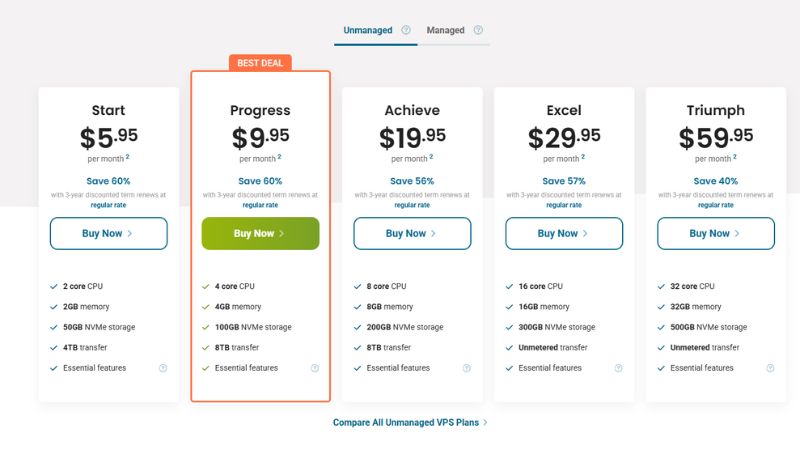
ScalaHosting and HostPapa are two of the best VPS providers for running online forums. Both deliver the stability, scalability, and support that active communities need to stay fast and secure.
ScalaHosting offers exceptional value through its proprietary SPanel and SShield technologies, giving users full control with built-in security and automated updates. Its VPS plans are flexible and come with daily backups, strong DDoS protection, and the option to deploy on AWS infrastructure for global reach — making it ideal for high-traffic or international communities.
HostPapa, meanwhile, provides a straightforward and transparent VPS platform suited for forum owners who prefer simplicity and dependable service. All plans run on NVMe storage and CloudLinux OS, with managed tiers that include cPanel, Imunify360 protection, and GlobalSign SSL. Its responsive support and clear resource allocation make it a strong choice for small to medium-sized forums that need predictable performance without enterprise-level pricing.
For more alternatives, explore our full guide on the best web hosting for forum websites.
Which is the Best VPS Hosting for AI/ML Projects?

Atlantic.Net is the best VPS hosting provider for AI and machine learning projects. Developers can use its standard cloud VPS for lightweight development, data preparation, and early-stage applications, then move to GPU cloud or dedicated GPU infrastructure as compute requirements grow.
Atlantic.Net provides NVIDIA L40S and H100 NVL options, shared or dedicated GPU allocation, full root access, and multi-GPU configurations. Its GPU environments support TensorFlow, PyTorch, and CUDA for model training, fine-tuning, inference, and other parallel-processing workloads. This gives AI teams a clearer scaling path than providers limited to CPU-based VPS plans.
Which is the Best VPS Hosting with Windows Support?
Verpex is a good Windows VPS choice for budget-conscious users, while Atlantic.Net better suits serious business and production workloads. Both providers support Windows environments, but they target different levels of technical and operational demand.
Verpex provides managed and unmanaged Windows VPS plans with a Windows licence, Plesk, root access, and scalable resources. It offers a more accessible starting point for websites, resellers, testing environments, and smaller Microsoft-based applications.
Atlantic.Net supports Windows across a broader cloud infrastructure with hourly billing, multiple server categories, eight regions, and optional managed or compliance-focused services. It is the stronger choice for SaaS products, business applications, regulated workloads, and projects that may later require dedicated or GPU infrastructure.
Which is the Best VPS Hosting with Linux Support?
ScalaHosting and RoseHosting are the best VPS providers for Linux support. Both offer a wide selection of distributions, including Ubuntu, AlmaLinux, Debian, and CentOS, giving developers full control to configure and deploy their preferred Linux stack.
ScalaHosting integrates Linux VPS with SPanel, daily backups, and SShield security. This setup simplifies management by removing third-party panel licensing while ensuring continuous protection. RoseHosting, by contrast, emphasizes dedicated resources and transparent pricing. Signup and renewal prices remain identical, guaranteeing predictable costs alongside stable Linux server performance.
Which is the Best VPS Hosting with Ubuntu Support?
ScalaHosting is the best VPS provider for Ubuntu hosting. Its platform includes ready-to-deploy Ubuntu templates, allowing developers to launch environments within minutes. SPanel integration manages websites, databases, and email from a single interface, without additional control panel costs.
Security and scalability strengthen ScalaHosting’s value. Every plan includes SShield real-time protection and automated daily backups, making it suitable for developers, SaaS workloads, and businesses that rely on Ubuntu. Its AWS upgrade path ensures seamless scaling from startup-level VPS to enterprise infrastructure without migrating providers.
Which is the Best VPS Hosting with cPanel Support?
InMotion Hosting and Verpex are the best VPS providers with cPanel support. Both integrate cPanel/WHM licenses directly into their VPS plans, making them ideal for agencies and users who rely on the cPanel ecosystem.
InMotion Hosting emphasizes business-class reliability, with U.S.-based support, SSL, DDoS protection, and migration assistance. Its long business record makes it a dependable choice for companies that want stability.
Verpex is better suited for resellers and freelancers. Mid-tier VPS plans allow 100+ hosted websites, and the platform includes white-label reseller tools. While cPanel licensing adds extra cost, Verpex remains attractive for budget-conscious users needing multi-site management.
Which is the Best VPS Hosting with Crypto Payment Support?
Hostinger is the best VPS hosting provider for crypto payments. It allows customers to pay with Bitcoin, Ethereum, Litecoin, and several other cryptocurrencies, making it easier for privacy-conscious users or businesses in regions with limited payment gateways.
Beyond payment flexibility, Hostinger VPS includes NVMe SSD storage, full root access, automation-ready templates, and the Kodee AI assistant. Combined with its ultra-low pricing, Hostinger stands out as the most accessible host for crypto-first buyers who want reliable VPS hosting without depending on traditional banking systems.
What is VPS Hosting?

Virtual Private Server (VPS) hosting isolates your website or application on a virtualized server. Each VPS runs its own operating system with dedicated CPU, RAM, and storage allocations, giving users more control, customization, and stability than shared hosting.
What Can VPS Hosting Be Used For?
VPS hosting supports a wide range of workloads.
High-traffic websites and online stores use VPS to ensure fast load times and safeguard customer data. Agencies and freelancers host multiple websites on a single account with isolated resources for each project. Developers deploy SaaS applications, Forex trading software, and multiplayer game servers.
Its flexibility allows you to configure servers to fit specific technical or business requirements.
How Does VPS Compare to Shared and Dedicated Hosting?
VPS hosting sits between shared and dedicated hosting. It balances performance, control, and price, making it the logical upgrade for users who have outgrown shared hosting.
Compared to shared hosting, VPS offers dedicated resources, stronger isolation, and better security. Shared plans pool CPU and RAM across many users, so performance suffers when one site spikes traffic. VPS avoids this by allocating guaranteed resources to each account.
Compared to dedicated hosting, VPS is more affordable and easier to manage. Dedicated servers provide maximum power but require higher costs and complex maintenance. VPS delivers many of the same benefits through virtualization without the hardware overhead.
VPS Hosting Pros and Cons
Pros
- Dedicated resources for better performance and stability
- Full root access for customization and software control
- Scales easily with additional CPU, RAM, or storage
- Improved security through environment isolation
- Supports diverse workloads like SaaS, eCommerce, Forex trading, or gaming
Cons
- Higher cost than shared hosting
- Technical knowledge required for unmanaged plans
- Limited scalability compared to cloud hosting
- Noisy neighbors still possible if the provider oversells hardware
Final Thoughts on Choosing the Right VPS Hosting
The right VPS hosting provider depends on your workload, technical experience, and plans for growth. Compare resource allocation, storage and backups, management level, scalability, security, support, server locations, and total long-term cost rather than relying on the advertised starting price alone.
If you are comfortable managing a server, Hostinger offers affordable unmanaged VPS plans with full root access. If you want the provider to handle updates, monitoring, and server security, ScalaHosting is our preferred managed option. Its SPanel platform also provides a path to managed AWS infrastructure as your project grows.
VPS hosting provides more control, consistent resources, and scalability than shared hosting without the higher cost of a dedicated server. It suits growing business websites, online stores, SaaS applications, development environments, and other workloads that need an isolated server environment.
Still unsure which provider fits your needs? Get a free hosting consultation from our team. If you have already purchased a VPS plan, our hosting setup help service can handle the technical setup and help you avoid common configuration mistakes.