
When choosing a host for your website, one key factor to evaluate is how much bandwidth you need and how it impacts your hosting costs.
Many providers advertise “unlimited” bandwidth, but in reality, there are always limits. If your site exceeds a provider’s definition of “normal” usage, you may face throttling or extra fees. So, how much bandwidth does your website actually need? Understanding this can be tricky, but with the right approach, you can estimate it more accurately.
What Do “Bandwidth” and “Data Transfer” Mean in Hosting?
Bandwidth and data transfer are often used interchangeably in web hosting, but they are not the same. Understanding the difference between these terms can help you make better decisions when choosing a hosting plan.
What is Data Transfer?
Data transfer refers to the total amount of data moved between your website and its visitors over a specific period, usually measured monthly. This includes everything from web pages and images to downloadable files and videos.
What is Bandwidth?
Bandwidth measures the maximum amount of data that can be transferred at any given moment, typically measured in bits per second (bps). It determines how fast data can flow between your website and its visitors.
Data Transfer vs Bandwidth
Think of bandwidth as the width of a water pipe and data transfer as the amount of water flowing through it. A wider pipe (higher bandwidth) allows water (data) to flow more quickly, but the total amount of water used over time (data transfer) depends on actual consumption.
In web hosting, “bandwidth” is often used as a shorthand for “monthly data transfer allowance.” While this can be misleading, most hosting providers use the term to describe how much data your site can serve to visitors within a month.
How to Estimate Your Website’s Bandwidth Needs?
Think of bandwidth like clothing sizes – you need the right fit. Buying too much bandwidth is unnecessary, but if you don’t have enough, your website won’t function properly. If your waist size is 36, you won’t fit into a 32 – it’s simple math. The same logic applies to bandwidth allocation.
Here’s how to calculate the required bandwidth for your website:
- Determine your average page size – Measure the average size of your web pages in kilobytes (KB) or megabytes (MB).
- Calculate monthly data usage – Multiply the average page size by the number of visitors your site receives each month.
- Factor in page views per visitor – Multiply the result from Step 2 by the average number of pages each visitor views.
If you’re unsure of your page size, use Pingdom’s Load Time Test on several pages and calculate an average (see example below).
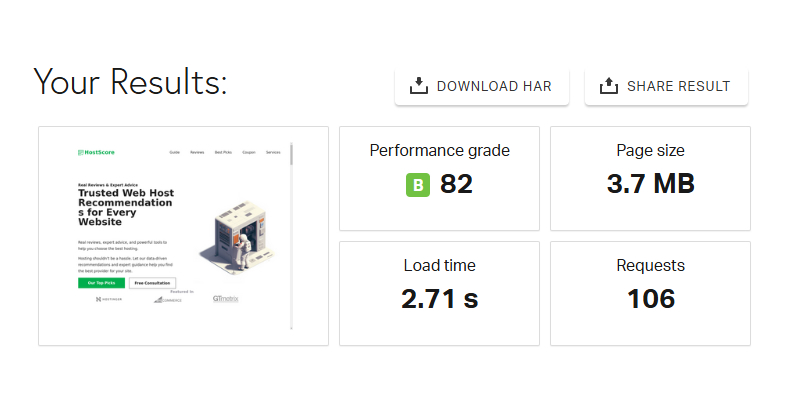
Calculating your base bandwidth gives you a starting point, but you’re not done yet. Websites don’t experience perfectly consistent traffic – sudden spikes can occur due to seasonal trends, viral content, or marketing campaigns.
To ensure your site runs smoothly even during high-traffic periods, you should allocate extra bandwidth. A good rule of thumb is to add at least 50% more than your base estimate as a buffer. This ensures that unexpected surges don’t slow down or crash your site.
Additionally, if you expect steady growth in traffic, consider scaling your bandwidth allocation accordingly. Choosing a hosting plan that allows for easy upgrades can help you stay ahead without overpaying for unused capacity.
Scenario #1 – Sites Without User Downloads
To do this calculation, use the following formula:
Bandwidth needed = Average Page Views x Average Page Size x Average Daily Visitors x Number of days in a month (30) x Redundant Factor
- Average Daily Visitors: The total number of monthly visitors/30.
- Average Page Size: The average size of your web page.
- Average Page Views: The average page viewed per visitors.
- Redundant Factor: A safety factor ranged from 1.3 – 1.8.
Scenario #2 – Sites With User Downloads or Streaming
If your site does not use or allow downloads:
Bandwidth needed = [(Average Page Views x Average Page Size x Average Daily Visitors) + (Average Download per day x Average File Size) ] x Number of days in a month (30) x Redundant Factor
- Average Daily Visitors: The total number of monthly visitors/ 30.
- Average Page Size: The average size of your web page
- Average Page Views: The average page viewed per visitor
- Average File Size: The total file size divided to the number of files
- Redundant Factor: A safety factor ranged from 1.3 – 1.8.
How Bandwidth Limits Affect Your Hosting Plan?
Bandwidth is a key factor in your website’s performance and scalability. If your site features interactive content, high-resolution images, or streaming media, having more bandwidth ensures faster load times and a smoother user experience. As your website traffic grows, the amount of data transferred increases, making sufficient bandwidth essential.
A hosting plan with low bandwidth can lead to slow site speeds or even downtime during traffic spikes. This can negatively impact user experience, search rankings, and conversions.
From a cost perspective, higher-bandwidth hosting plans (especially cloud hosting) tend to be more expensive. Some providers also charge additional fees if you exceed your bandwidth limit. Striking the right balance between your server performance and hosting cost is crucial to maintaining a scalable website.
Is Bandwidth a Big Concern for New Websites?
If you’re launching a personal blog, small business site, or portfolio, bandwidth may not be your primary concern. Here’s why:
- New sites typically use minimal bandwidth – If your site consists mostly of text and a few images, data transfer will remain low. Bandwidth only becomes a concern as traffic scales or when you introduce bandwidth-heavy features like videos or high-resolution media.
- Most shared hosting plans offer ample bandwidth – Many entry-level hosting plans today provide more data transfer capacity than a new website will likely consume. Over 90% of new users won’t max out their allocated bandwidth.
Instead of fixating on bandwidth, new website owners should focus on other key factors such as server reliability, ease of use, customer support, and upgrade flexibility.
Want to make an informed decision? Check out our Best Web Hosting Guide to find the right hosting plan for your needs.
What Happens If You Exceed Your Bandwidth Limit?
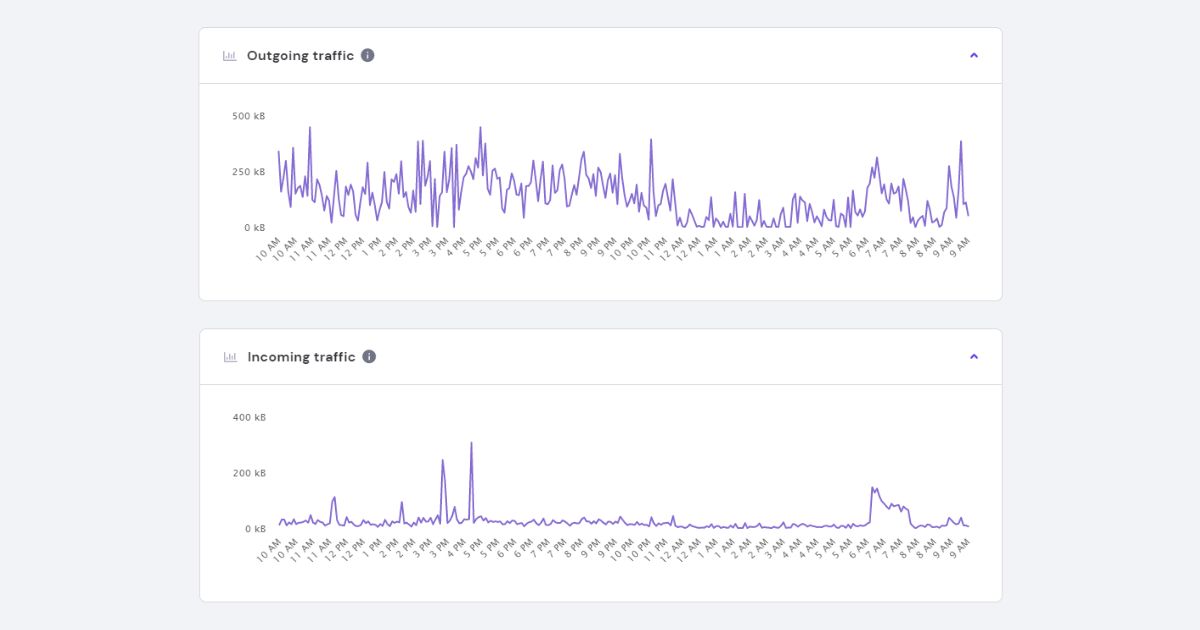
When a website exceeds its allocated bandwidth, your host may slow down performance, apply overage charges, or temporarily disable the site.
Some providers implement bandwidth throttling, which reduces your site’s speed after hitting the cap. Others may charge extra per GB or suspend service until the next billing cycle.
The impact depends on your hosting plan. Entry-level shared hosting often has strict limits, while VPS and cloud plans may offer more flexibility or pay-as-you-go options.
To avoid disruptions, check your monthly usage in your control panel and choose a plan that offers enough overhead for traffic spikes.
Which Hosts Offer Unlimited or High Bandwidth Plans?
Many hosting providers offer unmetered or high-bandwidth plans but the details vary by platform.
Hostinger provides unmetered bandwidth on most of its shared and cloud hosting plans, though fair usage policies apply. Cloudways allocates bandwidth based on your selected cloud provider; for example, 20 GB on the smallest DigitalOcean plan, with costs scaling per additional GB used.
GreenGeeks includes unmetered data transfer on its shared hosting, and Verpex offers unlimited bandwidth even on entry plans, subject to resource usage guidelines. Kamatera, a cloud host, offers scalable bandwidth options where you only pay for what you consume – ideal for growing or bursty traffic.
Before choosing a host, always check how they define “unlimited” or “unmetered.” Many apply soft caps or performance throttles under sustained high usage.

