
The best CRM hosting providers for small-to-mid businesses are ScalaHosting, Hostinger, RoseHosting, Kamatera, and Kinsta. These providers support different CRM requirements, from affordable open-source software deployments to managed business applications and WordPress-based CRM systems.
Customer Relationship Management (CRM) software helps businesses organize customer records, manage sales pipelines, and automate daily workflows. Hosting your own CRM gives you greater control over its configuration, integrations, and data storage. However, your choice of hosting provider affects application performance, security, maintenance, and recovery options.
Our recommendations focus on hosting infrastructure for self-hosted CRM applications, including SuiteCRM, EspoCRM, Vtiger, and WordPress CRM plugins. We compare providers using HostScore’s performance findings, hosting features, management services, and suitability for different business needs.
If you prefer a ready-to-use CRM without managing hosting, SaaS platforms such as HubSpot and Zoho CRM are also worth considering. We discuss these alternatives later in this guide.
| Hosting Provider | Best For | Recommended Hosting Type |
|---|---|---|
| ScalaHosting | Growing businesses needing managed infrastructure | Managed Cloud VPS |
| Hostinger | Affordable open-source CRM deployment | Self-managed VPS |
| RoseHosting | Businesses needing hands-on CRM support | Fully Managed CRM VPS |
| Kamatera | Custom CRM infrastructure and integrations | Configurable Cloud Server |
| Kinsta | WordPress-based CRM applications | Managed WordPress |
1. ScalaHosting

Website: https://www.scalahosting.com/
ScalaHosting is our top CRM hosting recommendation for growing businesses that need reliable performance, managed infrastructure, and room to scale. Its managed cloud VPS plans allocate dedicated computing resources while reducing the work involved in server administration.
Why Do We Recommend ScalaHosting for CRM Hosting?
ScalaHosting is our top CRM hosting choice because of its strong performance, scalable managed VPS resources, SPanel control panel, and built-in security and backup features.
ScalaHosting combines managed VPS hosting with SPanel, its proprietary server management control panel. SPanel manages databases, email accounts, SSL certificates, and backups without requiring a separate cPanel license. Businesses can also allocate more CPU, RAM, and storage as their CRM databases and user activity grow.
Performance is another key reason for our recommendation. In our hands-on testing, ScalaHosting maintained uptime above 99.9% and delivered strong server response times. Our OpenCart benchmark also handled up to 500 concurrent users without server errors. Although these were not CRM-specific tests, they demonstrate the provider’s ability to handle demanding database-backed applications.
ScalaHosting also includes SShield security monitoring, NVMe storage, and automated backups with its managed cloud hosting. These features help businesses protect customer records and maintain their CRM infrastructure without employing a full-time server administrator.
Limitations with ScalaHosting
ScalaHosting’s main limitations are its server-focused management scope and higher VPS renewal prices.
While Scala manages the underlying server environment, its services may not cover every CRM installation, software update, extension, or application-level issue. Businesses should confirm the exact support responsibilities before deploying their CRM.
VPS renewal prices are also higher than introductory rates. Compare the full subscription cost rather than the promotional price alone.
Which CRM Applications Can Run on ScalaHosting?
ScalaHosting’s managed VPS environment is suitable for deploying PHP-based CRM applications, including:
- SuiteCRM: An open-source CRM offering contact management, sales automation, reporting, and customizable business workflows.
- EspoCRM: A lightweight CRM that supports sales pipelines, custom fields, customer activities, and integrations.
- Vtiger CRM: A CRM platform covering sales, marketing, and customer service functions, subject to the deployment requirements of the selected edition.
These applications can run on appropriately configured Linux hosting environments. However, compatibility depends on the CRM version, PHP and database requirements, scheduled tasks, and any additional background services.
Who Should Choose ScalaHosting?
ScalaHosting is ideal for growing SMEs that need managed CRM infrastructure with a clear path to larger deployments. Its managed VPS plans provide dedicated resources, security tools, and server administration without requiring businesses to maintain their own infrastructure team.
For businesses with greater computing requirements, ScalaHosting also offers fully managed AWS cloud hosting. This combines AWS infrastructure with ScalaHosting’s SPanel and managed support, giving expanding businesses access to additional resources and regional deployment options without managing AWS directly.
2. Hostinger

Website: https://www.hostinger.com/
Hostinger is our recommended affordable CRM hosting provider for startups and small businesses. Its VPS platform supports self-hosted applications, while a dedicated EspoCRM deployment option simplifies the initial installation process.
Why Is Hostinger a Good Affordable CRM Hosting Option?
Hostinger is an affordable CRM hosting option because its VPS plans combine allocated server resources, preconfigured EspoCRM deployment, security controls, and backup tools without charging per-user SaaS fees.
Hostinger’s VPS plans include allocated CPU and RAM, NVMe storage, and a selection of server locations. These resources allow businesses to run open-source CRM applications without sharing the same hosting environment as unrelated websites.
One advantage is Hostinger’s preconfigured EspoCRM deployment. Businesses can launch the application through its VPS deployment system, reducing the manual work involved in preparing the server and installing the CRM.
Hostinger also provides a Docker management interface, container logs, firewall controls, DDoS protection, and automated weekly backups. These tools simplify deployment, security configuration, and basic monitoring for users with some server administration experience.
Our hands-on Hostinger review found reliable uptime and good performance across its tested hosting services. Though, these results do not represent direct performance measurements of EspoCRM running on Hostinger VPS.
Limitations with Hostinger
Hostinger’s main limitation for CRM hosting is its self-managed VPS environment, which leaves server maintenance, security configuration, monitoring, and CRM updates largely to the customer.
Although Hostinger provides AI-assisted tools and simplified application deployment, these do not replace ongoing technical administration. Businesses without dedicated IT resources should consider whether they can manage these responsibilities or need a fully managed CRM hosting provider.
Which CRM Applications Can Run on Hostinger?
Hostinger provides a dedicated deployment option for EspoCRM, making it the clearest CRM use case within its current VPS offering.
Other applications that may be deployed on a suitably configured VPS include:
- SuiteCRM: For businesses needing customizable sales, contact, and customer service workflows.
- Vtiger CRM: For organizations using compatible self-hosted editions of Vtiger.
- CiviCRM: For nonprofits and membership organizations managing contacts, donations, and constituent relationships.
Unlike EspoCRM’s preconfigured deployment, these applications may require manual installation, software dependency management, and additional server configuration.
Who Should Choose Hostinger?
Hostinger suits startups, small sales teams, and cost-conscious businesses with some technical knowledge. It is particularly attractive for companies that want to experiment with EspoCRM or launch a small internal CRM before committing to more expensive infrastructure.
3. RoseHosting

Website: https://www.rosehosting.com/
RoseHosting is our preferred CRM hosting provider for businesses that want hands-on technical assistance. Unlike general-purpose VPS services, RoseHosting offers dedicated managed hosting solutions for applications such as SuiteCRM and Vtiger.
Why Do We Recommend RoseHosting for Managed CRM Hosting?
RoseHosting is recommended for managed CRM hosting because it combines application-specific technical support, managed Linux infrastructure, and an advertised lifetime price-lock policy.
RoseHosting specializes in managed Linux hosting, with technical assistance covering CRM installation, server configuration, optimization, migration, and troubleshooting. This reduces the administration workload for SMEs that depend on their CRM but lack dedicated Linux administrators.
Its managed SuiteCRM hosting includes root access, NVMe storage, server monitoring, and support for application configuration. RoseHosting also assists with application-related issues on a best-effort basis, although customers should confirm the scope of support for their chosen CRM.
RoseHosting’s long business track record is another key reason we recommend them. The company has operated since 2001 and advertises a lifetime price-lock policy. This provides a degree of pricing predictability for businesses planning long-term CRM deployments.
Limitations with RoseHosting
RoseHosting’s main limitations are its higher entry costs and U.S.-only server locations, which may not suit budget-conscious businesses or organizations requiring infrastructure closer to overseas operations.
RoseHosting costs more than entry-level unmanaged VPS providers because of its managed infrastructure and technical support. Businesses with existing IT expertise may find self-managed hosting more economical.
The company’s U.S.-based infrastructure limits regional deployment choices. Businesses serving overseas offices may experience higher network latency, while organizations with strict data residency requirements may need hosting in specific countries.
Which CRM Applications Does RoseHosting Support?
RoseHosting publishes dedicated hosting services for several CRM applications, including:
- SuiteCRM: Managed hosting with assistance for installation, configuration, performance tuning, and troubleshooting.
- Vtiger CRM: Application-specific hosting for customer management, sales, and related business workflows.
- SugarCRM: Hosting services for compatible SugarCRM deployments, with licensing and version requirements to be confirmed.
- CiviCRM: Hosting for organizations that manage memberships, donors, contacts, and constituent data.
- openCRX: Hosting for businesses that require a customizable CRM system with enterprise-oriented features.
The provider also offers managed hosting for other business applications. Its support team can help assess software requirements before deployment.
Importantly, application-specific hosting does not automatically include custom development, third-party extension maintenance, or unlimited application modifications. Businesses should confirm the exact scope of support before subscribing.
Who Should Choose RoseHosting?
RoseHosting is best for businesses that need a self-hosted CRM but do not want to manage the technical environment alone. Its application-specific hosting and hands-on support suit professional service firms, small sales organizations, and companies without dedicated Linux administrators.
RoseHosting is particularly suitable for U.S.-focused businesses, as its servers are located in St. Louis, Missouri. This centralized location can serve American offices and customers well, but businesses with substantial overseas operations or regional data residency requirements may prefer providers with a broader choice of data centers.
4. Kamatera

Website: https://www.kamatera.com/
Kamatera is our recommendation for businesses that need highly configurable cloud infrastructure for customized CRM applications. Its cloud platform allows customers to select computing resources, operating systems, storage, and networking configurations according to their requirements.
Why Is Kamatera Suitable for Custom CRM Infrastructure?
Kamatera is suitable for custom CRM infrastructure because it combines configurable cloud resources, extensive global server locations, and flexible deployment architectures.
Kamatera allows businesses to configure cloud servers with their preferred CPU, RAM, storage, and operating systems. This flexibility supports customized CRM software, database-heavy applications, and integrations that may not fit conventional shared or managed hosting environments.
Another advantage is Kamatera’s global data center network, spanning North America, Europe, Asia, and Australia. Businesses with offices in multiple countries can deploy CRM infrastructure closer to their employees, potentially reducing network latency and improving application responsiveness.
Kamatera also supports more complex infrastructure designs. Businesses with sufficient technical resources can deploy separate application and database servers, establish private networks, or build multi-region environments with traffic routing and data replication. These configurations provide greater control over performance and availability but require careful planning.
Limitations with Kamatera
Kamatera’s main limitations are its technical complexity, self-managed infrastructure, and additional charges for services that businesses may need to operate a reliable CRM environment.
Its standard cloud servers require customers to manage operating system updates, security configuration, application deployment, and ongoing maintenance. This makes Kamatera less suitable for businesses without technical staff or external IT support.
Advanced backups, firewall protection, and managed assistance can also increase the overall hosting cost. Businesses should evaluate these charges alongside the base server price and confirm which management responsibilities are covered.
Which CRM Applications Can Run on Kamatera?
Kamatera’s configurable servers can accommodate various CRM applications when the selected environment meets their software requirements.
Examples include:
- SuiteCRM and EspoCRM: PHP-based CRM applications deployable on suitably configured Linux servers.
- Vtiger CRM: Self-hosted editions requiring compatible web server, database, and runtime configurations.
- Odoo: Business management software with CRM functionality that may require a PostgreSQL database and additional application services.
- Custom CRM applications: Internally developed systems using supported operating systems, databases, and application frameworks.
These are potential deployment options rather than preinstalled or officially managed CRM packages.
Who Should Choose Kamatera?
Kamatera is best for medium-sized businesses with developers, system administrators, or external IT partners. It suits organizations building custom CRM workflows, integrating several business systems, or requiring infrastructure configurations that conventional managed hosting does not provide.
5. Kinsta

Website: https://www.kinsta.com/
Kinsta is our preferred managed WordPress hosting provider for businesses running on-site CRM applications. Plugins such as FluentCRM, Groundhogg, and Jetpack CRM extend WordPress to handle contact management, customer tracking, and marketing automation. By running these applications directly on Kinsta, businesses can streamline customer relationship management within their existing WordPress websites without operating a separate CRM platform.
Why Do We Recommend Kinsta for WordPress-Based CRM?
Powered by Google Cloud infrastructure, Kinsta combines isolated container environments, integrated Cloudflare protection, automated daily backups, and staging environments to safeguard customer records and critical operational workflows. For technical teams maintaining custom setups, developer tools like SSH and WP-CLI offer added operational flexibility.
Kinsta also stands out for its independently verified security standards. The company completed its first SOC 2 Type II audit in August 2023, followed by ISO 27001, ISO 27017, and ISO 27018 certifications in August 2024. These frameworks offer strong assurance for organizations evaluating information security and data privacy compliance.
Over years of hands-on experience, we have found Kinsta to deliver stable performance paired with a polished user experience.
Limitations with Kinsta
However, there are key trade-offs with Kinsta to consider.
Email sending restrictions is one major turn-off in our opinion. Kinsta restricts non-transactional email delivery directly from its servers. Businesses using CRM plugins for bulk marketing or newsletters will need to integrate a third-party email provider (such as SendGrid or Mailgun).
Kinsta’s premium pricing tiers and strict resource limits mean costs can scale up quickly, particularly for high-traffic sites or automation-heavy, contact-rich databases.
Which WordPress CRM Applications Can Run on Kinsta?
Kinsta’s managed WordPress hosting can potentially support CRM plugins such as:
- FluentCRM: A WordPress-based CRM and email marketing automation plugin for managing contacts, campaigns, and customer journeys.
- Groundhogg: A CRM and marketing automation system built around WordPress contacts, forms, and automated workflows.
- Jetpack CRM: A customer and contact management plugin for WordPress, with extensions for business records and related workflows.
Compatibility depends on each plugin’s requirements, scheduled tasks, resource consumption, and third-party integrations. Businesses should test their workflows rather than assume every CRM feature will operate identically across hosting environments.
Unlike other providers in our list, Kinsta is not intended as a general-purpose hosting platform for standalone applications (eg: SuiteCRM, EspoCRM, Vtiger CRM). For custom CRM applications, developers can instead consider Sevalla, the application hosting platform that took over Kinsta’s application, database, and related hosting services in February 2026.
Who Should Choose Kinsta?
Kinsta is best for businesses that already rely on WordPress and want to extend their existing website with CRM functions. The platform suits content-driven businesses, service providers, agencies, and online stores that manage customer information through WordPress plugins and integrations.
A company using FluentCRM for contact management and marketing workflows, for example, may appreciate having its website and CRM data within the same WordPress environment. However, it must also plan for scheduled processing, external email delivery, and suitable backup frequency.
Setting up hosting can be confusing. That’s why we created HostScore Setup Help, a done-for-you service for getting your hosting configured the right way.
We help with SSL installation, DNS & nameserver setup, WordPress install or migration, and security tuning. One-time fee. Backed by a 100% refund guarantee.
Explore Our ServicesWhat Is CRM Hosting?
CRM hosting provides the server infrastructure needed to run Customer Relationship Management (CRM) software. It stores customer records, processes application requests, and supports activities such as contact management, sales tracking, reporting, and workflow automation.
Businesses can use CRM software through a SaaS subscription, deploy it on rented hosting infrastructure, or operate it on their own servers. Each approach offers different levels of control, management responsibility, and cost.
This guide focuses on hosting providers that support self-hosted CRM applications, while recognizing that SaaS platforms may be more practical for some businesses.
What Does CRM Software Do?
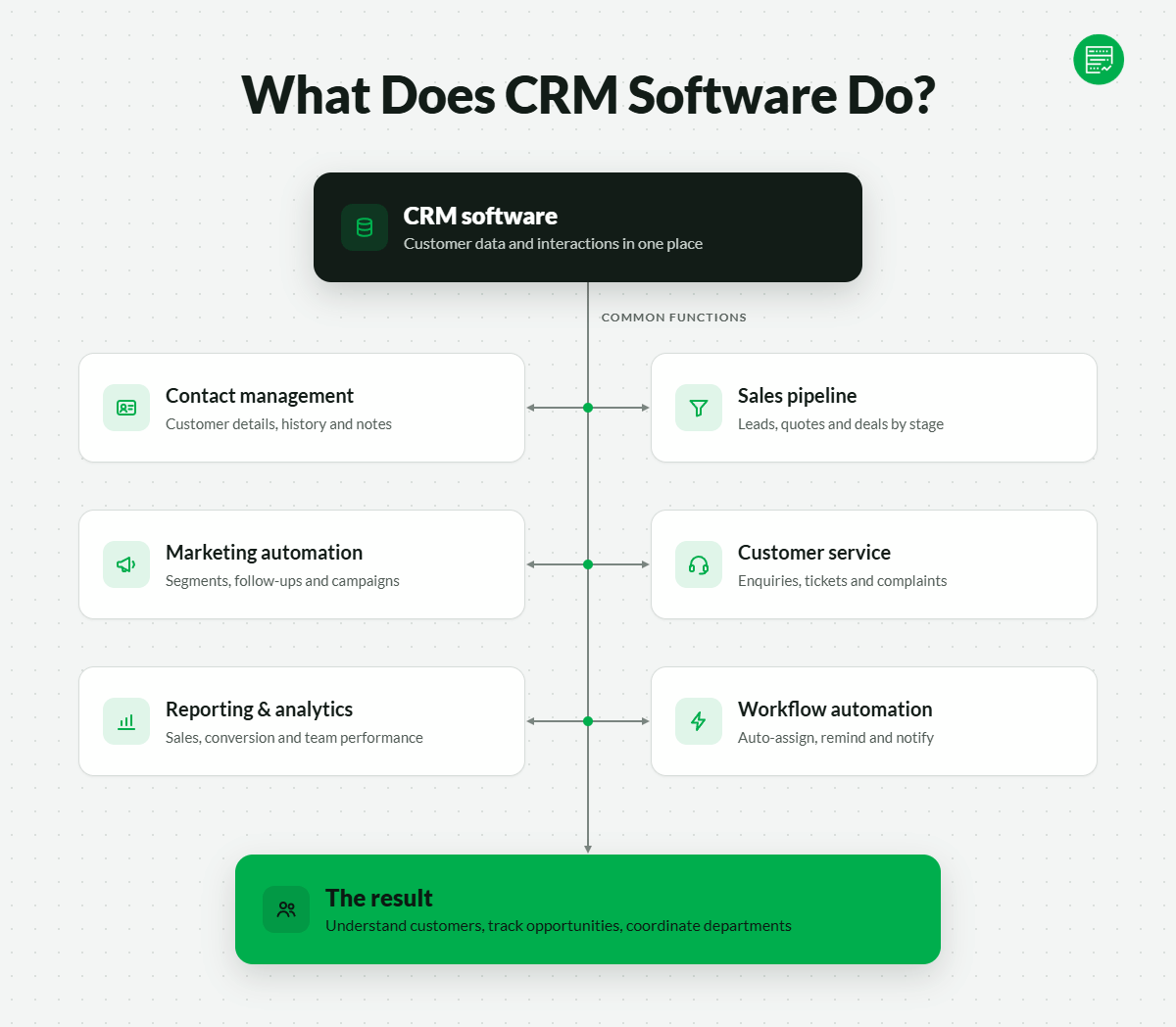
CRM software organizes customer information and interactions within a central system. It helps employees understand their customers, track business opportunities, and coordinate activities across departments.
Common CRM functions include:
- Contact management: Store customer details, communication histories, notes, and account information.
- Sales pipeline management: Track leads, opportunities, quotations, and deals through different sales stages.
- Marketing automation: Segment contacts, schedule follow-ups, and manage marketing campaigns.
- Customer service: Record enquiries, support tickets, complaints, and service interactions.
- Reporting and analytics: Measure sales performance, conversion rates, customer activity, and team productivity.
- Workflow automation: Trigger assignments, reminders, notifications, and other actions based on customer activity.
What Is the Difference Between SaaS, Self-Hosted, and On-Premise CRM?
The main difference between SaaS, self-hosted, and on-premise CRM is who operates the application and its underlying infrastructure.
| CRM Deployment Model | How It Works | Who Manages It |
|---|---|---|
| SaaS CRM | Access CRM software through a vendor-hosted subscription | SaaS provider manages the application and infrastructure |
| Self-hosted CRM | Install CRM software on rented VPS, cloud, or dedicated hosting | Business or contracted technical team manages the application; infrastructure duties vary |
| On-premise CRM | Operate CRM software on servers owned or controlled by the organization at its premises | Internal IT team or contracted administrator |
Self-hosted CRM does not necessarily mean on-premise hosting. A business can run SuiteCRM on a cloud VPS without purchasing physical servers.
Likewise, cloud-hosted CRM does not always mean SaaS. A company can self-host CRM software on cloud infrastructure while retaining administrative control over the application.
SaaS removes much of the server and application maintenance workload. Self-hosting offers greater flexibility over software configuration, deployment, and integrations, but requires more technical oversight.
Which CRM Applications Can Businesses Self-Host?
Businesses can self-host several open-source CRM applications or use CRM plugins within an existing WordPress installation.
Popular examples include:
| CRM Application | Primary Focus | Typical Hosting Environment |
|---|---|---|
| SuiteCRM | Sales, customer service, reporting, and customizable workflows | Linux VPS or managed application hosting |
| EspoCRM | Contact management, sales pipelines, and workflow automation | Linux VPS or compatible cloud hosting |
| Vtiger CRM | Sales and customer service management | Compatible Linux application hosting, depending on edition |
| Odoo CRM | CRM connected to accounting, inventory, and other business functions | Cloud VPS or application infrastructure supporting Odoo |
| FluentCRM | Contact management and email automation within WordPress | Managed WordPress hosting |
| CiviCRM | Constituents, memberships, donations, and nonprofit relationships | Compatible CMS and application hosting |
The hosting requirements differ between applications. Some need PHP and MySQL or MariaDB, while others use PostgreSQL, Python, or additional background services.
Businesses should select their CRM software before purchasing hosting. This prevents compatibility problems and reduces the risk of paying for infrastructure that cannot run the required application.
How Do You Choose a CRM Hosting Provider?
Choose a CRM hosting provider by checking software compatibility, server resources, management responsibilities, provider reliability, backup provisions, and long-term operating costs.
Unlike a basic company website, a CRM may process business transactions throughout the day. Performance problems or extended outages can interrupt sales activities, customer support, and internal operations.
Does the Host Support Your CRM Software?
A CRM hosting provider must support the application’s operating system, database, runtime, and background processing requirements.
For example, EspoCRM requires compatible PHP and database versions, along with scheduled jobs for tasks such as notifications and data synchronization. SuiteCRM, on the other hand, requires cron jobs and, from version 8.10, a Messenger worker for certain asynchronous tasks.
A hosting plan that supports PHP and MySQL is not automatically suitable for every CRM.
Before subscribing, confirm:
- Software compatibility: The supported PHP, Python, database, and operating system versions match your CRM.
- Background processing: The server supports cron jobs, task queues, and persistent workers where required.
- Administrative access: SSH, root access, or suitable management tools are available for installation and maintenance.
- Application support: The provider clearly states whether it assists with CRM installation, updates, and troubleshooting.
Preconfigured CRM installations can simplify deployment, but they do not eliminate ongoing maintenance requirements.
How Much Server Capacity Does Your CRM Need?
CRM hosting capacity depends on the number of active users, database size, simultaneous operations, and background tasks. A small CRM used by a few employees may operate comfortably on a modest VPS. A larger system with frequent imports, complex reporting, automated campaigns, and third-party integrations requires more resources.
Consider these factors when choosing a plan:
| Resource | Why It Matters for CRM |
|---|---|
| CPU | Processes application requests, calculations, and automation tasks |
| RAM | Supports application processes, database operations, and background workers |
| SSD/NVMe Storage | Stores customer records, attachments, application files, and databases |
| Database Performance | Affects contact searches, reporting, and record updates |
| Network Capacity | Supports remote employees, integrations, and data transfers |
| Scalability | Allows resources to increase as CRM usage grows |
Concurrent user activity matters more than the total number of contacts alone. A large contact database used occasionally may consume fewer resources than a smaller database processing continuous automation tasks.
Businesses should monitor actual CPU, memory, database, and application response metrics after deployment. These measurements provide a better basis for upgrading than generic hosting recommendations.
What Does Managed CRM Hosting Actually Include?
Managed CRM hosting can reduce technical maintenance, but the term does not guarantee that the provider manages every part of the application.
Hosting management operates at several levels:
| Management Level | Typical Responsibilities |
|---|---|
| Infrastructure Management | Physical servers, virtualization, network, and underlying infrastructure |
| Server Management | Operating system updates, server security, monitoring, and system services |
| Application Management | CRM installation, software updates, application configuration, and troubleshooting |
| Business Configuration | Custom workflows, integrations, reporting, user permissions, and application extensions |
A managed VPS provider might maintain the server while leaving CRM upgrades and software troubleshooting to the customer.
Application-focused providers, such as RoseHosting, may offer more direct assistance with CRM installation and maintenance. However, custom development and third-party integrations can still fall outside the service agreement.
Ask the provider who handles failed application updates, database errors, background processing failures, and restoration after an incident.
These responsibilities should be clear before your business depends on the CRM.
How Do You Evaluate a Hosting Provider’s Stability?
A CRM hosting provider should demonstrate operational reliability, transparent service policies, and a credible business history.
Migrating a CRM is more complicated than moving a basic website. Customer databases, attachments, scheduled tasks, user permissions, and integrations must remain intact.
Provider evaluation should therefore include operating history, ownership changes, service status records, incident communication, support arrangements, and migration assistance.
A long-established hosting company may provide useful evidence of business continuity, but age alone does not guarantee reliability. Recent incidents, support practices, and the provider’s ability to resolve problems are equally important.
Also examine the service-level agreement (SLA). An uptime guarantee may provide account credits after qualifying outages, but it rarely compensates a business for lost sales activity or interrupted operations.
What Backup and Disaster Recovery Features Does CRM Hosting Need?
CRM hosting needs automated backups, secure backup storage, and a tested recovery process. Businesses should be able to restore customer records and resume operations after data corruption, server failure, accidental deletion, or a security incident.
Two recovery measurements help establish the appropriate protection level:
- Recovery Point Objective (RPO): How much recent data the business can afford to lose, expressed as a time period.
- Recovery Time Objective (RTO): How long the CRM can remain unavailable before the disruption becomes unacceptable.
For example, a business with an RPO of one hour needs a recovery arrangement capable of restoring data to a point no more than one hour before an incident. A business with an RTO of four hours needs to plan for restoring service within that period.
These are planning targets, not guarantees that a hosting provider can meet them.
When comparing backup services, check whether the provider supports:
- Automated database and application backups at an appropriate frequency.
- Off-server or geographically separate backup copies.
- Backup retention and recovery of earlier versions.
- Encryption and restricted access to backup data.
- Restoration testing, with documented recovery procedures.
- Recovery of application settings, uploads, and integration configurations.
What Is the Total Cost of Running a Self-Hosted CRM?
The total cost of self-hosted CRM includes more than the advertised hosting subscription.
Businesses may also pay for software licences, extensions, technical support, security services, backup storage, email delivery, integrations, and ongoing maintenance.
| Cost Component | What to Check |
|---|---|
| Hosting Subscription | Initial price, renewal price, billing commitment, and resource allocation |
| CRM Software | Open-source licensing terms, commercial editions, and paid modules |
| Technical Maintenance | Server administration, application updates, and troubleshooting |
| Backups | Backup frequency, storage allowances, retention, and restoration charges |
| Security | Additional monitoring, firewall services, and compliance requirements |
| Email Services | Transactional email, sales notifications, and marketing email delivery |
| Integrations | Third-party subscriptions, development, and API-related charges |
An open-source CRM may have no software licence fee, but it is not necessarily free to operate.
For small teams, a SaaS subscription may cost less than hiring someone to maintain a self-hosted application. For larger teams with stable requirements and internal IT resources, self-hosting may offer a different cost structure.
Compare total costs over several years rather than using the first month’s hosting price.
What Security and Compliance Features Should CRM Hosting Include?
CRM hosting security should protect customer records against unauthorized access, data loss, and operational disruption. Businesses handling personal information must also consider their contractual and legal obligations.
Important controls include encryption, access management, monitoring, backup protection, and documented provider security practices.
Does Your CRM Hosting Provider Offer a Data Processing Agreement?
A Data Processing Agreement (DPA) establishes contractual responsibilities when a service provider processes personal data on behalf of a business.
Under GDPR, businesses acting as data controllers generally need an appropriate agreement with service providers acting as data processors. A CRM hosting company may fill that processor role, depending on the services and processing arrangements involved.
A DPA should address matters such as:
- Processing instructions: How the provider may handle customer information.
- Security obligations: The technical and organizational measures used to protect personal data.
- Subprocessors: Other companies involved in storing or processing the data.
- Breach assistance: The provider’s responsibilities when security incidents occur.
- Data return and deletion: What happens to personal information when the agreement ends.
- Compliance assistance: Information and cooperation needed to meet relevant legal obligations.
Businesses should also review server locations and international data transfers where applicable.
A provider advertising GDPR compliance does not remove the customer’s own legal responsibilities. Check whether the DPA covers the selected hosting service and the processing activities involved.
Should CRM Hosting Providers Have SOC 2 or ISO 27001?
SOC 2 reports and ISO 27001 certification provide independent evidence about a provider’s security management practices. They can help businesses assess a host before entrusting it with customer records.
However, the two frameworks serve different purposes.
| Framework | What It Assesses | What Buyers Should Verify |
|---|---|---|
| SOC 2 | Controls relevant to applicable Trust Services Criteria, including security and potentially availability, confidentiality, processing integrity, and privacy | Report type, covered systems, examination period, and exceptions |
| ISO/IEC 27001 | An organization’s information security management system | Certification validity, issuing body, and scope of certification |
SOC 2 Type II reports assess the design and operating effectiveness of relevant controls over a specified period. ISO 27001 certification evaluates whether an information security management system meets the standard’s requirements.
For example, Kinsta completed its first SOC 2 Type II report in August 2023 and achieved ISO 27001 certification in August 2024, alongside ISO 27017 and ISO 27018.
These credentials provide useful assurance, but certification scope matters. A data center’s certification does not automatically mean every hosting service or CRM application meets the same requirements.
Small businesses should prioritize sound access controls, backups, and operational security. Organizations with stricter procurement requirements may also need formal reports, audit evidence, and supporting contractual documents.
How Should CRM Data Be Encrypted and Access Controlled?
CRM hosting should protect data during transmission, storage, and everyday application use.
TLS encryption secures connections between users and the CRM. Encryption at rest can protect stored databases, disks, and backups, provided encryption is correctly configured and keys are appropriately managed.
Access control is equally important. Employees should receive permissions based on their responsibilities rather than unrestricted access to all customer records.
Practical safeguards include multi-factor authentication, role-based permissions, strong credential management, activity logging, and prompt removal of access when employees leave.
The hosting provider and business share responsibility for these controls. A web host can secure the infrastructure while an outdated CRM plugin or compromised administrator account still exposes customer records.
Businesses with stricter requirements may also investigate customer-managed encryption keys. We explain this option in the FAQs below.
What Are the Alternatives to Self-Hosted CRM?
SaaS CRM platforms are the main alternative to hosting your own CRM application. They provide ready-to-use software through subscriptions, with the vendor responsible for maintaining the application infrastructure.
For many SMEs, SaaS removes enough technical work to justify the recurring fees.
How Does SaaS CRM Compare With Self-Hosted CRM?
SaaS CRM reduces deployment and maintenance responsibilities, while self-hosted CRM provides greater control over infrastructure and application configuration.
| Consideration | Self-Hosted CRM | SaaS CRM |
|---|---|---|
| Setup | Requires installation and configuration | Usually accessible after account setup |
| Server Maintenance | Managed by business or hosting provider | Managed by SaaS provider |
| Application Updates | Business or contracted team is responsible | Managed by SaaS provider |
| Customization | Greater flexibility where software licences and architecture permit | Limited to vendor-supported features and APIs |
| Data Storage | Business chooses available hosting locations | Determined by vendor’s service and regional options |
| Cost Structure | Hosting, maintenance, support, and software costs | Subscription and optional feature charges |
| Scaling | Requires infrastructure and application planning | Usually handled through vendor plans and service limits |
| Data Portability | Application and database migration options depend on the software | Export capabilities and limitations depend on the vendor |
Neither deployment model guarantees better security or lower costs.
SaaS transfers much of the technical maintenance to the vendor, but customers remain responsible for user access, data handling, and appropriate application configuration.
Self-hosting gives businesses more deployment choices, but those choices come with additional operational work.
Which SaaS CRM Platforms Should Small Businesses Consider?
Several established SaaS CRM platforms provide alternatives to operating your own application.
| SaaS CRM Platform | Main Strength | Suitable For |
|---|---|---|
| HubSpot CRM | Connected sales, marketing, and customer service tools | Businesses wanting an integrated customer management platform |
| Zoho CRM | Sales automation and connections with other Zoho applications | Cost-conscious SMEs managing several business processes |
| Salesforce Sales Cloud | Extensive sales management features, customization, and integrations | Growing companies with complex sales operations |
| Pipedrive | Visual pipeline management and sales activity tracking | Small sales teams focused on managing deals |
HubSpot CRM is worth considering when sales, marketing, and customer service teams need connected customer information. Its broader product ecosystem can simplify integration, although costs may increase as businesses add advanced features or larger contact allowances.
Zoho CRM provides a flexible option for businesses using several connected business applications. Its integration with the wider Zoho ecosystem can be useful for companies managing sales alongside finance, support, and other operations.
Salesforce Sales Cloud targets businesses with more demanding sales processes and customization needs. Its broad capabilities come with greater implementation and administration considerations.
Pipedrive concentrates on sales pipeline visibility and activity management. It can be easier to evaluate for smaller sales teams that do not need a broad business management platform.
These are alternatives worth evaluating, not a ranked comparison. Businesses should review current pricing, data export options, regional availability, and integration requirements directly with each vendor.
When Should You Choose SaaS Instead of Self-Hosted CRM?
SaaS CRM is generally the more practical starting point for businesses without technical staff or specialized deployment requirements.
A small company may benefit more from having its CRM operational immediately than from controlling the underlying server.
Self-hosted CRM becomes more attractive when a business needs extensive application modifications, greater infrastructure control, or integrations that are difficult to implement within a SaaS platform.
For organizations with strict data governance requirements, either approach may be suitable. The decision depends on data residency, contractual provisions, encryption, access controls, and the operational safeguards available.
Choose the model that matches your technical capabilities and business requirements. Paying for self-hosted infrastructure makes little sense if your team cannot maintain the software reliably.
CRM Hosting FAQs
Can You Manage Your Own CRM Encryption Keys?
Yes. Some cloud platforms support customer-managed encryption keys, allowing businesses to control aspects of the encryption key lifecycle and access permissions.
Several arrangements are available include provider-managed keys, customer-managed keys, Bring Your Own Key (BYOK), Hold Your Own Key (HYOK). These options provide different levels of independence. A customer-managed key does not necessarily mean the cloud provider cannot perform decryption operations.
Independent key management can also increase costs and operational risks. If required keys become unavailable, applications may lose access to encrypted data.
Most small businesses should first establish appropriate encryption, access controls, and backups. Businesses with formal key ownership requirements should verify support for the exact arrangement before choosing infrastructure.
Can You Run a CRM on Shared Hosting?
Yes. Some lightweight CRM applications can run on shared hosting when the plan meets their software and resource requirements. However, shared hosting often restricts server configuration, background processes, memory consumption, and long-running tasks. A small CRM with limited users may operate adequately on compatible shared hosting. Applications requiring persistent workers, specialized runtimes, or frequent background jobs are usually better suited to VPS or configurable cloud infrastructure.
Can You Host CRM Software on an Existing WordPress Website?
Yes. WordPress CRM plugins allow businesses to manage customer records and workflows from their existing WordPress installation. FluentCRM, Groundhogg, and Jetpack CRM are examples of this approach. WordPress-based CRM can simplify administration because it uses the same website environment. However, database growth, background jobs, email automation, and plugin compatibility can affect performance. Managed WordPress hosting, such as Kinsta, is worth considering when the application requirements match the hosting environment. Standalone applications such as SuiteCRM generally require a separate deployment rather than installation as a standard WordPress plugin.
Can You Move Your CRM to Another Hosting Provider?
Yes. Most self-hosted CRM applications can be migrated to another compatible hosting environment, provided the necessary application files, data, and configuration are accessible. A complete migration may involve database exports, uploaded attachments, application settings, user accounts, background jobs, and external integrations. Businesses should also account for server compatibility, encryption keys, email configuration, and DNS changes. Test the migrated application before switching production traffic. Verify that customer records, permissions, scheduled tasks, and connected services operate correctly.
Find Hosting That Matches Your CRM Application Requirements
Start by identifying your CRM’s software dependencies, expected users, data storage needs, and management requirements.
You can use our Hosting Cost Calculator to explore the likely cost of different hosting configurations. Its estimates provide a starting point rather than a CRM-specific infrastructure quotation.
Compare those estimates with the provider’s actual server resources, renewal rates, backup policies, and support coverage before making a decision.
For businesses operating self-hosted CRM software, the best hosting choice is one that can support the application reliably while keeping its maintenance and recovery responsibilities manageable.

