

The best web hosting providers for SaaS applications are Cloudways, Kinsta, and LiquidWeb.
SaaS platforms demand more than just a place to host files – they need scalable infrastructure, solid performance under pressure, security controls, and dev-friendly tools that help teams build and iterate fast. Whether you’re launching a lightweight MVP or scaling a production-grade platform, your hosting choice directly affects performance, cost efficiency, and your team’s workflow.
Cloudways offers flexible, stack-agnostic hosting across multiple cloud providers – making it a great fit for developers who want infrastructure control without managing servers. Kinsta is ideal for WordPress-based SaaS platforms needing high availability and outstanding support. LiquidWeb suits mature SaaS applications that require full server control, compliance-ready environments, and mission-critical uptime guarantees.
Compare Best SaaS Application Hosting
| Web Host | Best For | Key Features | Starting Price |
|---|---|---|---|
| Cloudways | Bootstrapped and agile SaaS teams | Multi-cloud support, staging, Git, custom stack deployment | $11.00/mo |
| Kinsta | WordPress-based SaaS apps | Google Cloud infra, container isolation, edge caching, WP support | $35.00/mo |
| LiquidWeb | Custom SaaS infrastructure with compliance | Root access, SLA-backed uptime, dedicated servers or Cloud VPS | $20.00/mo |
| Kamatera | Developer-controlled global deployment | Instant VM setup, 100+ OS images, hourly billing, root access | $4.00/mo |
| DigitalOcean | Dev-led teams and CI/CD-heavy environments | App Platform, Kubernetes, managed DBs, flexible API-based workflows | $4.00/mo |
Note: While our HostScore ratings offer a data-backed view of hosting performance, the best web hosting for your SaaS application depends on your specific needs; whether it’s fast deployment, horizontal scalability, stack flexibility, or developer collaboration tools. This guide is built to help SaaS founders, developers, and technical teams choose the right hosting solution based on real-world performance and use-case fit.
Cloudways

Cloudways delivers managed hosting built on top of major cloud platforms, including DigitalOcean, AWS, Vultr, and Google Cloud. It gives site owners access to cloud-level performance and scaling, but without the burden of handling server administration themselves. The service is geared toward agencies, developers, and fast-growing businesses that need flexibility. That said, Cloudways is not aimed at first-time site owners. Its pricing structure can be harder to follow than traditional shared hosting, and there are no low-cost entry plans. Still, for users who want managed cloud power with advanced features, Cloudways is a strong choice.
Technical Support
Live chat and email
Pricing (Estimation)
HostScore
Cloudways Pros
- Reliable server uptime and speed performance
- Good abstration over complex cloud server setups with integrated dashboard
- High scalability; Autonomous plan supports auto-scaling
- Easy server cloning, site staging, and website transfer
- Host unlimited websites and applications in one account
- 30% discount for first two months with coupon “HOSTSCORE”
Cloudways Cons
- Getting expensive – Prices increased steadily for the past few years
- Limited trial period
- Excellent technical support, but poor billing practices and support
Kinsta

Kinsta is a premium managed WordPress hosting provider built on Google Cloud Platform. Known for its exceptional speed, strong security, and sleek user interface, Kinsta caters to users who want a hands-off experience with enterprise-grade infrastructure. It’s particularly attractive to businesses, developers, and agencies that prioritize performance and scalability over budget. While pricing is on the higher end, the platform delivers on its promise of stress-free, high-performance WordPress hosting, making it one of the top-tier choices for serious websites.
Technical Support
Live chat and email
Pricing (Estimation)
HostScore
Kinsta Pros
- Outstanding uptime and speed backed by Google Cloud’s premium tier network.
- 300+ CDN locations worldwide through Cloudflare Enterprise integration.
- Advanced firewall, DDoS protection, and built-in malware scanning.
- Specialized WordPress support in English, Portuguese, Spanish, Italian, French, German, Japanese, Danish, Dutch, and Swedish.
- Free site migration assistance handled by Kinsta’s support team.
- MyKinsta dashboard with detailed analytics, staging environments, and one-click tools.
- Free premium Cloudflare features, including HTTP/3, wildcard SSLs, and edge caching at no extra cost.
Kinsta Cons
- Pricing is expensive and less suitable for those managing multiple small sites.
- No built-in email hosting, requiring a separate provider.
- Certain WordPress plugins are restricted due to performance or security issues.
LiquidWeb

LiquidWeb is a powerhouse in the managed hosting space, catering to mission-critical websites with high performance demands. From fully managed VPS and dedicated servers to enterprise cloud setups, the company is built for businesses that can’t afford downtime. With white-glove support, customizable plans, and excellent reliability, it’s a favorite among developers, agencies, and enterprises. Though pricing is well above average, the level of service and infrastructure quality justifies the cost for serious use cases.
Technical Support
Phone, live chat, and email
Pricing (Estimation)
HostScore
LiquidWeb Pros
- Powerful enterprise hosting solutions with great scalability
- 100% network uptime, backed by detailed Service Level Agreement (SLA)
- Excellent customer support – 59-Second support response guarantee
- Self-operated data centres – Higher degree of security and data integrity compared to providers renting space from third-parties
- PCI-Compliant and HIPAA-Compliant hosting servers available
- Cheaper cloud VPS plan (starts at $5/mo) now available
LiquidWeb Cons
- Does not provide low-cost shared hosting plans
- No Asia-based data center
Kamatera

Kamatera delivers ultra-flexible cloud hosting that puts full control in the hands of the user — even its basic plans require you to configure the server from scratch. It’s a dream platform for developers who want granular control without breaking the bank. But for beginners or anyone unfamiliar with server management, the learning curve is steep. Kamatera shines for the tech-savvy, but it’s a maze for anyone looking for plug-and-play simplicity.
Technical Support
Phone, live chat, and email
Pricing (Estimation)
Kamatera Pros
- Excellent server speed performance
- Highly flexible hosting plans
- Wide range of support and use cases
- Affordable pricing at bare server unit
- Choice of 24 distributed data centers
- Free to create a $100 worth server during the first 30 days
Kamatera Cons
- Confusing pay-as-you-go pricing model
- Many vital add-ons require extra cost
Digital Ocean

Cloud hosting can be a little daunting for many people in the first place, but Digital Ocean has made that doubly so with the liberal use of self-developed technical jargon. For layman unfamiliar with the company, start by exploring “Droplets” – their unique term for “cloud hosting solution”. That said, Digital Ocean is a highly modular and scalable environment with many advanced, developer-friendly features. Everything here is priced independently, so you’re really paying for only what you need.
Technical Support
Pricing (Estimation)
HostScore
Digital Ocean Pros
- Outstanding server uptime and speed performance
- Competitive and flexible pricing model
- Choice of 15 distributed data centers
- Highly configurable virtual machines
- Built-in alert system for resource thresholds or critical issues
Digital Ocean Cons
- Charges apply for automated backups
- Unencrypted backups
- Only suitable for advanced users
- Less user-friendly for team operations
Comparison Among the Best Hosting Providers for SaaS Applications
Choosing the right hosting provider for your SaaS application depends on your tech stack, budget, scaling needs, and development workflow. Below is a quick comparison to help you understand how each host aligns with different SaaS priorities:
| Web Host | Best For | Key Features | Starting Price |
|---|---|---|---|
| Cloudways | Bootstrapped and agile SaaS teams | Multi-cloud support, staging, Git, custom stack deployment | $11.00/mo |
| Kinsta | WordPress-based SaaS apps | Google Cloud infra, container isolation, edge caching, WP support | $35.00/mo |
| LiquidWeb | Custom SaaS infrastructure with compliance | Root access, SLA-backed uptime, dedicated servers or Cloud VPS | $20.00/mo |
| Kamatera | Developer-controlled global deployment | Instant VM setup, 100+ OS images, hourly billing, root access | $4.00/mo |
| DigitalOcean | Dev-led teams and CI/CD-heavy environments | App Platform, Kubernetes, managed DBs, flexible API-based workflows | $4.00/mo |
What Is the Best Web Host for Early-Stage SaaS Startups?
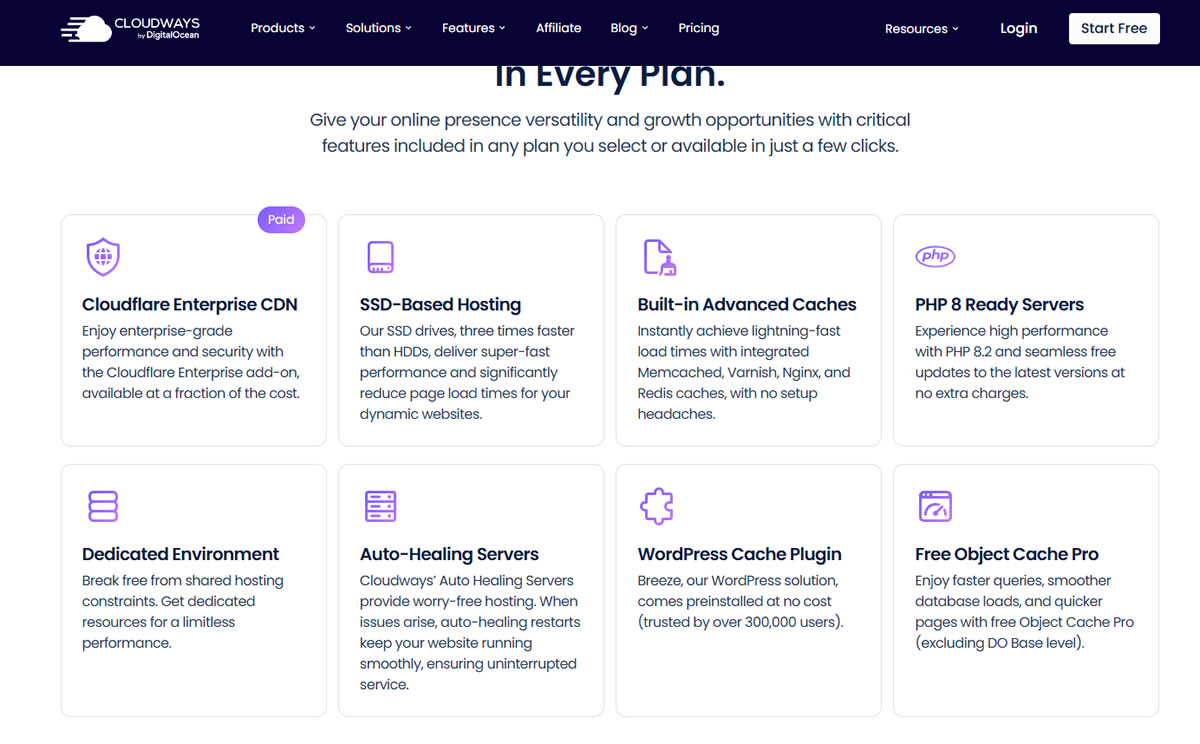
The best host for early-stage SaaS startups is Cloudways – and the reasoning comes down to agility, flexibility, and developer control without the burden of server maintenance.
Cloudways sits on top of leading IaaS providers (like DigitalOcean, Vultr, AWS, and GCP), which gives startups the power to choose their infrastructure provider while enjoying managed server operations. Its pre-configured stack includes Nginx + Apache hybrid architecture, Varnish, Redis caching, and optional Object Cache Pro for WordPress apps. Together, they offer reliable hosting performance out of the box.
More importantly, Cloudways is startup-friendly because of its developer tooling and project collaboration features. Teams can deploy via Git, manage isolated staging environments, use their REST API for automation, and assign role-based access to collaborators – all from a central dashboard. There’s no need to hire a DevOps engineer to get going, but technical teams still retain SSH access and database control.
Its transparent, monthly pricing model starts as low as $11.00 per month, scaling only as your traffic and resource needs grow. For teams building MVPs or launching early-stage platforms, this flexibility is a game-changer: you can ship faster, test freely, and iterate without having to commit to rigid infrastructure decisions up front.
What Is the Best Web Host for WordPress-Based SaaS Products?

If you’re building a SaaS platform on WordPress – whether it’s an LMS, subscription-based tool, scheduling platform, or client portal – Kinsta is the clear choice.
Kinsta is a premium managed WordPress host powered by Google Cloud Platform’s C2 machines and global Premium Tier network. Every site runs in an isolated LXD container, ensuring predictable performance and tight resource boundaries, which is essential for SaaS applications where one user’s traffic shouldn’t affect others.
What really sets Kinsta apart is its developer-focused environment built specifically around WordPress. Features like SSH access, Git integration, WP-CLI, and one-click staging make it easy to push updates and test changes safely. Their built-in APM tool (included on Pro plans and above) helps you identify bottlenecks in real-time, crucial for performance tuning on SaaS apps that serve thousands of dynamic users.
For WordPress-centric SaaS products that demand performance and reliability, Kinsta removes the technical friction without giving up power.
What Is the Best Web Host for Custom Infrastructure and Compliance?

The best web host for SaaS platforms with specialized infrastructure or compliance requirements is LiquidWeb – particularly for businesses that need root-level control, high performance, and enterprise-grade support.
LiquidWeb offers a range of VPS, cloud VPS, and bare metal servers, allowing you to design your hosting environment around your application’s architecture. Whether you’re running Node.js microservices, legacy .NET apps, or custom-built financial platforms, LiquidWeb gives you full root access, the ability to install any OS or stack, and deep configuration control.
It’s also one of the few hosts offering HIPAA and PCI-compliant setups, which is critical for SaaS platforms dealing with medical records, payment processing, or sensitive user data. Their infrastructure includes redundant networking, DDoS protection, and enterprise-grade firewalls — all backed by a 100% network and power uptime SLA.
Support is another major reason LiquidWeb stands out. Their 24/7 Heroic Support™ is handled by experienced technicians who can troubleshoot complex server-level issues. This hands-on, U.S.-based support is a safety net for dev teams managing live production environments.
If you’re launching a compliance-sensitive product or simply need infrastructure that you can customize to the bone, LiquidWeb is the right choice — it’s built for SaaS teams that can’t afford to compromise on uptime or security.
What Is the Best Web Host for Global SaaS Applications?

For SaaS applications targeting users across continents or regions, Kamatera is the top recommendation due to its global infrastructure, instant provisioning, and hyper-granular resource control.
Kamatera operates 18+ data centers across North America, Europe, the Middle East, and Asia-Pacific, allowing SaaS teams to deploy virtual machines near their end-users for reduced latency and improved responsiveness. This is especially important for platforms offering real-time collaboration, financial dashboards, or interactive user portals.
Unlike most managed platforms, Kamatera gives you complete control from the start: you can choose your OS from over 100 images (including Linux distros and Windows Server), configure exact CPU, RAM, and storage amounts, and spin up VMs in under 60 seconds. This level of flexibility is ideal for SaaS companies deploying containerized applications, region-specific services, or distributed microservices.
Kamatera also supports vertical scaling without reboots – you can adjust server specs on-the-fly as traffic grows, without interrupting your app. Combined with hourly billing, root access, and free trial options, it’s a powerful platform for SaaS founders who need to balance global reach with infrastructure precision.
What Is the Best Web Host for Developer-Led SaaS Teams?

The best host for developer-led SaaS teams is DigitalOcean. Its appeal lies in simplicity, scalability, and infrastructure transparency.
With services like App Platform (PaaS), Kubernetes, managed databases, and well-documented APIs, DigitalOcean makes it easy to integrate hosting into your CI/CD pipelines. Developers get full root access, predictable billing, and optional load balancers – all essential for building SaaS products with frequent iterations and tight deployment cycles.
What Is SaaS Hosting?
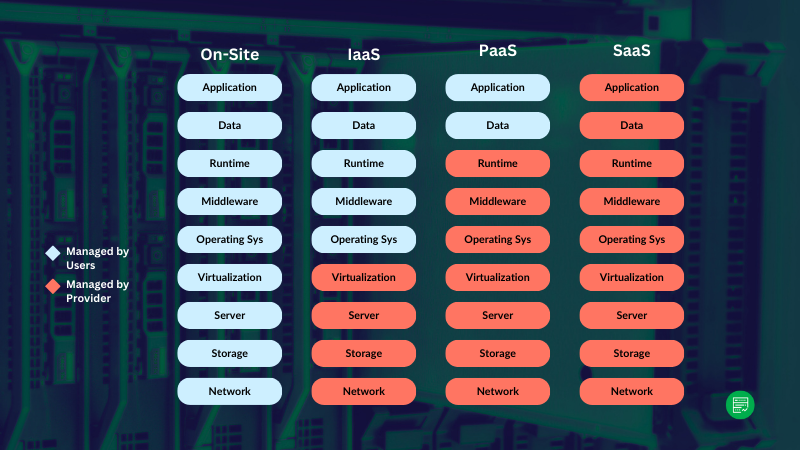
SaaS Hosting refers to the infrastructure and services needed to run Software-as-a-Service applications reliably and securely online. Unlike static websites, SaaS platforms rely on dynamic backend systems, user authentication, databases, APIs, and third-party integrations – requiring more resources, control, and performance from the hosting provider.
How Is SaaS Hosting Different from Standard Web Hosting?
Standard web hosting is built for simpler sites like blogs or brochures, where traffic is predictable and backend processes are minimal. In contrast, SaaS hosting must handle real-time data, logged-in users, high database activity, and scaling under load. It demands higher uptime, deeper server access, development tools, and the ability to scale beyond what shared hosting typically offers.
What Hosting Features Are Important for SaaS Companies?
To run a secure and performant SaaS platform, founders and developers should look for hosting providers that offer:
Hosting architecture and stack
SaaS hosting should support modern tech stacks – whether that’s LAMP, Node.js, Laravel, or WordPress-based platforms. Hosts like Cloudways and Kinsta provide optimized stacks (e.g., Nginx + Apache, MariaDB, PHP 8+) while still offering isolation, caching, and containerization.
Scalability handling
As usage grows, you need infrastructure that can scale vertically (adding more RAM/CPU) or horizontally (adding nodes). Cloud-native solutions like Kamatera and GCP-backed hosts like Kinsta make it easier to handle traffic spikes and expansion.
Server customization and control
For non-standard workloads or compliance requirements, full root access and custom OS installs are essential. LiquidWeb and Kamatera offer strong customization options, letting developers tailor environments to their stack.
Dev tools integration
Staging environments, Git hooks, SSH, CLI, and RESTful APIs are must-haves for developer velocity. Cloudways, DigitalOcean, and Kinsta all include robust dev tools to streamline testing and deployment workflows.
Technical Support
24/7 support is critical when you’re managing a live SaaS product. Kinsta and LiquidWeb are known for high-touch support with quick resolutions, while Cloudways offers live chat with optional premium tiers.
Pricing model
SaaS teams prefer transparent, predictable pricing – especially during MVP and early scaling stages. Providers like Cloudways, Kamatera, and DigitalOcean offer pay-as-you-go options (hourly rate), while Kinsta and LiquidWeb use flat monthly rates with all-inclusive plans.
Different SaaS project requirements
The hosting needs of a lightweight booking tool differ from a HIPAA-compliant medical SaaS. That’s why a flexible hosting stack – with scaling, customization, and support options — is essential for matching your app’s specific workload.
Why Does Hosting Performance Impact SaaS User Retention?
Slow response times, outages, or bottlenecks can immediately erode trust and drive users away from a SaaS product. Performance not only affects SEO and engagement, but also directly influences your user retention and churn rates, especially for platforms that rely on real-time interactions or integrations. If your SaaS app lags or fails under load, users won’t wait around.
Fast hosting, global CDN integration, and containerized environments help maintain speed and stability as traffic scales. Choosing a performance-first host improves user satisfaction and supports long-term growth.
How Do You Measure and Monitor SaaS Hosting Performance?
Measuring and monitoring SaaS hosting performance involves two related but distinct activities:
- Measurement is the act of collecting performance metrics (e.g. uptime, response time, resource usage) to understand how well your hosting environment is handling user traffic and application processes.
- Monitoring involves setting up systems that observe these metrics continuously, alerting you to problems before they affect users — such as downtime, memory leaks, or slow queries.
For SaaS platforms, consistent performance is critical to user satisfaction and churn reduction. Issues like delayed page loads, broken API endpoints, or even intermittent outages can lead to lost trust and revenue. That’s why performance tracking should go beyond simple uptime – you need tools that cover the full stack: front-end speed, server health, database response, and even third-party dependency failures.
Below is a breakdown of tools you can use to monitor and measure performance across different layers of your SaaS stack:
| Tool / Platform | What It Measures / Monitors | Best For |
|---|---|---|
| Pingdom | Uptime, page speed, transaction monitoring | Basic uptime + real user experience insights |
| New Relic | Application performance, database latency, error rates | Deep full-stack monitoring with APM |
| Datadog | Server metrics, logs, infrastructure-level events | Cloud-native apps with complex architectures |
| Kinsta APM | WordPress-specific performance bottlenecks | Kinsta users running SaaS on WordPress |
| Cloudways Monitoring | RAM, CPU, bandwidth usage, alerts | Cloudways users wanting quick server health checks |
| Grafana + Prometheus | Custom dashboards and real-time monitoring | Teams with DevOps setup or custom infrastructures |
| StatusCake | Uptime and basic performance tests | Lightweight uptime monitoring with email/SMS alerts |
| Bitcatcha / WebPageTest | Front-end speed, Core Web Vitals | Measuring UX-related performance bottlenecks |
When integrated properly, these tools can alert you to spikes in error rates, memory exhaustion, long database queries, and other issues that degrade your app’s user experience. For mission-critical SaaS, set performance thresholds and alerts – so you’re notified before users notice something’s wrong.

