Best n8n Hosting Providers for Self-Hosted Workflows
Jerry Low
Updated
/Published
Disclosure: HostScore may earn commissions from our links, and some providers pay for featured placement on selected pages. Testing and performance data are collected independently (see our methodology). Prices are in USD unless stated otherwise.
Table of Content
Ask AI about this page:
ChatGPT
Claude
Perplexity
Grok
Google AI
The best n8n hosting providers for self-hosted workflows are ScalaHosting, Hostinger, and Kamatera.
Choosing the right n8n host depends on a few practical requirements. A suitable provider supports persistent runtime environments (Docker or Node.js), allows open ports for webhooks, allocates predictable CPU and RAM resources, and includes backup or scaling options to keep workflows stable over time.
In our perspective at HostScore, ScalaHostingis the best n8n hosting provider overall for self-hosted workflows.. It delivers a fully managed, one-click n8n deployment with automatic updates, unlimited workflows, and migration assistance, removing most of the friction associated with self-hosting. Hostinger stands out as the best budget option with a pre-installed n8n environment, while Kamatera fits advanced users who need flexible scaling, granular server control, and predictable performance for high-volume workflows.
Compare Best n8n Hosting
Hosting Provider
Starting Price
Key Features
Best For
Pre-installed n8n
ScalaHosting
$29.95/mo
Pre-installed n8n, 500+ workflow template, anytime money back guarantee
Beginners, agencies
Yes
Hostinger
$6.49/mo
Pre-installed n8n, Kodee AI assistant, weekly backups
Beginners, solo developers
Yes
Kamatera
$4.00/mo
Custom VPS configs, vertical scaling, global data centers
ScalaHosting is a proven cloud hosting provider with a long track record of strong server performance. Based on our own testing over the years, ScalaHosting’s cloud servers have consistently handled load and stability tests well, which is an important factor for n8n, where workflow reliability and queue execution matter as much as raw speed.
What sets ScalaHosting apart is its fully managed, one-click n8n deployment. The platform ships with n8n pre-installed, handles version updates automatically, and offers workflow migration assistance, making it one of the easiest ways to self-host n8n today. Plans support unlimited workflows and include 500+ prebuilt workflow templates, giving ScalaHosting a clear advantage for users who want fewer platform limits without managing their own stack.
However, you should pay close attention to pricing behavior. While the entry plan is attractively priced upfront and backed by an anytime money-back guarantee, renewal rates rise sharply to $54.95/month, discounts apply mainly to 12-month terms, and plan upgrades involve large price jumps. ScalaHosting is best suited for beginners and teams who value managed convenience and stability, but it requires cost awareness when scaling.
Fully managed n8n environment with one-click deployment
Renewal pricing increases sharply (entry plan renews at $54.95/month)
Proven cloud server performance based on long-term testing experience
For higher plan, best signup discounts apply only to 12-month terms
Unlimited workflows, unlike n8n Cloud plans
Large upgrade jumps between plans (from $54.95/month to $96.95/month)
500+ prebuilt workflow templates included
Anytime money-back guarantee
2. Hostinger
Website: https://www.hostinger.com/n8n-hosting/
Based on our experience at HostScore, Hostinger is the best budget-friendly option for running n8n. The platform stands out by offering a dedicated n8n VPS plan with n8n pre-installed, allowing users to skip manual setup and start building workflows immediately. This is something very few mainstream VPS providers currently offer.
Hostinger’s n8n VPS plans start at $6.49/mo and provide predictable CPU and RAM allocations, NVMe storage, global data center options, and weekly automated backups. The platform also includes Kodee, an AI assistant that helps with basic VPS configuration and troubleshooting. Combined with a simple VPS dashboard and built-in security features, Hostinger makes self-hosted n8n accessible without heavy sysadmin overhead.
No hourly billing (fixed 24-month term for lowest pricing)
Very affordable pricing with high resource allocations
Limited server control compared to cloud platforms
AI assistant (Kodee) available for server management help
Weekly backups and easy plan upgrades
Global data center availability
3. Kamatera
Website: https://www.kamatera.com/
Kamatera is a veteran cloud infrastructure provider offering fully customizable VPS hosting with flexible hourly or monthly billing. Unlike fixed-package hosts, Kamatera lets you build your VPS from the ground up — selecting CPU cores (starting from 1 to 32+), RAM, SSD storage, and your preferred OS during deployment.
Kamatera is ideal for developers running advanced n8n setups or scaling client workloads. You can start with a minimal instance and upgrade resources instantly as your automation usage grows. Their platform supports Docker and Node.js, offers root access, and includes a powerful cloud management dashboard. Data centers across the US, Europe, Asia, and the Middle East give you low-latency options for global workflows.
With 24/7 human support and a 30-day free trial (up to $100 in usage), Kamatera is a top choice for experienced users who want full control without vendor limitations.
More complex for beginners without cloud experience
Hourly or monthly billing options
Global data center coverage
4. RoseHosting
Website: https://www.rosehosting.com/
RoseHosting is a US-based managed hosting provider known for its personalized technical support and Linux-focused VPS offerings. Founded in 2001, RoseHosting is one of the few providers that include direct sysadmin support with all managed VPS plans (no outsourcing, no chatbots).
For developers or teams who want to self-host n8n but prefer not to manage updates, firewalls, or runtime errors themselves, RoseHosting offers a fully managed experience. Their support team will install and configure n8n for you and take care of system-level patching, backups, and performance tuning.
This makes RoseHosting a strong choice for agencies, small businesses, or automation consultants who want VPS-level control without managing server ops internally.
Limited global data center reach (primarily US-based)
No control panel clutter
SSD-powered servers with optional daily backups
99.99% uptime guarantee
5. DigitalOcean
Website: https://www.digitalocean.com/
DigitalOcean is a developer-focused cloud platform that offers scalable virtual machines (“Droplets”) with predictable pricing and full root access. The platform allocates dedicated CPU and RAM resources, supports Docker and Node.js out of the box, and gives users complete control over how n8n is deployed and scaled.
DigitalOcean works best for users who are comfortable managing infrastructure. You can start with a small Droplet (1 vCPU, 512 MB RAM for $4/mo) and scale vertically or horizontally as workflow volume increases. Features like hourly billing, load balancers, volume storage, and private networking make it suitable for advanced n8n setups and multi-instance architectures.
DigitalOcean does not provide n8n pre-installed or managed updates. Setup, maintenance, and troubleshooting remain the user’s responsibility. For developers who want flexibility and transparent billing, DigitalOcean is a strong option. For beginners or teams seeking a managed experience, it requires more operational effort.
Full developer control with API, CLI, and integrations
Higher operational overhead for non-technical users
Strong documentation and user community
Global data center availability
6. n8n Cloud
Website: https://n8n.io/pricing/
n8n Cloud is the official hosted service operated by the n8n team. It provides a ready-to-use n8n environment with all maintenance, security, and scaling handled by the vendor. For teams who want to use n8n without touching a server, this is the most convenient option.
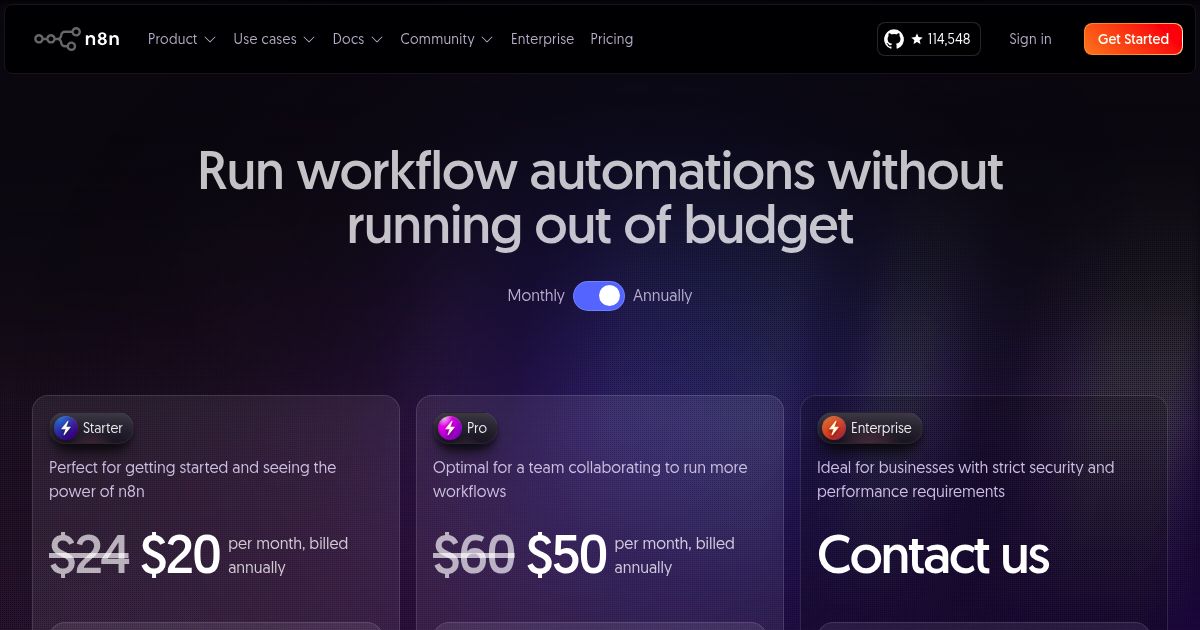
The Starter plan begins at $20/month for 2,500 workflow executions and 5 active workflows, while the Pro plan offers 10,000 executions and 15 active workflows for $50/month. Higher limits and unlimited workflows are only available via custom-priced Enterprise plans.
Although n8n Cloud isn’t a self-hosted solution in the strict sense, it’s a useful benchmark for comparing pricing and value.
Pros
Cons
Zero setup and maintenance required
Higher cost per execution compared to VPS
Hosted by the official n8n team
Workflow and execution limits on Starter and Pro plans
Regular updates, support, and security included
No server-level customization or control
Great for teams who want reliability without ops overhead
Comparison among the Best n8n Hosting Providers
With self-hosted n8n, there’s no one-size-fits-all solution. The best hosting provider depends on your technical experience, workload intensity, and whether you’re managing automation for yourself or clients.
Hosting Provider
Starting Price
Key Features
Best For
Pre-installed n8n
ScalaHosting
$29.95/mo
Pre-installed n8n, 500+ workflow template, anytime money back guarantee
Beginners, agencies
Yes
Hostinger
$6.49/mo
Pre-installed n8n, Kodee AI assistant, weekly backups
Beginners, solo developers
Yes
Kamatera
$4.00/mo
Custom VPS configs, vertical scaling, global data centers
ScalaHostingis the best n8n hosting provider for beginners overall, followed closely by Hostinger for budget users. ScalaHosting removes nearly all setup and maintenance work by offering a fully managed, one-click n8n deployment with automatic updates, workflow migration assistance, backups, and unlimited workflows. This makes it ideal for users who want to self-host n8n without managing Docker, Node.js, or server security.
Hostinger is a strong alternative for beginners who want lower entry pricing (starting at $6.49/mo) and more hands-on control. It offers n8n pre-installed on VPS plans, visual resource monitoring, simple OS reinstalls, and weekly automated backups. The included AI assistant, Kodee, helps guide basic VPS tasks, making Hostinger a good fit for users comfortable managing a lightweight server environment.
What Is the Best n8n Host for Agency and Client Automation?
ScalaHosting and RoseHosting are the strongest options for agency and client automation use cases. ScalaHosting works well for agencies that want predictable performance, managed updates, and scalability without operational overhead. Its cloud infrastructure has proven stable under load, and the managed environment allows teams to focus on building and maintaining workflows instead of infrastructure.
RoseHosting remains a solid choice for agencies that prefer traditional fully managed VPS hosting with hands-on technical support. Its team handles n8n installation, server optimization, and backend maintenance, making it suitable for client-facing automation projects where uptime and support responsiveness matter more than granular server control.
What Is the Best n8n Host for Heavy Workflow Execution?
If you’re running large-scale automations, such as data integrations, multi-step jobs, or webhook-heavy pipelines, then DigitalOcean and Kamatera are the top picks.
DigitalOcean offers high-performance VPS (called Droplets) with SSD / NVMe SSD storage, private networking, and horizontal scaling features like load balancers and floating IPs. For developers comfortable with infrastructure, you can create multiple Droplets to split workloads by function or client, then connect them to a shared Postgres database or remote storage. This horizontal approach lets you run large volumes of concurrent workflows without overloading a single node.
Kamatera, on the other hand, specializes in real-time vertical scaling. You can increase CPU, RAM, or SSD storage instantly without restarting your server, a huge advantage when handling bursty or growing automation workloads. This makes Kamatera especially useful for production systems where uptime is critical and workflows may unpredictably increase in size or complexity.
What Is the Best n8n Host with Pre-Installed Environment?
ScalaHostingand Hostingerare the two best n8n hosts offering pre-installed environments. ScalaHosting provides a fully managed n8n setup with automatic updates, built-in backups, workflow templates, and migration support, making it the easiest option for long-term production use. Hostinger offers a pre-installed n8n VPS at a lower cost, giving users quick access to a working environment while retaining more control over the server.
What Is the Most Affordable VPS for Running n8n?
Hostinger offers the most budget-friendly entry point to run n8n reliably. The KVM 1 plan includes 1 vCPU, 4 GB RAM, and 50 GB NVMe SSD storage for just $4.99/month. This is sufficient for most lightweight workloads and includes essential features like backups, global data centers, and easy upgrades – all at a price point lower than most competitors.
Which Provider Offers the Easiest Scaling for n8n Workflows?
Kamatera leads in ease of scaling. You can upgrade CPU, RAM, and storage instantly via their control panel without reinstalling or migrating your instance. This is particularly valuable for automation platforms like n8n, where demand can spike quickly based on active integrations or webhook triggers.
n8n Self-Hosted Pricing
When evaluating n8n hosting costs, the decision often comes down to long-term workflow volume and how comfortable you are managing infrastructure. A basic VPS suitable for light workloads typically starts around $4 to $10 per month, while managed VPS plans begin closer to $25 to $40 per month. In contrast, n8n Cloud charges $20/month for 2,500 executions and $50/month for 10,000 executions – which can add up quickly for active users.
Below is a breakdown of pricing across common usage scenarios:
Use Case
Recommended Option
Estimated Monthly Cost
Notes
Testing / Learning
Hostinger KVM1 VPS
$4.99
Pre-installed n8n, low commitment, ideal for beginners
Startup / Solo Dev
Hostinger KVM2 / DO 1GB
$6 – 12
More RAM for testing webhooks, external APIs
Small Team (moderate volume)
n8n Cloud Starter Plan
$20
2.5k executions, 5 active workflows, no server setup required
Growing App / Client Work
Kamatera 2vCPU or DO 2GB
$18 – 24
Scales well with persistent workflows and external DB
High-volume Automations
Kamatera 4–8vCPU / n8n Cloud Enterprise
$40 – 150+
Kamatera offers real-time scaling; Cloud Enterprise requires contact for pricing
Beware of Hidden Costs Associated with Self-Hosting n8n
Self-hosting offers flat, predictable pricing, but there are additional costs to be aware of. For instance, DigitalOcean’s one-click n8n Marketplace app spins up a 2 GB Droplet by default, costing $12/month, even though lighter workloads could run on a $4/month instance. This kind of preset sizing is convenient but not always cost-efficient. Similarly, if you opt for a managed PostgreSQL database or add backups, monitoring, or scaling tools like load balancers, your monthly spend can easily double.
There are also setup-related costs. To secure your n8n instance in production, you’ll likely need a domain name (about $10 – 15/year) and an HTTPS setup using Let’s Encrypt, which requires configuring a reverse proxy like NGINX. And once deployed, you’re responsible for keeping your OS, n8n version, and dependencies up to date, along with monitoring resource usage and uptime. These aren’t deal-breakers, but they do require time and technical confidence.
In short, self-hosting is clearly the most cost-effective option over time. But its true cost includes more than just your VPS invoice. If you’re willing to manage your own server stack, the savings can be substantial. If not, a managed provider or n8n Cloud may be worth the premium for peace of mind.
Do I Need a Domain Name to Host n8n?
You don’t need a domain name to host n8n, but having one is strongly recommended. Hosting n8n on a domain allows you to easily configure SSL certificates, access your workflows via HTTPS, and set up clean webhook URLs (e.g., https://n8n.yourdomain.com/webhook/test). It also simplifies reverse proxy setup when using NGINX or Apache. While you can access your n8n instance via IP address, using a domain improves security, maintainability, and user access.
What Database Should I Use with Self-Hosted n8n?
The recommended database for self-hosted n8n is PostgreSQL. While n8n defaults to SQLite, it’s not ideal for production workloads due to its limited concurrency and file-based architecture. PostgreSQL provides better data integrity, allows for simultaneous writes, and handles large datasets more efficiently (essential for automations that depend on frequent data storage).
Using Postgres also allows you to scale across multiple n8n nodes while maintaining consistent workflow state and execution logs, which is critical if you plan to scale horizontally.
What to Look for in a Hosting Provider for n8n?
Choosing a hosting provider for self-hosted n8n goes beyond checking RAM and CPU. A good provider should support your automation needs across setup, scalability, reliability, and ongoing management.
Here’s what to prioritize:
Open networking and port access: n8n requires exposed ports to handle webhook calls. Your VPS must allow full control over inbound and outbound traffic.
Support for Docker or Node.js: n8n can run in either environment. Your provider should allow package installation, container runtimes, and persistent storage.
Backup options: Look for automatic or easily configurable backups to avoid data loss.
Scalability: You should be able to upgrade resources (CPU/RAM/disk) without downtime or complex migrations.
Security tools: Providers that offer built-in firewalls, DDoS protection, and SSH hardening save you configuration time.
Data center locations: Hosting near your users or systems improves latency for webhooks and API calls
What is n8n?
n8n is an open-source, node-based workflow automation tool that allows users to connect APIs, services, and apps to automate complex tasks. Unlike tools like Zapier or Make, n8n is self-hostable, fully extensible, and supports custom logic and third-party integrations without vendor restrictions.
I’ve built entire business workflows using n8n. It gave me the power and flexibility of a custom-built automation stack, without writing code for every piece. The highlight is how we automated customer inquiries via WhatsApp – it’s fast, personal, and works around the clock.
It supports both a visual interface for building workflows and a powerful backend for developers. Workflows can be triggered by events, time schedules, or webhooks, and executed locally or via hosted solutions. Because of its open-source license and high flexibility, n8n is widely adopted among developers, SaaS teams, and automation-focused agencies.
Final Verdict: Which n8n Hosting Should You Choose?
In our perspective at HostScore, ScalaHosting is the best n8n hosting option overall. It delivers a fully managed, one-click n8n environment with proven cloud performance, unlimited workflows, and built-in updates, making it the easiest and most stable choice for beginners, teams, and agencies that want to self-host without operational overhead.
Hostinger is the best budget-friendly alternative. Its pre-installed n8n VPS plans offer fast setup and strong resource value at low entry pricing, making it ideal for users who want to self-host affordably and are comfortable managing a basic server. Kamatera and DigitalOcean are better suited for advanced users who need full control over scaling, architecture, and infrastructure design.
No matter your experience level, choosing the right n8n host sets the foundation for workflow stability, execution reliability, and long-term cost efficiency. If you need help deciding, reach out to us for a free consultation. We’ll help match your n8n setup to your workflow needs, budget, and technical stack.
About the Author: Jerry Low
Jerry Low has more than 20 years of experience building and hosting websites. He founded HostScore to turn that hands-on experience into practical hosting reviews based on uptime monitoring, speed measurements, latency checks, and load testing.
More from HostScore
Find a Web Host Backed by Real Test Data
HostScore reviews web hosts using TTFB, uptime, load test results, latency, and Core Web Vitals. Our Web Hosting Finder combines these findings with your website type, expected traffic, and budget to recommend suitable options.
See why each host fits your needs, which limitations to check, and what trade-offs to expect.
To provide the best experiences, we use technologies like cookies to store and/or access device information. Consenting to these technologies will allow us to process data such as browsing behavior or unique IDs on this site. Not consenting or withdrawing consent, may adversely affect certain features and functions.
Functional
Always active
The technical storage or access is strictly necessary for the legitimate purpose of enabling the use of a specific service explicitly requested by the subscriber or user, or for the sole purpose of carrying out the transmission of a communication over an electronic communications network.
Preferences
The technical storage or access is necessary for the legitimate purpose of storing preferences that are not requested by the subscriber or user.
Statistics
The technical storage or access that is used exclusively for statistical purposes.The technical storage or access that is used exclusively for anonymous statistical purposes. Without a subpoena, voluntary compliance on the part of your Internet Service Provider, or additional records from a third party, information stored or retrieved for this purpose alone cannot usually be used to identify you.
Marketing
The technical storage or access is required to create user profiles to send advertising, or to track the user on a website or across several websites for similar marketing purposes.