The best OpenClaw hosting providers, based on our research, are Cloudways, Atlantic.Net, and Hostinger.
Cloudways is our top overall choice because it manages deployment, infrastructure, security updates, backups, and OpenClaw versioning while retaining terminal access and model flexibility. Atlantic.Net ranks second for its one-click deployment, full server control, BYOM support, and potential path to GPU infrastructure. Hostinger, on the other hand, provides a lower-cost starting point for beginners and budget users.
OpenClaw works best in a separate VPS or managed cloud environment instead of your personal computer. An isolated server keeps the agent online around the clock, separates it from your local network, and provides a safer environment for storing API keys, connecting external services, and testing automated workflows.
Side-by-side Comparison
| Host | Best For | OpenClaw Setup | Starting Cost | Server Type | Key Advantage | Main Limitation |
|---|---|---|---|---|---|---|
| Cloudways | Best overall | Managed OpenClaw deployment | $4.99/mo | Managed cloud | Managed updates, backups, support, and model flexibility | Costs (2x) more than an unmanaged VPS |
| Atlantic.net | Advanced projects and future GPU workloads | One-click OpenClaw application | – | Cloud | One-click OpenClaw deployment, BYOM support | Pricing not displayed publicly; users manage updates, backups, and application health |
| Hostinger | Beginners and budget users | One-click OpenClaw VPS template | $6.49/mo | VPS | Low cost and simple onboarding | Still requires basic VPS management |
| Kamatera | Flexible scaling | Cloud VPS deployment | $4.00/mo | Cloud VPS | Customizable CPU, RAM, storage, and region | More self-service unless managed support is added |
| ClawHost | Users who do not want to manage a server | Purpose-built OpenClaw platform | $25.00/mo | Managed platform | OpenClaw-specific managed experience | Smaller provider with a shorter track record |
| DigitalOcean | DIY developers | 1-Click App, Droplet, or App Platform | $4.00/mo | Cloud | Clean developer workflow and strong documentation | Users manage security and server maintenance |
| Alibaba Cloud | Qwen users | Ready deployment with Model Studio | Flexible hourly pricing | Cloud | Natural integration with Qwen and Alibaba’s AI ecosystem | Confusing interface and greater friction with other models |
1. Cloudways

Website: https://cloudways.com/en/managed-ai-agents/openclaw.php
Cloudways is a managed cloud hosting platform that now provides purpose-built OpenClaw hosting. The service manages server deployment, security updates, backups, SSL certificates, and OpenClaw versioning while retaining terminal access and support for external AI models.
What Makes Cloudways Great for Hosting OpenClaw?
Cloudways is our top OpenClaw hosting pick because it removes most server maintenance without locking users into one AI model. Users can deploy OpenClaw in under two minutes without manually configuring Docker, networking, SSL, or the runtime stack.
The platform also validates OpenClaw updates before deploying them. Automated backups with one-click restoration provide a recovery point if an update, integration, or configuration change causes problems.
Model flexibility is another advantage. Cloudways supports bring-your-own-key access for major LLM providers, including Claude, OpenAI, and Gemini. Users can also choose their server region to improve response times or meet data-residency requirements.
Power users retain terminal access for OpenClaw CLI commands, file transfers, debugging, and custom integrations. We use Cloudways to host HostScore.net, and our experience with its support team has been consistently positive, especially when troubleshooting server and application-stack issues.
The trade-off with Cloudways is cost and responsibility. Cloudways costs more than a basic unmanaged VPS, while LLM usage is billed separately by the selected model provider. Users must also manage their API keys, agent skills, nodes, workflows, and usage limits. Cloudways manages the infrastructure layer but leaves the agent configuration to the user.
Learn more in our Cloudways review.
Cloudways OpenClaw Hosting Pros & Cons
Pros
- Managed OpenClaw deployment in under two minutes
- Validated OpenClaw updates
- Automatic security updates
- Automated backups with one-click restoration
- Bring-your-own-key support for major AI models
- Choice of server region
- Terminal access for advanced configuration
- Strong developer-focused support based on our experience
Cons
- Costs more than an unmanaged VPS
- LLM usage is billed separately
- Users still manage API keys, skills, nodes, and workflows
- Dashboard-based messaging support currently focuses on WhatsApp and Slack
- Not intended for users who want fully self-managed server infrastructure
2. Atlantic.Net

Website: https://www.atlantic.net/cloud-platform/openclaw-hosting
Atlantic.Net is a Florida-based cloud provider that combines one-click OpenClaw deployment with full server administration. It is a strong choice for technical teams that want a prepared OpenClaw environment today and a path to GPU infrastructure as their AI workloads grow.
Why Is Atlantic.Net a Good Fit for OpenClaw?
Atlantic.Net is a good fit for OpenClaw because it removes most of the setup work without restricting server-level control. Its one-click application deploys OpenClaw on a prepared cloud server, so users do not need to install the operating system, Node.js runtime, and base application manually.
Atlantic.Net also supports bring-your-own-model access, allowing users to connect OpenAI, Anthropic, OpenRouter, or another OpenClaw-compatible provider. In our view, its H100 NVL and L40S GPU hosting (starting at $4,729.44/mo) provides a valuable scaling path for projects that may later require local model inference, fine-tuning, or other GPU-intensive workloads.
The main trade-off we see is that OpenClaw remains self-managed after deployment. Users handle onboarding, updates, application monitoring, backups, credentials, and integrations themselves.
Learn more in our Atlantic.Net review.
Atlantic.Net OpenClaw Hosting Pros & Cons
Pros
- One-click OpenClaw application deployment
- No manual OS, Node.js, or base application installation
- Root-level server and networking access
- Bring-your-own-model support
- Strong upgrade path for advanced AI workloads, including NVIDIA L40S and H100 NVL GPU hosting options
Cons
- OpenClaw remains self-managed after deployment
3. Hostinger

Website: https://www.hostinger.com/openclaw
Hostinger is a global web hosting company known for affordable shared hosting, VPS hosting, and beginner-friendly control panels. For OpenClaw users, Hostinger stands out because it offers a one-click OpenClaw VPS deployment path, low entry pricing, and a cleaner onboarding experience than most unmanaged cloud providers.
What Makes Hostinger Great for Hosting OpenClaw?
Hostinger is our top OpenClaw hosting pick because it reduces the two biggest problems beginners face: setup friction and server cost. The OpenClaw template helps users deploy the application faster, while Hostinger’s VPS plans provide enough room to run an always-on agent without starting on expensive cloud infrastructure.
Hostinger also gives users a more approachable VPS management experience. Its hPanel interface, Docker Manager, backups, and AI assistant support make the platform easier for non-sysadmins. This matters because OpenClaw users are often AI builders, founders, marketers, or automation users — not necessarily Linux server experts.
Keep in mind though – Hostinger is not a fully managed OpenClaw platform. You still need to manage API keys, model providers, security settings, and basic VPS maintenance. But for most users, it offers the best balance between price, simplicity, and control.
Learn more in our Hostinger review.
Hostinger OpenClaw Hosting Pros & Cons
Pros
- One-click OpenClaw deployment
- Low VPS pricing
- Beginner-friendly hPanel interface
- Docker Manager support
- Good fit for first-time OpenClaw users
- Easier than most cloud VPS dashboards
Cons
- Not fully managed
- Users still need basic VPS security knowledge
- Renewal pricing should be checked before purchase
- Less flexible than cloud platforms like Kamatera
4. Kamatera

Website: https://www.kamatera.com/
Kamatera is a cloud infrastructure provider that offers customizable cloud VPS servers across multiple global data centers. It is a strong OpenClaw hosting option for users who want flexible CPU, RAM, storage, and billing choices instead of fixed VPS packages.
Why Kamatera is a Good Fit for OpenClaw?
Kamatera is a good fit for OpenClaw because it lets users scale the server around the workload. A light personal assistant can start with modest resources (more about OpenClaw server requirement below), while heavier browser automation, multi-channel workflows, or more complex agent tasks can move to higher CPU and RAM allocations.
Kamatera also gives technical users more control over location, operating system, server sizing, and billing. This makes it a better long-term choice for users who expect their OpenClaw setup to grow beyond simple testing.
The trade-off is usability. Kamatera is more self-service than Hostinger and less OpenClaw-specific than ClawHost. It works best for users who are comfortable with VPS setup, SSH, firewall rules, and cloud server management.
Learn more in our Kamatera review.
Kamatera OpenClaw Hosting Pros & Cons
Pros
- Highly flexible cloud VPS configuration
- Hourly and monthly billing options
- Scalable CPU, RAM, and storage
- Good global data center coverage
- Suitable for growing OpenClaw workloads
Cons
- Less beginner-friendly
- More self-service setup
- Managed support costs extra
- Not as guided as Hostinger or ClawHost
5. ClawHost

Website: https://www.clawhost.cloud
ClawHost is a hosting platform built specifically for OpenClaw users. Unlike general VPS providers, ClawHost focuses on managed OpenClaw hosting, always-on agent access, long-term memory, multi-channel use, and built-in AI credits.
What Makes ClawHost a Good Fit?
ClawHost is the easiest option for users who want OpenClaw without managing a Linux server. The platform removes much of the setup burden and packages the hosting experience around OpenClaw itself, not general-purpose VPS administration. In result, this makes ClawHost attractive for business users, non-technical users, and anyone who wants to start using OpenClaw quickly. It is also useful for users who value convenience more than infrastructure flexibility (that include us here at HostScore).
The main concern with ClawHost, however, is maturity. ClawHost is more expensive than budget VPS hosting and has a shorter business track record than any other hosts we review on this page. For users who want maximum control, a standard VPS may still be the safer long-term choice.
ClawHost OpenClaw Hosting Pros & Cons
Pros
- Built specifically for OpenClaw
- Easiest managed OpenClaw option
- Includes OpenClaw-focused features
- Good for non-technical users
- Reduces server setup work
Cons
- More expensive than VPS hosting
- Smaller and less proven provider
- Less infrastructure flexibility
- Potential platform dependency
6. DigitalOcean

Website: https://www.digitalocean.com/
DigitalOcean is a developer-focused cloud provider known for Droplets, App Platform, managed databases, and strong technical documentation. For OpenClaw users, DigitalOcean offers a clean deployment path through Droplets, 1-Click Apps, or App Platform.
Why Use Digital Ocean for Hosting Open Claw?
DigitalOcean is a good OpenClaw host for developers because it gives users a familiar cloud environment without the complexity of larger enterprise platforms. Users can start with a Droplet, control the server directly, and expand later if they want a more structured deployment flow.
DigitalOcean’s documentation is another advantage. Users who are comfortable reading tutorials and working with cloud servers will likely find the OpenClaw setup path clear enough, especially compared with less familiar platforms.
The key downside with Digital Ocean is support and hand-holding. The company gives users strong tools, but it does not feel as beginner-friendly as Hostinger or as OpenClaw-specific as ClawHost. It is a better fit for technical users than casual AI users.
Learn more in our Digital Ocean review.
Digital Ocean OpenClaw Hosting Pros & Cons
Pros
- Good developer experience
- 1-Click OpenClaw deployment path
- Strong documentation
- Flexible Droplet and App Platform options
- Good fit for technical users
Cons
- Less beginner-friendly
- Users manage their own server security
- Cloud options may confuse non-technical users
7. Alibaba Cloud

Website: https://www.alibabacloud.com/
Alibaba Cloud is a major cloud provider with strong infrastructure across Asia and deep integration with Alibaba’s AI ecosystem. For OpenClaw users, it offers ready deployment options and a natural pairing with Qwen through Alibaba Model Studio.
What Makes Alibaba Cloud a Good Fit for OpenClaw?
Alibaba Cloud is worth considering if you already want to use Qwen or Alibaba’s AI tools. The OpenClaw setup path can be convenient when you stay inside the Alibaba ecosystem, especially if your workflow depends on Qwen models or Asia-region infrastructure.
However, Alibaba Cloud is harder to recommend as a general OpenClaw host. In our own setup, the server deployment process was not the biggest issue. The harder part was pairing OpenClaw with the preferred LLM provider and understanding how to move away from the default Qwen-oriented workflow.
Alibaba Cloud does not technically limit OpenClaw to Qwen, but its guided experience feels strongly optimized around Model Studio and Alibaba’s own AI stack. Users who want OpenAI, Claude, Gemini, OpenRouter, or another provider may need to configure OpenClaw manually instead of relying on the default path.
Alibaba Cloud OpenClaw Hosting Pros & Cons
Pros
- Good fit for Qwen users
- Ready OpenClaw deployment options
- Strong Alibaba ecosystem integration
- Useful for developers who are familiar with China or Asia-focused infrastructure
- Competitive pricing in some cases
Cons
- Confusing UX for international users
- Qwen-centric setup experience
- Harder to switch model providers
- Support flow may feel unfamiliar
- Not the best first choice for beginners
Setting up hosting can be confusing. That’s why we created HostScore Setup Help, a done-for-you service for getting your hosting configured the right way.
We help with SSL installation, DNS & nameserver setup, WordPress install or migration, and security tuning. One-time fee. Backed by a 100% refund guarantee.
Explore Our ServicesWhich OpenClaw Host Should You Choose?
| Host | Best For | OpenClaw Setup | Starting Cost | Server Type | Key Advantage | Main Limitation |
|---|---|---|---|---|---|---|
| Cloudways | Best overall | Managed OpenClaw deployment | $4.99/mo | Managed cloud | Managed updates, backups, support, and model flexibility | Costs (2x) more than an unmanaged VPS |
| Atlantic.net | Advanced projects and future GPU workloads | One-click OpenClaw application | – | Cloud | One-click OpenClaw deployment, BYOM support | Pricing not displayed publicly; users manage updates, backups, and application health |
| Hostinger | Beginners and budget users | One-click OpenClaw VPS template | $6.49/mo | VPS | Low cost and simple onboarding | Still requires basic VPS management |
| Kamatera | Flexible scaling | Cloud VPS deployment | $4.00/mo | Cloud VPS | Customizable CPU, RAM, storage, and region | More self-service unless managed support is added |
| ClawHost | Users who do not want to manage a server | Purpose-built OpenClaw platform | $25.00/mo | Managed platform | OpenClaw-specific managed experience | Smaller provider with a shorter track record |
| DigitalOcean | DIY developers | 1-Click App, Droplet, or App Platform | $4.00/mo | Cloud | Clean developer workflow and strong documentation | Users manage security and server maintenance |
| Alibaba Cloud | Qwen users | Ready deployment with Model Studio | Flexible hourly pricing | Cloud | Natural integration with Qwen and Alibaba’s AI ecosystem | Confusing interface and greater friction with other models |
Which OpenClaw Host Is Best Overall?

Cloudways is our choice of best overall OpenClaw host because the platform combines managed infrastructure with useful technical control. It handles deployment, SSL, security updates, validated OpenClaw releases, automated backups, and server maintenance. Users retain terminal access, region choice, and the freedom to connect their preferred AI model.
This site you are reading (HostScore.net) itself is hosted on Cloudways, and we have been happy with its performance and technical support. Its support team has been particularly helpful with server and application-stack issues. While the managed OpenClaw service is newer, our broader experience with Cloudways gives us more confidence in recommending it.
Which OpenClaw Host Is Best for Beginners?

Hostinger is the best OpenClaw host for beginners because it reduces setup friction. The platform gives users a simpler VPS dashboard, OpenClaw deployment support, and a more guided hosting experience than developer-first cloud providers.
Beginners still need to understand the basics. OpenClaw connects to external tools, files, browsers, and LLM providers, so users should protect API keys, enable backups, and avoid exposing unnecessary ports. Hostinger does not remove those responsibilities, but it makes the server side easier to manage.
Which OpenClaw Host Is Best for Flexible Scaling?
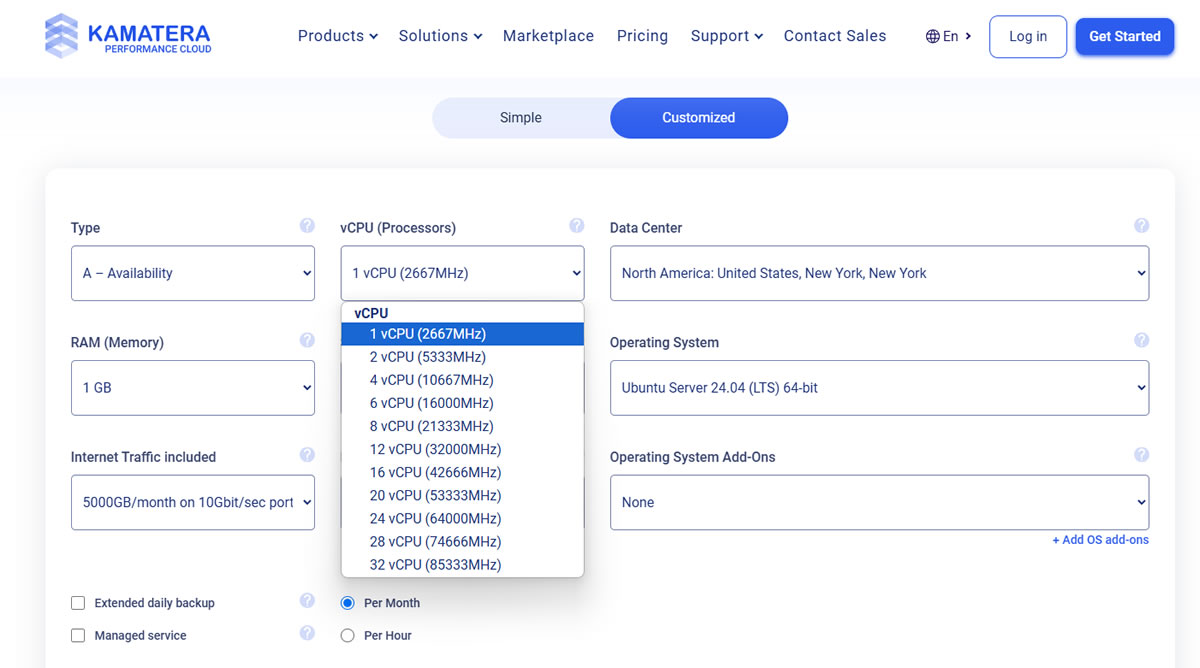
Kamatera is the best OpenClaw host for flexible scaling because it lets users configure CPU, RAM, storage, and billing more precisely. This is useful if your OpenClaw workload may grow from light testing into heavier automation.
A small OpenClaw setup may only need modest VPS resources. A busier setup with browser automation, multiple channels, or heavier background tasks may need more RAM and CPU. Kamatera gives users more room to adjust those resources without moving to a completely different platform.
Which OpenClaw Host Is Best If You Do Not Want to Manage a Server?

Cloudways and ClawHost are the best options for running OpenClaw without managing a Linux server.
Cloudways manages server provisioning, OpenClaw deployment, SSL, security updates, backups, and version updates. Users can launch and manage the agent through its dashboard without configuring Docker or the underlying server. Terminal access remains available for advanced configuration and debugging.
ClawHost, on the other hand, provides a more OpenClaw-specific experience. Its purpose-built platform suits non-technical users and teams that prefer agent management over general cloud-server administration.
From our perspective, Cloudways is the stronger choice if you value an established hosting platform, managed infrastructure, and experienced technical support. ClawHost is worth considering if you prefer a smaller platform built entirely around OpenClaw. Its main trade-offs are higher pricing than standard VPS hosting and a shorter operating history.
Which OpenClaw Host Is Best for Developers?
Cloudways is the best OpenClaw host for developers who want terminal access and technical support without managing the entire server. It provides access for OpenClaw CLI commands, file transfers, custom integrations, and agent debugging while managing deployment, security updates, backups, and OpenClaw versioning. Based on our experience hosting HostScore on Cloudways, its technical support is particularly useful when server or application-stack problems require deeper troubleshooting.
Atlantic.Net is better for advanced developers who need root-level control over networking, operating-system policies, monitoring, storage, and backups. Its L40S and H100 NVL hosting also makes it worth considering for projects that may later require GPU infrastructure.
DigitalOcean suits developers who prioritize lower infrastructure costs and a fully self-managed workflow. Developers can use a Droplet for direct server control, but they must take greater responsibility for deployment, security, updates, backups, and troubleshooting.
Which OpenClaw Host Is Best for Qwen?

Alibaba Cloud is the best OpenClaw host for Qwen users because its OpenClaw workflow connects naturally with Alibaba Model Studio and Qwen models. If your preferred LLM is Qwen, Alibaba Cloud can make that pairing easier than starting from a neutral VPS provider.
The drawback is model flexibility and user experience. Alibaba Cloud does not technically lock OpenClaw to Qwen, but its guided setup feels strongly optimized around Alibaba’s own AI stack. Users who want OpenAI, Claude, Gemini, OpenRouter, or other providers may find Hostinger, Kamatera, or DigitalOcean easier to configure.
Which OpenClaw Host Gives the Best Model Flexibility?

Cloudways and Atlantic.Net both provide the best model flexibility, but they suit different levels of technical involvement.
Cloudways combines BYOK support with a managed OpenClaw environment. Users can add or replace API keys for major LLM providers through its dashboard, while more advanced users can configure other OpenClaw-compatible models through terminal access.
Atlantic.Net, on the other hand, provides greater control over the model environment. Their platform supports customer-supplied model providers and includes root-level access for custom networking, operating-system policies, and model configurations.
Which OpenClaw Host Is Best for Projects That May Need GPU Infrastructure?

Atlantic.Net is the best choice for OpenClaw projects that may eventually require GPU infrastructure. Users can begin with its one-click OpenClaw deployment on a standard cloud server, then consider Atlantic.Net’s L40S or H100 NVL hosting for local model inference, fine-tuning, or other GPU-intensive workloads.
Most OpenClaw users connecting to external models through API keys will not need a GPU server. However, Atlantic.Net provides a stronger long-term infrastructure path for businesses, developers, and AI teams that expect their workloads to grow beyond a standard OpenClaw gateway.
What Makes a Good OpenClaw Hosting Provider?
A good OpenClaw hosting provider should isolate the agent, keep it available 24×7, and make updates and recovery manageable. It should also provide enough server resources, model flexibility, technical support, and control for your intended workload.
OpenClaw connects to AI models, messaging platforms, browsers, files, and external services. This makes security, backups, data location, and update management just as important as price or server specifications.
How Should the Host Protect Your OpenClaw Agent?
A secure OpenClaw host should run the agent on isolated VPS, cloud, or container infrastructure. This keeps the agent separate from your personal computer, office network, and other hosting customers.
Check for hosting-account 2FA, SSH key access, firewall controls, DDoS protection, and SSL or TLS support. OpenClaw access should also be protected through Gateway authentication, device pairing, user restrictions, and carefully limited tool permissions.
SSL only encrypts the connection to your OpenClaw interface. It does not protect exposed API keys, excessive agent permissions, or an incorrectly configured Gateway.
How Easy Is OpenClaw to Deploy and Restore?
A good OpenClaw host should provide a one-click application, preconfigured server image, or managed deployment process. This reduces the work required to configure Docker, networking, ports, dependencies, and service restarts.
The host should also provide automated backups or server snapshots. Cloudways, for example, includes automated backups with one-click restoration for its OpenClaw service. This gives users a recovery point after a failed update, configuration error, or broken integration.
Backup frequency and retention still matter. Check how often the host creates backups, how long it retains them, and whether restoration replaces the entire server or only selected OpenClaw data.
How Much CPU and RAM Does OpenClaw Need?

OpenClaw hosting should start with at least 2 vCPU and 4GB RAM as per the official website recommendation. But the minimum server capacity (“can run”) and the optimum server capacity (“run well”) are two different things. An 8GB server in our experience would provides sufficient room for browser automation, multiple channels, concurrent tasks, and longer-running workflows.
The ideal OpenClaw hosting provider should allow you to increase CPU, RAM, and storage without rebuilding the entire deployment. Smaller VPS plans may also need swap space, but swap should serve as a temporary buffer rather than a replacement for sufficient RAM.
Resource monitoring is equally important. CPU, RAM, storage, and process monitoring help you identify whether slow responses come from the server, OpenClaw itself, or an external AI model.
Does the Host Automate OpenClaw and Server Updates?
A good OpenClaw host should clearly explain which updates it manages. Operating-system security patches, Docker components, OpenClaw releases, and plugins may follow separate update processes.
Cloudways states that its managed service applies automatic security updates and validates OpenClaw updates before deployment. This reduces the risk of installing an update that breaks tools, integrations, or existing workflows. Other providers, such as Hostinger and Kamatera, may give you an OpenClaw template but leave ongoing maintenance to you. Check whether updates install automatically, require manual approval, include rollback support, or remain entirely your responsibility.
Can You Change AI Models Without Moving Hosts?
A flexible OpenClaw host should let you connect different AI models without rebuilding the server. This allows you to compare model quality, API pricing, context limits, and tool-use performance over time.
Cloudways supports a bring-your-own-key model. You can connect your preferred LLM using your own API key, while the model provider bills usage separately. This reduces dependence on one AI ecosystem and makes future model changes easier.
Hostinger, Kamatera, DigitalOcean, and other general-purpose server environments can also provide model flexibility because you control the OpenClaw configuration. Alibaba Cloud remains a strong option for Qwen users, but users who regularly switch between model providers should examine how much manual configuration is required.
What Level of Technical Support Does OpenClaw Hosting Require?
The right support model depends on your server-management experience. Beginners should prioritize guided deployment, clear dashboards, backups, and support teams that can diagnose server problems.
Developers may prefer terminal access, logs, Docker controls, firewall settings, and detailed documentation. However, developer-friendly tools do not always mean that engineers will help troubleshoot your application.
Before buying, check where the provider’s responsibility ends. Some teams manage only the server infrastructure, while others may also assist with OpenClaw deployment, updates, integrations, and recovery.
What Does the Uptime SLA Actually Cover?
An uptime SLA should define the availability commitment, excluded events, claim process, and compensation for qualifying downtime. Most hosting companies provide service credits rather than direct financial penalties.
The SLA usually covers the provider’s server or network infrastructure. It may not cover downtime caused by OpenClaw configuration errors, failed updates, exhausted resources, third-party messaging services, or an unavailable AI model API.
Check the provider’s public status page and incident history where available. These records often reveal more about operational transparency than the advertised uptime percentage alone.
Where Will Your OpenClaw Data Be Stored?
An OpenClaw host should let you choose a server region that fits your latency and data-residency requirements. A nearby region can reduce dashboard latency and may help businesses keep stored data within a preferred jurisdiction.
Cloudways lets users choose where their OpenClaw agent runs. This provides more control over response times and the location of server-side data.
Note: Server location alone does not make an OpenClaw deployment GDPR-compliant. You should also check backup locations, logging policies, data processing agreements, subprocessors, and transfers involving LLM providers or connected messaging platforms.
How Much Server and OS-Level Control Do You Get?
Technical users should check whether the host provides terminal access, root privileges, Docker controls, firewall configuration, and service-level logs. These controls determine how much you can customize and troubleshoot independently.
OS-level access also affects swap configuration, Out-of-Memory behaviour, process limits, Docker memory caps, log rotation, and restart policies. These settings become more important when OpenClaw runs browser automation or several persistent workflows on a smaller server.
Frequent Asked Questions
How Much RAM Does OpenClaw Hosting Need?
OpenClaw should have at least 4GB of RAM for a practical starting setup. A 2GB server may handle basic testing, but browser automation, multiple channels, concurrent tasks, and persistent workflows can require 8GB or more.
Are AI Model Costs Included with OpenClaw Hosting?
AI model costs are usually separate from the hosting bill. Cloudways and general VPS providers let you connect your own API key, so the selected LLM provider bills model usage directly. Some OpenClaw-specific platforms may include credits, but you should check their limits and overage rates.
Does OpenClaw Need a GPU Server?
No, OpenClaw does not need a GPU when it connects to hosted models through APIs from Claude, OpenAI, Gemini, Qwen, or another provider. A GPU becomes relevant when you plan to run a local AI model on the same server.
Can I Run OpenClaw on My Own Computer?
Yes, you can run OpenClaw locally for testing and personal experiments. A VPS or managed cloud service is safer for persistent use because it keeps the agent away from your daily-use machine and remains online when your computer is turned off. Read our guide on Running OpenClaw at Home vs VPS to learn more.
Does OpenClaw Hosting Require a Domain Name?
No, OpenClaw hosting does not always require a domain name. Some providers supply a secure dashboard URL or direct access method. A custom domain becomes useful when you want a stable branded address, controlled DNS, or your own HTTPS configuration.
How Can I Monitor an OpenClaw Agent?
An uptime monitor can check whether the OpenClaw dashboard or public endpoint remains reachable. You should also monitor server CPU, RAM, storage, failed tasks, and LLM API spending because a reachable server does not guarantee that every agent workflow is functioning correctly.
Who Manages OpenClaw Updates and Backups?
Update and backup responsibility depends on the hosting type. Managed services such as Cloudways handle OpenClaw versioning, infrastructure updates, and automated backups, while most VPS providers leave application updates and recovery planning to the user. Always create a backup before changing models, plugins, workflows, or major configuration files.
Does OpenClaw Hosting Need Load Balancer Sticky Sessions?
Most personal and small-business OpenClaw installations do not need a load balancer. A single VPS or managed OpenClaw instance is simpler to operate and easier to recover. Larger deployments may need load balancing, WebSocket support, health checks, and sticky sessions that return a user to the same application instance. Session affinity alone does not synchronize files, credentials, logs, or agent state between multiple servers, so multi-instance OpenClaw hosting requires a broader architecture plan.
Final Thoughts: Choose the Right Level of Management
A good OpenClaw host should provide isolation, reliable uptime, enough server resources, secure access, backups, and a manageable update process. Cloudways suits users who want managed convenience, Atlantic.Net provides greater infrastructure control, and Hostinger offers a lower-cost starting point.
Start with modest resources, protect your API keys, restrict agent permissions, and scale only when monitoring shows that your workflows require more capacity.