The best RDP hosting providers on the market today are Ultahost, Kamatera, and Liquid Web.
Choosing the right RDP host comes down to a few practical factors: server location coverage, Windows licensing, resource flexibility, security protection, and how much management you want included. Some users need low-latency desktops for Forex trading. Others need stable remote environments for development, automation, or business teams. The right provider depends on how critical your workload is and how much control you require.
Based on our research and evaluation of 50+ hosting companies, Ultahost ranks first for overall value and accessibility. It combines NVMe storage, dedicated IPs, global data center options, and competitive pricing into plans that are easy to deploy. Kamatera follows for users who need deeper customization, allowing you to configure CPU cores, RAM, and regional deployment with precision. Liquid Web rounds out our top three as the premium managed option, ideal for businesses that prioritize infrastructure stability and expert support over entry-level pricing.
Quick Comparison
| Provider | Free Trial | Server Locations | Ease of Setup | Best For |
|---|---|---|---|---|
| Ultahost | 30 days | USA, UK, Mexico, Canada, Germany, India, Singapore, Turkey, South Korea, Netherland, Norway, Switzerland, Spain, Hong Kong, Japan, Australia, South Africa, Saudi Arabia, UAE, and Poland | Easy | All-purpose RDP (trading, business teams, dev) |
| Kamatera | Yes, 30 days, up to $100 | USA, UK, Canada, Netherlands, Finland, Germany, Italy, Spain, Sweden, Hong Kong, Israel, Australia, Singapore, and Japan | Advanced | Custom setups, trials, high-CPU use |
| LiquidWeb | 30 days | USA and Netherlands | Medium | Professional team and mission-critical workloads |
| Verpex | 45 days | USA, UK, Canada, Germany, Australia, Singapore, and India | Easy | Basic use, cheapest entry |
| DigitalOcean | No | USA, UK, Germany, Canada, Netherlands, Australia, Singapore, and India | Advanced | Devs needing flexible infra |
Note: HostScore Ratings offer a broad assessment of web hosting quality. However, your ideal RDP hsoting provider may vary based on use case. This guide is designed to help traders, developers, and remote teams find RDP hosting that fits their performance, access, and setup requirements.
1. Ultahost

Visit Online: https://www.ultahost.com/
Ultahost has built a solid reputation for affordable, high-performance VPS, VDS, and RDP hosting. It’s especially popular in the Middle East, Africa, and Southeast Asia, supported by multilingual service, flexible plan tiers, and frequent discounts.
What makes Ultahost great for RDP hosting?
Ultahost ranks second for RDP hosting due to its strong balance of price, scalability, and global reach. Its Windows VPS plans, suitable for RDP, include a 40% lifetime discount—making them among the lowest-cost options available.
Each plan provides full admin access, NVMe SSD storage, and a dedicated IPv4 address. Ultahost also stands out for its wide server coverage, operating in more than 25 locations including Saudi Arabia, South Africa, South Korea, Japan, Brazil, Dubai, Zurich, Norway, and Canada. This global spread benefits traders needing low-latency connections, developers serving regional users, and remote teams across continents. Plans scale easily, and provisioning is quick—allowing users to expand resources without migration hassles.
Ultahost Pros
- Outstanding hosting uptime and speed performance
- Highly competitive pricing
- Wide choice of server locations in four continents
- NVMe storage, DDoS protection, and unmetered traffic included
- Free malware scan & web applications firewall (WAF) in all shared plans
- Dedicated plans offer wide choice of Intel Xeon, AMD Ryzen, and AMD EPYC processors
Ultahost Cons
- Lowest prices require a long initial billing term
- Renewal prices are higher than discounted signup rates
- Some dedicated server locations carry additional monthly charges
2. Kamatera

Visit Online: https://www.kamatera.com/rdp/
Kamatera is a veteran cloud provider with over 20 years of infrastructure experience. Headquartered in New York and Tel Aviv, it delivers customizable cloud servers from 18 global data centers. The platform serves enterprises and individuals seeking flexible, high-performance cloud hosting.
Why Kamatera is great for RDP hosting?
Kamatera ranks #3 for RDP hosting due to its flexibility and free trial. New users can build custom servers worth up to $100 for 30 days with no upfront cost. This makes it ideal for testing Windows-based RDP hosting under real workloads. The platform guarantees 99.95% uptime, supports over 100 OS versions (Windows and Linux), and complies with GDPR, including optional Data Processing Agreements.
Kamatera lets users configure every detail—CPU cores, memory, SSD size, and data center region. This precision suits developers, financial professionals, and businesses that need tailored RDP environments without overpaying or being locked into fixed VPS plans.
Kamatera Pros
- Excellent server speed performance
- Highly flexible hosting plans
- Wide range of support and use cases
- Affordable pricing at bare server unit
- Choice of 24 distributed data centers
- Free to create a $100 worth server during the first 30 days
Kamatera Cons
- Confusing pay-as-you-go pricing model
- Many vital add-ons require extra cost
3. LiquidWeb

Liquid Web is a U.S.–based managed hosting provider founded in 1997, best known for its premium VPS, dedicated, and cloud infrastructure. The company positions itself in the high-performance segment of the market, serving agencies and enterprise users that require stability, security, and responsive support. Unlike budget VPS providers, Liquid Web focuses on managed services and infrastructure reliability rather than entry-level pricing.
Why LiquidWeb is great for RDP hosting?
From HostScore’s perspective, Liquid Web stands out in RDP hosting because it delivers Windows VPS environments with Remote Desktop preconfigured and production-ready. Users can deploy a Windows server and connect immediately without handling OS licensing or complex setup steps. The infrastructure includes built-in firewall protection, DDoS mitigation, and automated backups, which are essential for businesses running remote desktops for operations, accounting systems, or internal tools. This reduces operational risk compared to unmanaged VPS setups.
Another reason Liquid Web ranks among the top RDP hosts is its managed support model. RDP environments often require ongoing resource adjustments, patching, and troubleshooting. Liquid Web’s 24/7 expert support team and scalable VPS configurations make it easier for teams to grow their remote desktop workloads without migrating providers. While it is priced higher than budget alternatives, the added stability, proactive security, and management depth justify its position for business-critical RDP deployments.
LiquidWeb Pros
- Powerful enterprise hosting solutions with great scalability
- 100% network uptime, backed by detailed Service Level Agreement (SLA)
- Excellent customer support - 59-Second support response guarantee
- Self-operated data centres - Higher degree of security and data integrity compared to providers renting space from third-parties
- PCI-Compliant and HIPAA-Compliant hosting servers available
- Cheaper cloud VPS plan (starts at $5/mo) now available
LiquidWeb Cons
- Does not provide low-cost shared hosting plans
- No Asia-based data center
4. Verpex

Visit Online: https://www.verpex.com/
Verpex is a UK-based hosting provider that focuses on simplicity and affordability. While better known for its shared and reseller hosting plans, it also offers cloud VPS solutions that can be configured for RDP use.
What makes Verpex great for RDP hosting?
Based on our market research, Verpex stands out primarily for its pricing. If you’re looking for a cheap way to get started with RDP hosting, it’s one of the most cost-effective options available. The setup process is straightforward, and support is responsive even for budget-tier plans.
While it lacks the granular server controls, Verpex is perfectly sufficient for users who just need a stable Windows VPS for light remote tasks, file management, or running desktop apps from a distance. It’s a good entry point for freelancers, students, or remote workers who want a low-maintenance, budget-friendly remote desktop solution.
Verpex Pros
- Budget-friendly entry pricing on shared and VPS hosting plans
- 45-day money-back guarantee on shared/reseller plans (longer than industry standard)
- Daily backup included in all shared hosting plans at no extra cost
- Unlimited free site migrations
- Choice of 8 global data centers across five continents
- Wide hosting selection including Windows, reseller, and managed servers
Verpex Cons
- Steep renewal pricing after the first term (up to 90% higher than intro rates)
- Short refund window on managed VPS (7 days compared to 30+ with some competitors)
5. Digital Ocean

Visit Online: https://www.digitalocean.com/
DigitalOcean is a developer-first cloud provider based in New York, offering scalable droplets (VMs), storage, and database tools. It’s widely used by software engineers and startups that want simplified cloud hosting without the complexity of AWS or Google Cloud.
What makes Digital Ocean suitable for RDP hosting?
While DigitalOcean doesn’t officially offer RDP hosting, it supports custom Windows installations on droplets, allowing you to configure Remote Desktop Protocol manually. This flexibility is great for developers or system administrators who are comfortable managing Windows Server images themselves.
However, it can be confusing to configure for beginners. That said, the platform supports hourly billing, snapshotting, and quick vertical scaling – so it’s well suited for sandbox-style RDP environments, short-term GUI testing, or app development.
With Digital Ocean, you’ll get full root access, fast SSD storage, and access to multiple data centers in the U.S., Europe, and Asia.
Digital Ocean Pros
- Outstanding server uptime and speed performance
- Competitive and flexible pricing model
- Choice of 15 distributed data centers
- Highly configurable virtual machines
- Built-in alert system for resource thresholds or critical issues
Digital Ocean Cons
- Charges apply for automated backups
- Unencrypted backups
- Only suitable for advanced users
- Less user-friendly for team operations
Setting up hosting can be confusing. That’s why we created HostScore Setup Help, a done-for-you service for getting your hosting configured the right way.
We help with SSL installation, DNS & nameserver setup, WordPress install or migration, and security tuning. One-time fee. Backed by a 100% refund guarantee.
Explore Our ServicesComparing the Best RDP Hosting Providers
| Provider | Free Trial | Server Locations | Ease of Setup | Best For |
|---|---|---|---|---|
| Ultahost | 30 days | USA, UK, Mexico, Canada, Germany, India, Singapore, Turkey, South Korea, Netherland, Norway, Switzerland, Spain, Hong Kong, Japan, Australia, South Africa, Saudi Arabia, UAE, and Poland | Easy | All-purpose RDP (trading, business teams, dev) |
| Kamatera | Yes, 30 days, up to $100 | USA, UK, Canada, Netherlands, Finland, Germany, Italy, Spain, Sweden, Hong Kong, Israel, Australia, Singapore, and Japan | Advanced | Custom setups, trials, high-CPU use |
| LiquidWeb | 30 days | USA and Netherlands | Medium | Professional team and mission-critical workloads |
| Verpex | 45 days | USA, UK, Canada, Germany, Australia, Singapore, and India | Easy | Basic use, cheapest entry |
| DigitalOcean | No | USA, UK, Germany, Canada, Netherlands, Australia, Singapore, and India | Advanced | Devs needing flexible infra |
Who Offers the Best RDP Hosting for Remote Work and Virtual Teams?

Ultahost offers the best RDP hosting environments for remote work and virtual teams, blending ease of setup with global reach and managed support. Their Windows VPS plans come configured for RDP access out of the box, with full administrator control, NVMe SSD storage, and enterprise-grade hardware that provides consistent performance. Users benefit from a 30-day money-back guarantee, free DDoS protection, and 24×7 technical support.
From HostScore’s perspective, Ultahost is particularly strong for distributed teams because it offers multiple server configurations that scale from small workgroups to larger business units, without sacrificing security or uptime. Its wide network of global data centers helps minimize latency for teams spread across regions, ensuring remote desktops feel responsive whether you’re collaborating on documents or running business applications.
If you want straightforward RDP hosting that balances performance, accessibility, and support for everyday team use cases, Ultahost is a top choice in the market
What is the Best RDP Server for Forex Trading Platforms?
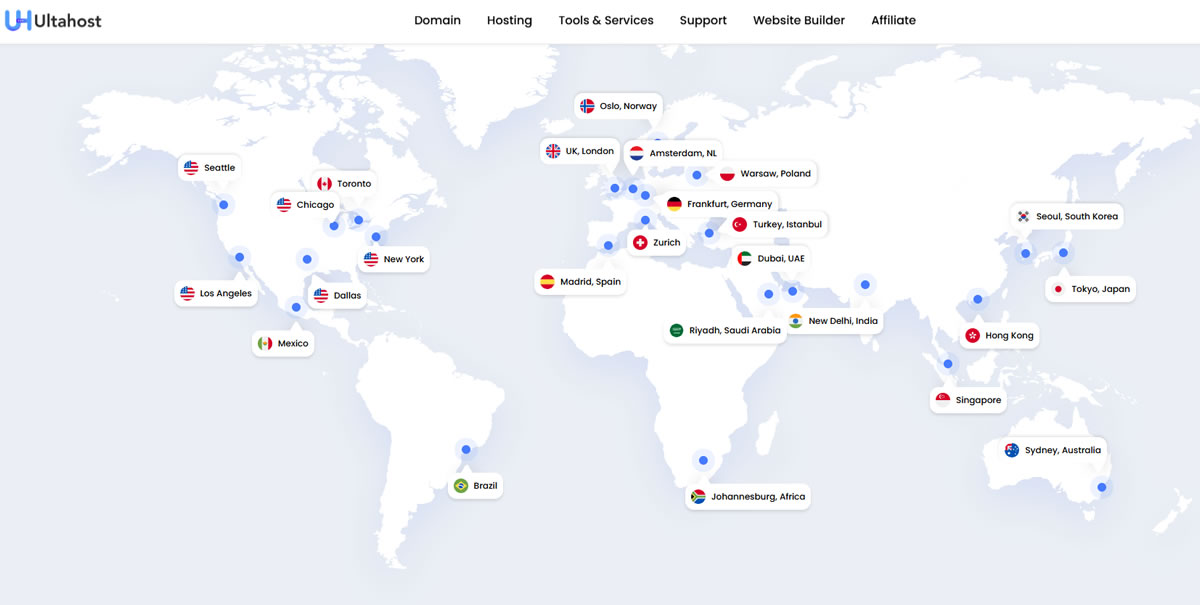
The best RDP hosting provider for Forex trading is Ultahost. Its large global network, spanning 25+ locations including financial hubs like London, Tokyo, Dubai, and New York, allows traders to deploy their terminals close to their brokers for lower latency.
All Ulta’s RDP servers come with full Windows access, dedicated IPv4 addresses, and NVMe storage, which ensures stable and responsive performance when running trading platforms such as MT4/MT5/cTrader. The plans are also affordable, starting under $20/month with frequent discounts. This makes Ultahost ideal for individual traders and prop firms looking for consistent execution and remote accessibility.
Which RDP Hosting Provider is Best for Software Developers?
Kamatera is the best RDP hosting provider for software developers. It offers full customization of the server stack—including the ability to choose CPU, memory, storage, and OS (over 100 options available). Developers can deploy Windows-based remote environments tailored to their project needs, whether that’s .NET development, GUI app testing, or code compilation. The hourly billing system is also great for temporary dev environments or testing labs. Kamatera’s API, scalability, and cloud dashboard make it attractive for tech-savvy users who want flexibility without vendor lock-in.
Which RDP Host is Best for GPU-intensive or High-Memory Workloads?
When it comes to GPU-intensive or high-memory RDP workloads, Liquid Web stands out as the best choice. HostScore rates Liquid Web highly in this category because its managed services extend beyond basic hosting. For teams and professionals running complex applications — whether that’s data analysis, large-scale remote desktop deployments, or resource-intensive software — the company’s combination of high-performance VPS options and expert 24/7 support means you can offload more of the infrastructure complexity. Its premium positioning justifies the investment for use cases where performance consistency and operational continuity matter most.
Who has the Cheapest RDP Hosting with Full Root Access?
Verpex is the most affordable RDP hosting provider with full root/admin access. Its unmanaged Windows VPS plans start around $18/month (renews at $30/month) and offer simple, no-frills deployment of remote desktop environments.
While it doesn’t match Ultahost or Kamatera in terms of global reach or raw power, Verpex is reliable enough for light desktop tasks, remote file access, or app testing. If budget is your top priority, and you don’t require custom builds or GPU capacity, Verpex delivers solid value for basic RDP usage.
What is RDP Hosting?
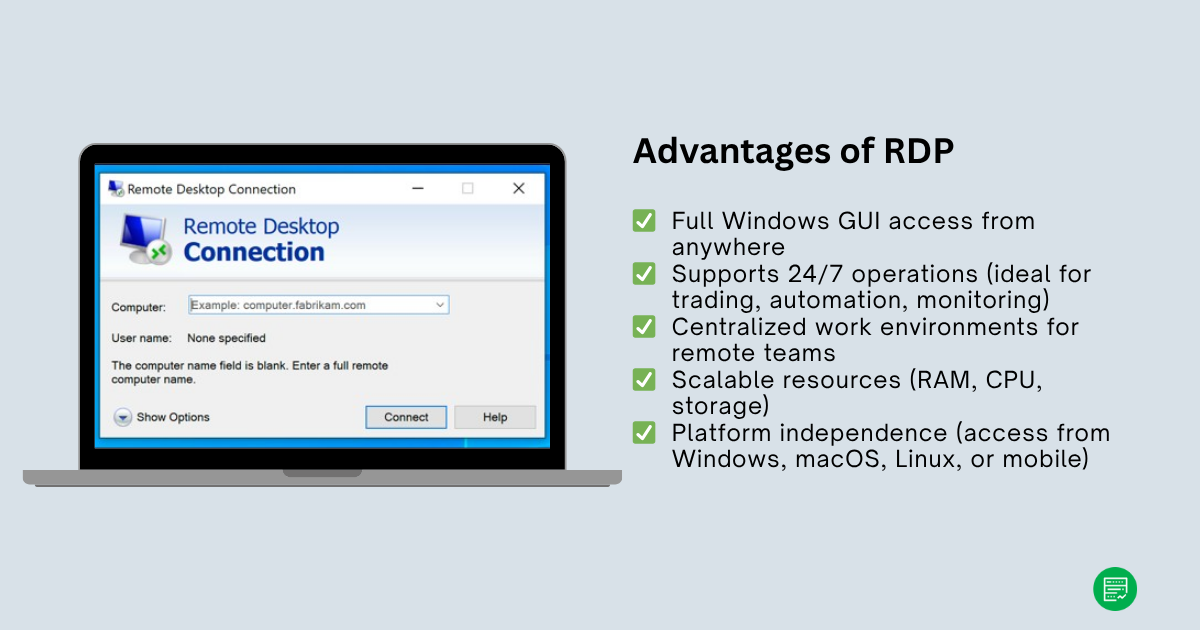
RDP Hosting refers to hosting a remote desktop environment on a server, usually running Windows, that users can access via Microsoft’s Remote Desktop Protocol (RDP). This setup allows you to control the remote server as if you were sitting in front of it, complete with GUI, file system, and application access.
RDP hosting is typically deployed on virtual private servers (VPS), cloud infrastructure, or dedicated machines. It’s useful for running desktop apps remotely, accessing software from anywhere, or isolating workloads from local machines.
How Does RDP Hosting Work for Traders, Developers, and Remote Teams?
RDP hosting works differently depending on your use case:
- For traders, RDP servers are used to host MT4/MT5 platforms so trades can run 24/7, even when the user’s local computer is off. Proximity to broker servers matters here, as lower latency can improve execution speed.
- For developers, RDP environments allow for cross-platform testing, remote coding in Windows-only tools, or deploying isolated dev stacks that mirror production environments.
- For remote teams, RDP hosting provides a shared workspace or application hub. It ensures everyone has consistent access to files, software, and business systems, especially when working across borders or time zones.
Pros & Cons of Using RDP Hosting
Key Advantages
RDP hosting offers unmatched convenience. It lets users remotely access a full Windows environment from any device. This makes it ideal for automation scripts, trading software, and Windows-only applications that need to run 24/7.
For teams, it provides a centralized workspace where members can share files and applications securely from anywhere. Most providers support easy resource scaling—allowing quick upgrades to RAM, CPU, or storage as workloads grow. It’s platform-independent and works seamlessly through the Remote Desktop app.
Key Disadvantages
The main drawback is licensing. Some providers exclude Windows licenses, adding extra cost and setup steps. Performance also depends on server location and network quality—choosing a distant region can increase latency and reduce reliability.
Certain platforms, such as DigitalOcean, require manual configuration, which may challenge beginners. Security remains a key responsibility; weak passwords, open ports, or misconfigured firewalls can expose systems. RDP hosting is powerful and flexible, but it requires proper setup and maintenance to stay secure and efficient.
How to Choose the Right RDP Hosting Provider?
Choosing the right RDP host depends heavily on your specific use case and technical comfort level.
Choose by Personal Use Case
For Forex traders, prioritize low-latency regions near your broker and stable uptime – Ultahost and Kamatera both offer data centers in financial hubs like London and New York. For developers, you’ll want flexibility, root access, and the ability to customize OS or resource allocation – Kamatera and DigitalOcean are the strongest options. If you’re managing a remote team, look for business-friendly support, GDPR compliance, and easy scaling – Kamatera and IONOS fits this profile best.
Pricing Models & Windows Licensing
Also consider pricing models. Some providers bill hourly (like Kamatera), which is great for short-term or test workloads, while others offer huge discounts when you subscribe for a longer term (like Ultahost and Verpex).
Finally, check whether Windows licensing is included, what level of support is provided, and if you’ll need to manually configure the environment. Align these factors with your workload and budget, and you’ll quickly narrow down the best-fit RDP host.
Quick Wrap Up
Database Mart leads as the best RDP hosting for remote work, traders, and developers – offering unmatched performance, security, and value. Whether you prioritize speed, scalability, or affordability, each provider on this list delivers reliable options tailored to different workloads and budgets.
You May Also Be Interested In: